Overview
The Flashpoint Ignite Threat Intelligence Engine App in ThreatConnect® ingests Alerts, Attributes, Events, Reports, and Vulnerabilities from Flashpoint® Ignite and creates corresponding objects in ThreatConnect with select Flashpoint Ignite metadata:
- Alerts are created as Event Groups in ThreatConnect. Some Alerts have associated images that are created as Document Groups. Attributes associated to Events are created as Address, File, Host, or URL Indicators in ThreatConnect.
- Events are created as Event Groups in ThreatConnect. In addition, Malware tags on ingested Events from Flashpoint Ignite are created as Malware Groups in ThreatConnect, and Actor or Actor Profile tags on ingested Events from Flashpoint Ignite are created as Intrusion Set Groups in ThreatConnect. Events with these tags typically describe an activity by malware or a threat actor that leverages indicators.
- Reports are created as Report Groups in ThreatConnect. In addition, Actor Profile tags on ingested Reports from Flashpoint Ignite are created as Intrusion Set Groups in ThreatConnect.
Vulnerabilities are created as Threat Groups in ThreatConnect. Each CVE® belonging to a Vulnerability is created as a Vulnerability Group in ThreatConnect if its CVE-ID has a Common Vulnerability Scoring System (CVSS) score provided by the National Institute of Standards and Technology (NIST) National Vulnerability Database (NVD).
Dependencies
ThreatConnect Dependencies
- ThreatConnect instance with version 7.2.0 or newer installed
Flashpoint Ignite Dependencies
- Active Flashpoint Ignite token
- Subscription to the Cyber Threat Intelligence (CTI) product within the Flashpoint Ignite platform
- To ingest premium Vulnerabilities, you must have the Vulnerability Intelligence Premium plan. See https://docs.flashpoint.io/flashpoint/docs/vulnerability-intelligence for more information (must have a valid Flashpoint account to view this documentation).
- For each Alert Rule you want to ingest into ThreatConnect, you must ensure that the Flashpoint Ignite API user associated with the Flashpoint Ignite token is subscribed to the Alert Rule prior to ingestion.HintYou can fine-tune the volume of data ingested into ThreatConnect from an Alert Rule by editing the Alert Rule in Flashpoint Ignite.
Application Setup and Configuration
The Flashpoint Ignite Threat Intelligence Engine App leverages the Feed Deployer to create a Source for data ingestion from Flashpoint Ignite in an Organization and to configure the corresponding Service’s ingestion and authentication parameters. After you install the Flashpoint Ignite Threat Intelligence Engine App on your ThreatConnect instance, you can deploy it to any Organization. It must be deployed separately for each Organization in which you want to create a Source for data ingestion and a corresponding Service.
Install the Flashpoint Ignite Threat Intelligence Engine App
Follow these steps to install the Flashpoint Ignite Threat Intelligence Engine App on your ThreatConnect instance:
- Log into ThreatConnect with a System Administrator account.
- From the Settings
 menu on the top navigation bar, select TC Exchange Settings.
 - Select the Catalog tab on the TC Exchange™ Settings screen.
- Locate the Flashpoint Ignite Threat Intelligence Engine App on the Catalog tab.
- Click Install
 in the Options column to install the App.
 - Click INSTALL in the App’s Release Notes window.
- After you install the Flashpoint Ignite Threat Intelligence Engine App, the Feed Deployer will open automatically. Follow the procedure in the “Deploy the Flashpoint Ignite Threat Intelligence App to an Organization” section to deploy the Flashpoint Ignite Threat Intelligence Engine App to a Source in an Organization and configure the corresponding Service.
Deploy the Flashpoint Ignite Threat Intelligence App to an Organization
Follow these steps to deploy the Flashpoint Ignite Threat Intelligence Engine App to an Organization:
- Log into ThreatConnect with a System Administrator account.
- From the Settingsmenu on the top navigation bar, select TC Exchange Settings.
- Locate the Flashpoint Ignite Threat Intelligence Engine App on the Installed tab. Then select Deploy from the Options⋮ dropdown.
- Follow the instructions in Table 1 to fill out the fields in the Feed Deployer window for a deployment of the Flashpoint Ignite Threat Intelligence Engine App.
Name Description Required? Source Tab Sources to Create Enter the name of the Source for the feed. NoteUnless you are redeploying the feed to an existing Source in an Organization, the name of the Source must be unique on your ThreatConnect instance. It is recommended to add the Organization’s name to the end of the default Source name (e.g., Flashpoint Ignite Threat Intelligence Engine – Demo Organization) for easy identification of the Source’s owner.Required Owner Select the Organization in which the Source will be created. Required Activate Deprecation Select this checkbox to allow confidence deprecation rules to be created and applied to Indicators in the Source. Optional Create Attributes Select this checkbox to allow custom Attribute Types for the Flashpoint Ignite Threat Intelligence Engine App to be created on the System level of your ThreatConnect instance. ImportantIt is recommended that you keep this checkbox selected. If you deselect it, data from the Flashpoint Ignite Threat Intelligence Engine App mapped to those Attribute Types will not be ingested.Optional Parameters Tab Launch Server Select tc-job as the launch server for the Feed API Service. Required Flashpoint Types Select the types of Flashpoint objects to ingest. Available options include the following: - Event
- FP Attribute
- Report
- Vulnerability
NoteVulnerability objects are available only for Flashpoint users who have the Vulnerability Intelligence Premium plan.Required Alert Sources Select the sources of Flashpoint Alerts to ingest. Available options include the following: - Media
- News
- Marketplaces
- Communities
- GitHub
- GitLab
- Bitbucket
Optional Advanced Settings Use this setting to set default values for the following items for the ThreatConnect objects to which Flashpoint data will be mapped:
- Confidence Rating (default_confidence)
- Threat Rating (default_rating)
- Security Label(default_label)
If specifying multiple items, separate each one with a pipe character (|).
Example- default_label=TLP:AMBER
- default_rating=5|default_label=TLP:WHITE|default_confidence=95
NoteThe values entered in the Advanced Settings field are also used in ad-hoc Job requests.Optional Variables Tab Flashpoint Ignite Bearer Token* Enter the Flashpoint Ignite bearer token. NoteYou must enter the actual Flashpoint bearer token value instead of populating this parameter with a ThreatConnect variable.Required Confirm Tab Run Feeds after deployment Select this checkbox to run the Flashpoint Ignite Threat Intelligence Engine Service immediately after you click DEPLOY on the Feed Deployer window. Optional Confirm Deployment Over Existing Source This checkbox and a warning message are displayed on the Confirm tab if the Source name entered on the Source tab is already used by a Source owned by the selected Organization. To confirm redeploying the App to the existing Source, select the checkbox. This will activate the DEPLOY button. Otherwise, you must return to the Source tab and either change the Source name or select a different Organization. WarningWhen you redeploy a Feed API Service to a Source, existing data in the Source may be overwritten. Redeployment will also create a new Service for the Feed API Service App. It is recommended that you delete the previous Service for the Feed API Service App after the new one is created.Optional - Click DEPLOY on the Confirm tab of the Feed Deployer window to deploy the Flashpoint Ignite Threat Intelligence Engine App in the Organization, which will create a Source for the feed in the Organization and a corresponding Feed API Service.
Update the Flashpoint Ignite Threat Intelligence Engine App
If you have previously deployed the Flashpoint Ignite Threat Intelligence Engine App to an Organization on your ThreatConnect instance, follow these steps to update the Flashpoint Ignite Threat Intelligence Engine App and the Attribute Types used for data ingestion into ThreatConnect:
- Download the attributes.json file provided for the Flashpoint Ignite Threat Intelligence Engine App on the ThreatConnect Developer Hub.
- Log into ThreatConnect with a System Administrator account.
- From the Settingsmenu on the top navigation bar, select System Settings.
- Select the Attribute Types tab.
- Click UPLOAD.
- Click + SELECT FILE on the Upload Attributes window.
- Locate and select the attributes.json file you downloaded in Step 1.
- Click SAVE to save the Attribute Types.
- From the Settingsmenu on the top navigation bar, select TC Exchange Settings.
- Select the Updates tab.
- Locate the Flashpoint Ignite Threat Intelligence Engine App on the Updates tab.
- Click Update Now
 in the Options column to update the App.
 - From the Automation & Feeds menu on the top navigation bar, select Services.
- Toggle the slider for each Flashpoint Ignite Threat Intelligence Engine Service off and then on to restart the Service.
Flashpoint Ignite Threat Intelligence Engine UI
After installing the Flashpoint Ignite Threat Intelligence Engine App and deploying it to an Organization, you can access the Flashpoint Ignite Threat Intelligence Engine user interface (UI), where you can manage data ingestion from Flashpoint Ignite into the Source created in the Organization.
Follow these steps to access the Flashpoint Ignite Threat Intelligence Engine UI:
- Log into ThreatConnect with a System Administrator account or a user account in the Organization with an Organization role of Organization Administrator.
- From the Automation & Feeds dropdown on the top navigation bar, select Services.
- Locate the row for the Flashpoint Ignite Threat Intelligence Engine Feed Service.HintSelect Feed Service from the Service Type dropdown at the upper right to filter the screen to show only Feed API Services.
- Turn on the slider in the Enable column if the Service is not already enabled.
- Click the link in the Service’s API Path field to open the Flashpoint Ignite Threat Intelligence Engine UI.
The following screens are available in the Flashpoint Ignite Threat Intelligence Engine UI:
Dashboard
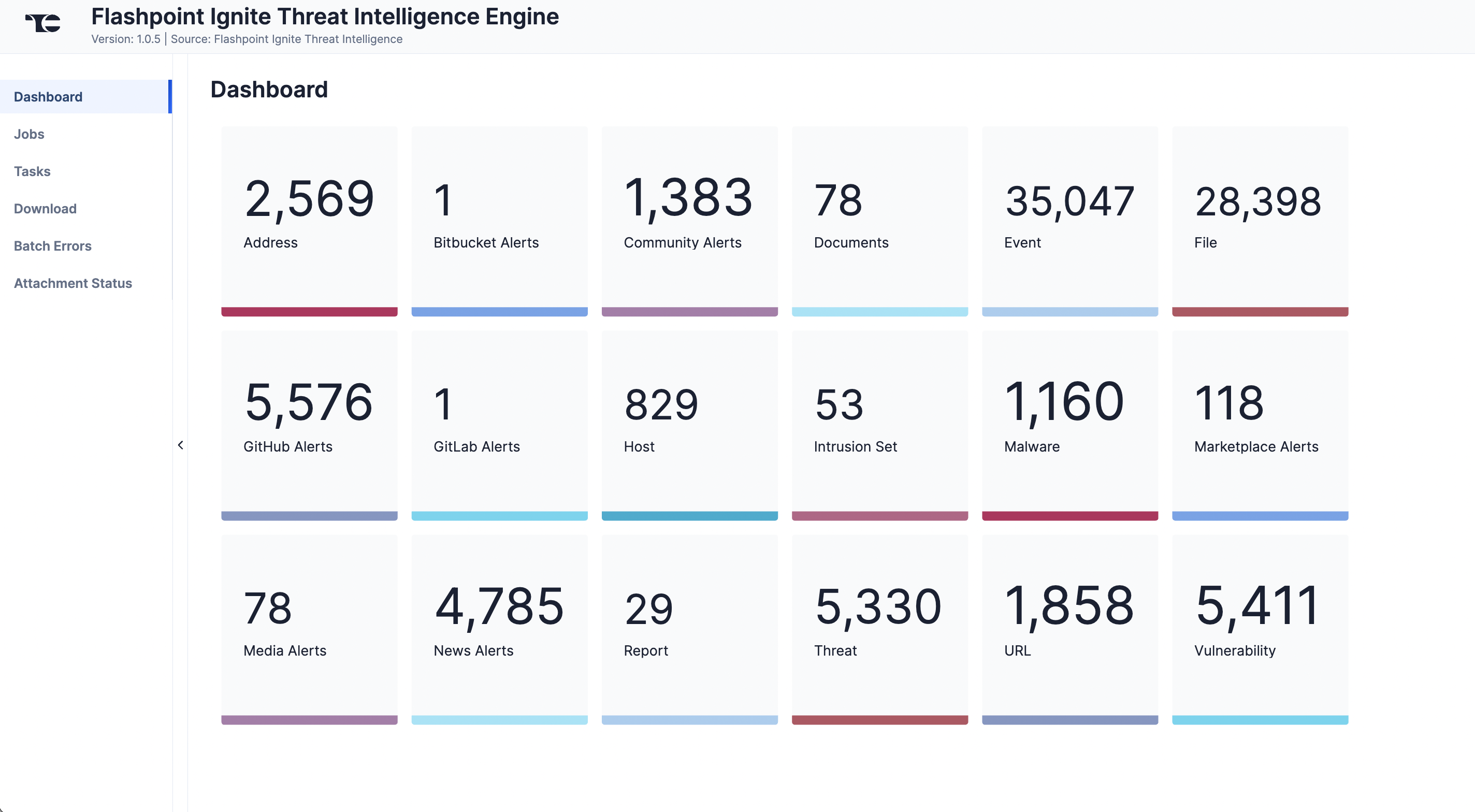
The Dashboard screen (Figure 1) provides an overview of the total number of Alerts (Event, Document) Attributes (Address, File, Host, URL), Events (Event, Malware, Intrusion Set), Reports (Report), and Vulnerabilities (Threat, Vulnerability) ingested from Flashpoint Ignite.
Jobs
The Jobs screen (Figure 2) breaks down the ingestion of Flashpoint Ignite data into manageable Job-like tasks, displaying all processes that are pending, in progress, complete, and failed. The ⋯ menu in a Job’s row provides the following options:
- Details: View details for the Job, such as download, convert, and upload start and complete times and counts of downloaded and batched Groups and Indicators.
- Download Files: Download metadata files for all Jobs and data (convert, download, and upload) files for completed Jobs.
- Batch Errors: View errors that have occurred for the Job on the Batch Errors screen.
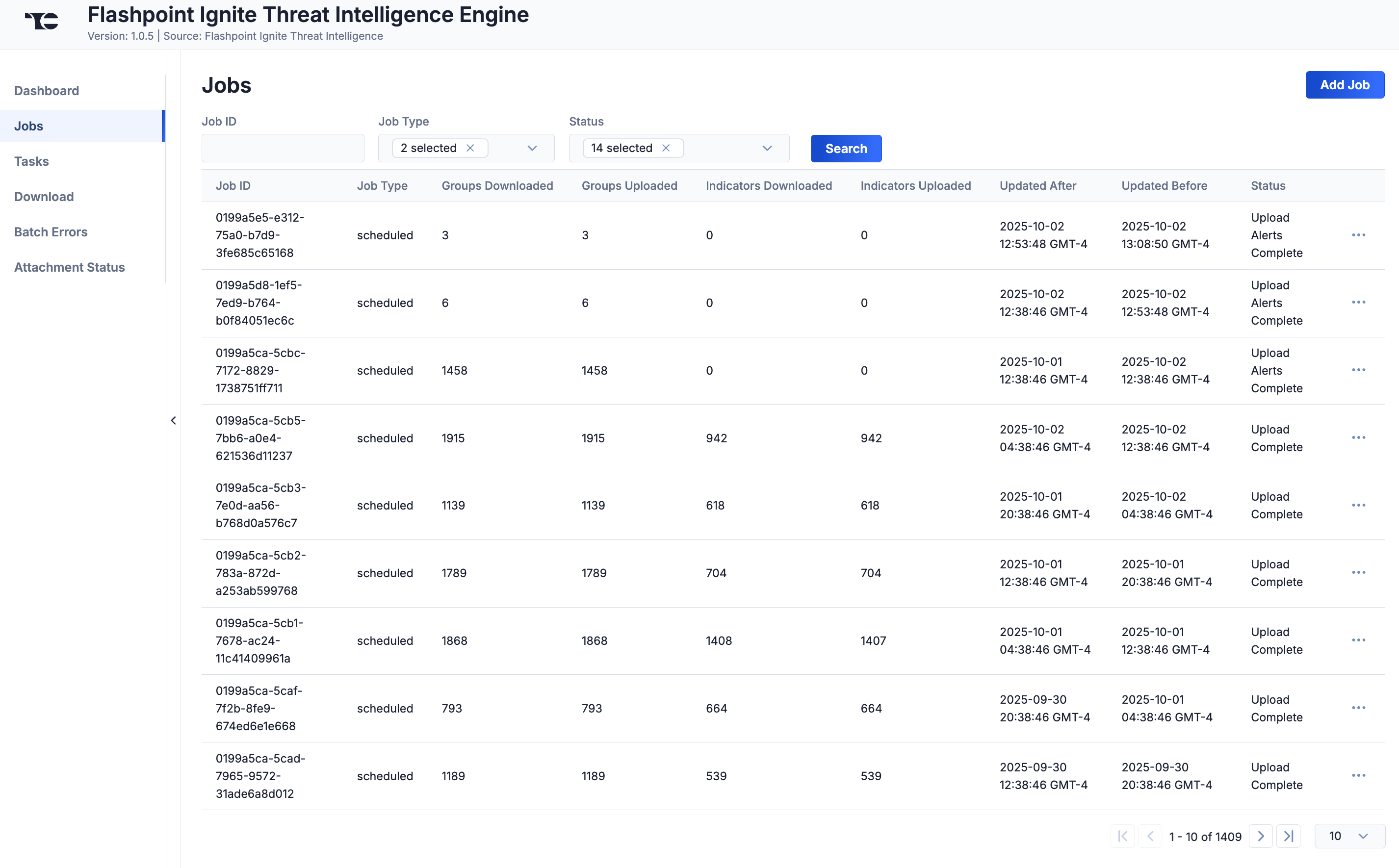
You can filter Flashpoint Ignite Threat Intelligence Engine App Jobs by the following elements:
- Job ID: Enter text into this box to search for a Job by its Job ID.
- Job Type: Select Job types to display on the Jobs screen.
- Status: Select Job statuses to display on the Jobs screen.
Add a Job
You can add ad-hoc Jobs on the Jobs screen. Follow these steps to create a request for an ad-hoc Job for the Flashpoint Ignite Threat Intelligence Engine Service:
- Click Add Job (Figure 2).
- Fill out the fields on the Add Job drawer (Figure 3) as follows:
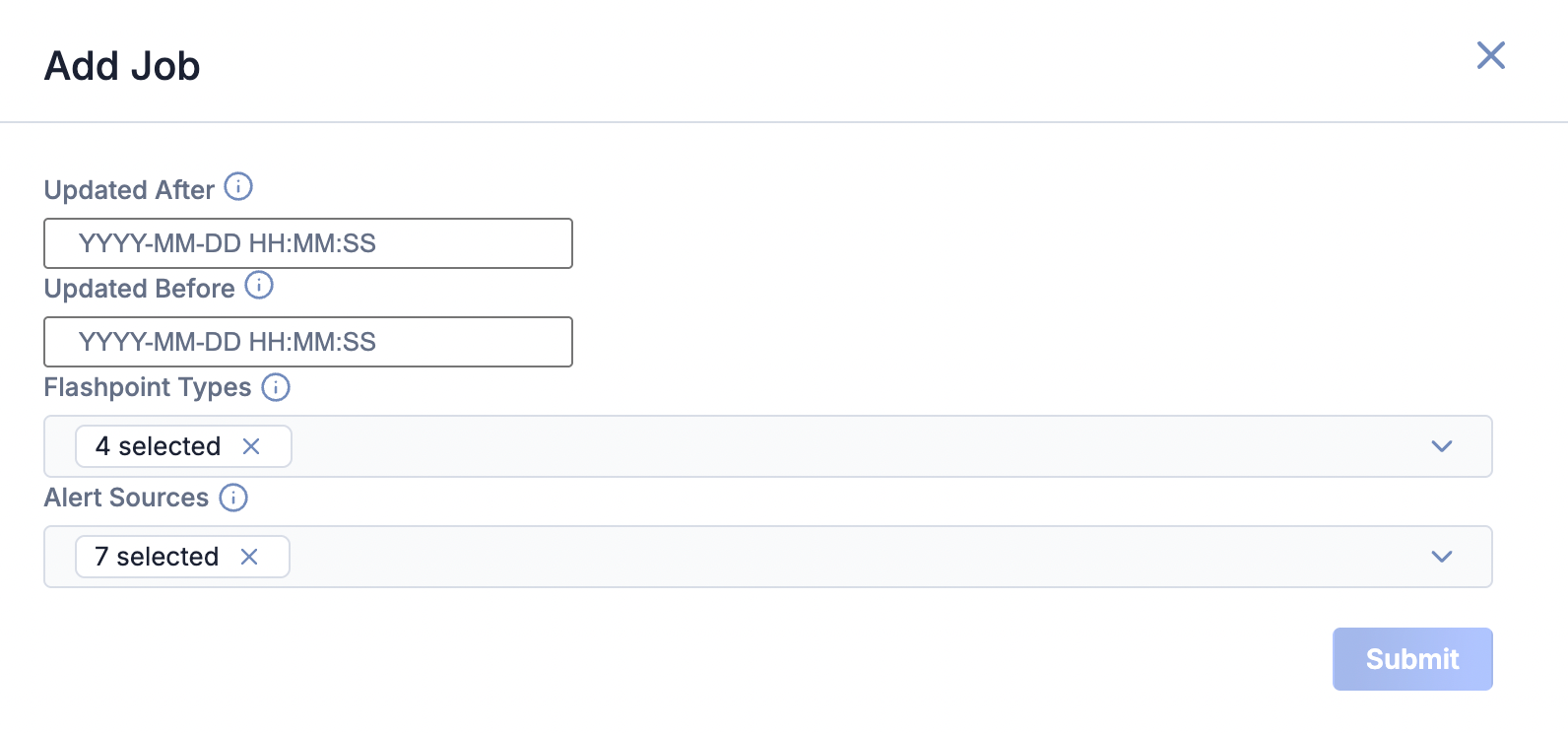
- Updated After: Select the date and time that Flashpoint Ignite data must be updated after in order to be ingested.
- Updated Before: Select the date and time that Flashpoint Ignite data must be updated before in order to be ingested.
- Flashpoint Types: Select the types of Flashpoint Ignite object types to include in the ad-hoc Job.
- Alert Sources: Select the Flashpoint Ignite Alert sources to include in the ad-hoc Job.
- Click Submit to submit the request for the ad-hoc Job.
Tasks
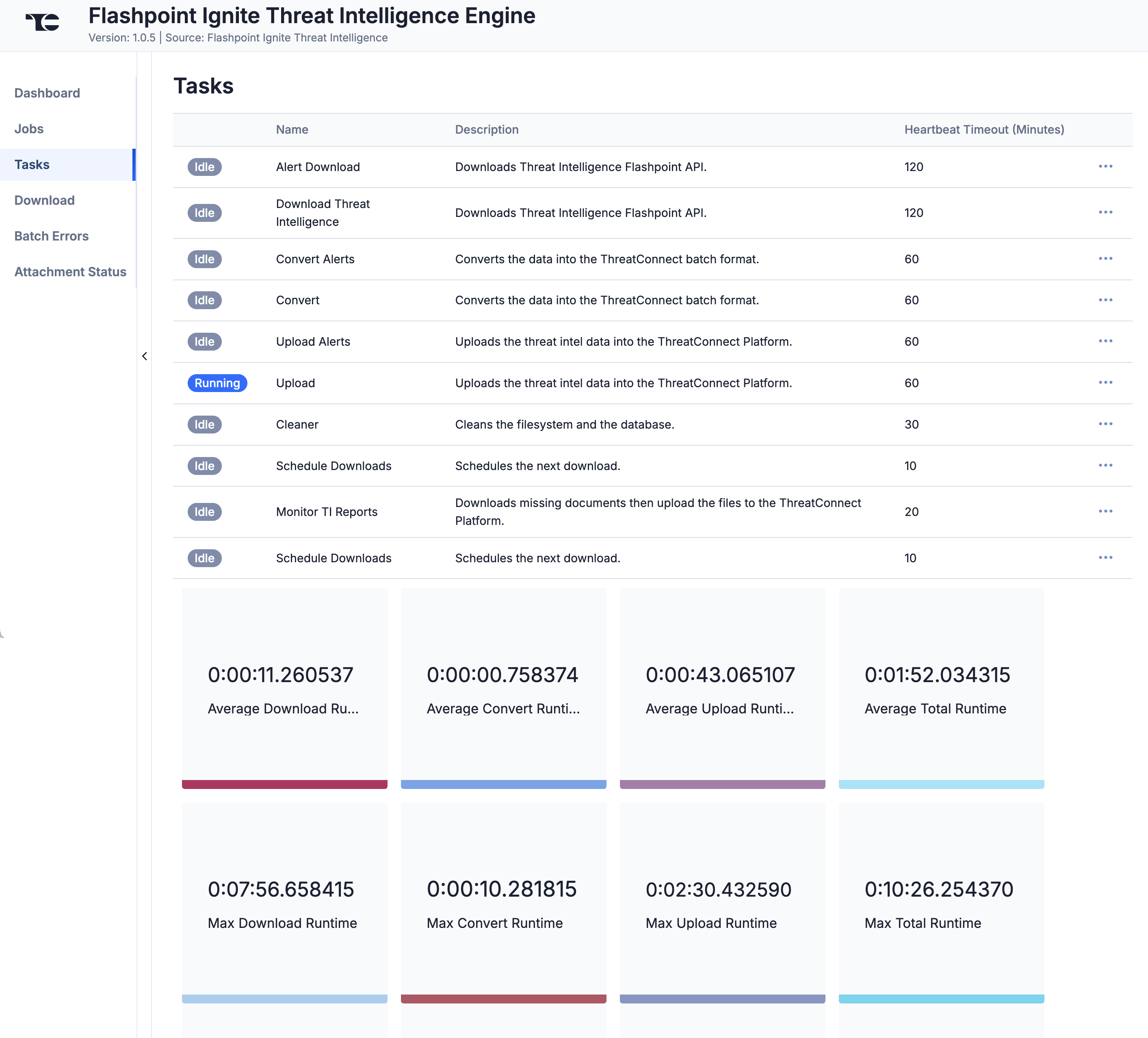
The Tasks screen (Figure 4) displays all Tasks that may be part of a Job, including each step of the download, convert, and upload processes, as well as Tasks for the Flashpoint Ignite Threat Intelligence Engine Service, such as Monitor, Scheduler, and Cleaner. The current status (Idle, Paused, or Running), name, description, and heartbeat timeout length, in minutes, are displayed for each Task. The ⋯ menu in a Task’s row provides the following options, depending on the Task’s status:
- Run (idle and paused Tasks only)
- Pause (idle and running Tasks only)
- Resume (paused Tasks only)
- Kill (running Tasks only)
Under the table is a dashboard where you can view runtime analytics.
Download
The Download screen (Figure 5) lets you download JavaScript® Object Notation (JSON) data for Flashpoint Ignite objects and then upload the data into ThreatConnect.
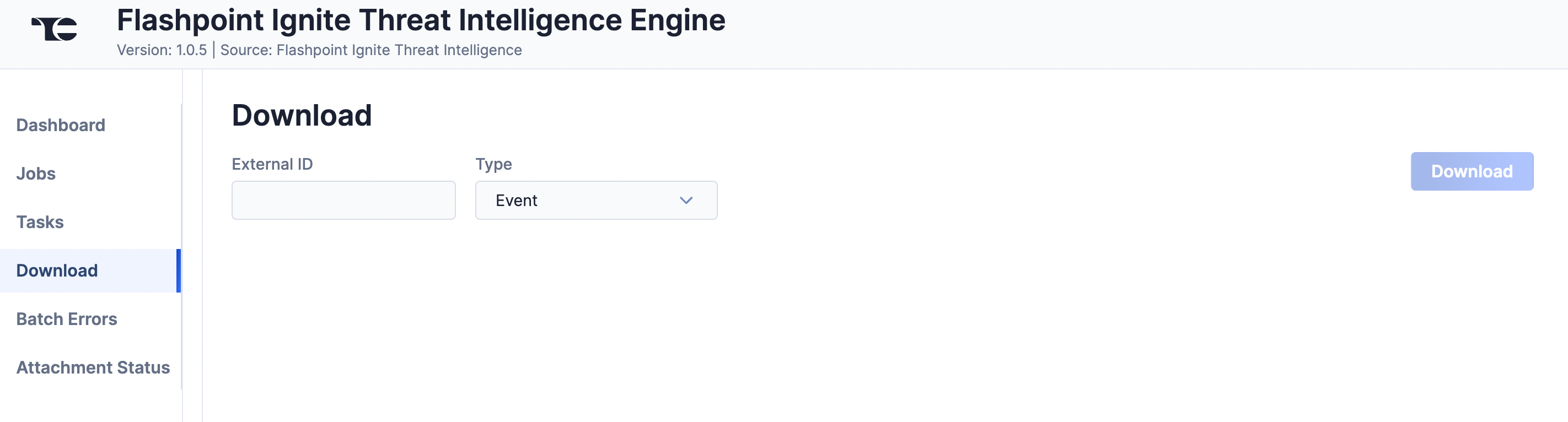
Follow these steps to download JSON data for a Flashpoint Ignite object on the Download screen and then upload the data into ThreatConnect:
- External ID: Enter the Flashpoint ID (FPID) of the object to download.
- Type: Select the Flashpoint Ignite object type to download:
- Vulnerability: Download a Flashpoint Ignite Vulnerability. If you upload the JSON data, a Threat Group will be created in ThreatConnect. If the Vulnerability includes CVEs with a CVSS scores, those CVEs will be created as Vulnerability Groups in ThreatConnect.
- Report: Download a Flashpoint Ignite Report. If you upload the JSON data, a Report Group will be created in ThreatConnect.
- Event: Download a Flashpoint Ignite Event. If you upload the JSON data, an Event Group will be created in ThreatConnect. If the Flashpoint Ignite Event has Attributes, then Address, File, Host, and/or URL Indicators will be created in ThreatConnect as well. In addition, if the Event has a Malware tag in Flashpoint Ignite, a Malware Group will be created in ThreatConnect. If the Event has an Actor or Actor Profile tag in Flashpoint Ignite, an Intrusion Set Group will be created in ThreatConnect.
- Notification: Download a Flashpoint Ignite Alert. If you upload the JSON data, a Document Group or Event Group will be created in ThreatConnect.
- Vulnerability: Download a Flashpoint Ignite Vulnerability. If you upload the JSON data, a Threat Group will be created in ThreatConnect. If the Vulnerability includes CVEs with a CVSS scores, those CVEs will be created as Vulnerability Groups in ThreatConnect.
- Click Download. The JSON data will be displayed in two columns: Results (raw JSON data) and Converted (JSON data in ThreatConnect batch format) (Figure 6).
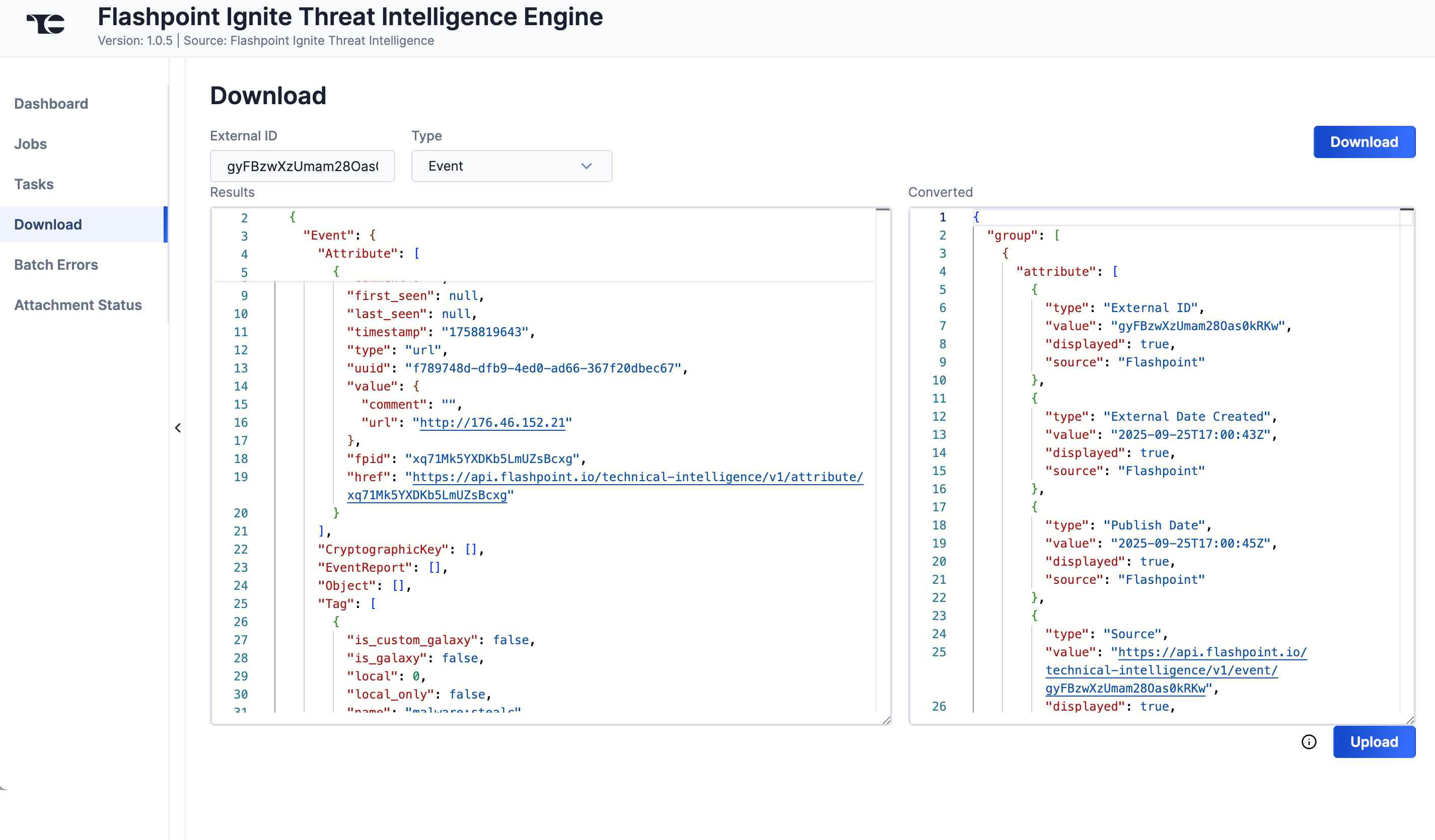
- Click Upload to submit the converted threat intelligence data via the ThreatConnect Batch API.
Batch Errors
The Batch Errors screen (Figure 7) displays an overview of the batch error types that have occurred for Job requests. You can enter keywords to filter by Job ID.
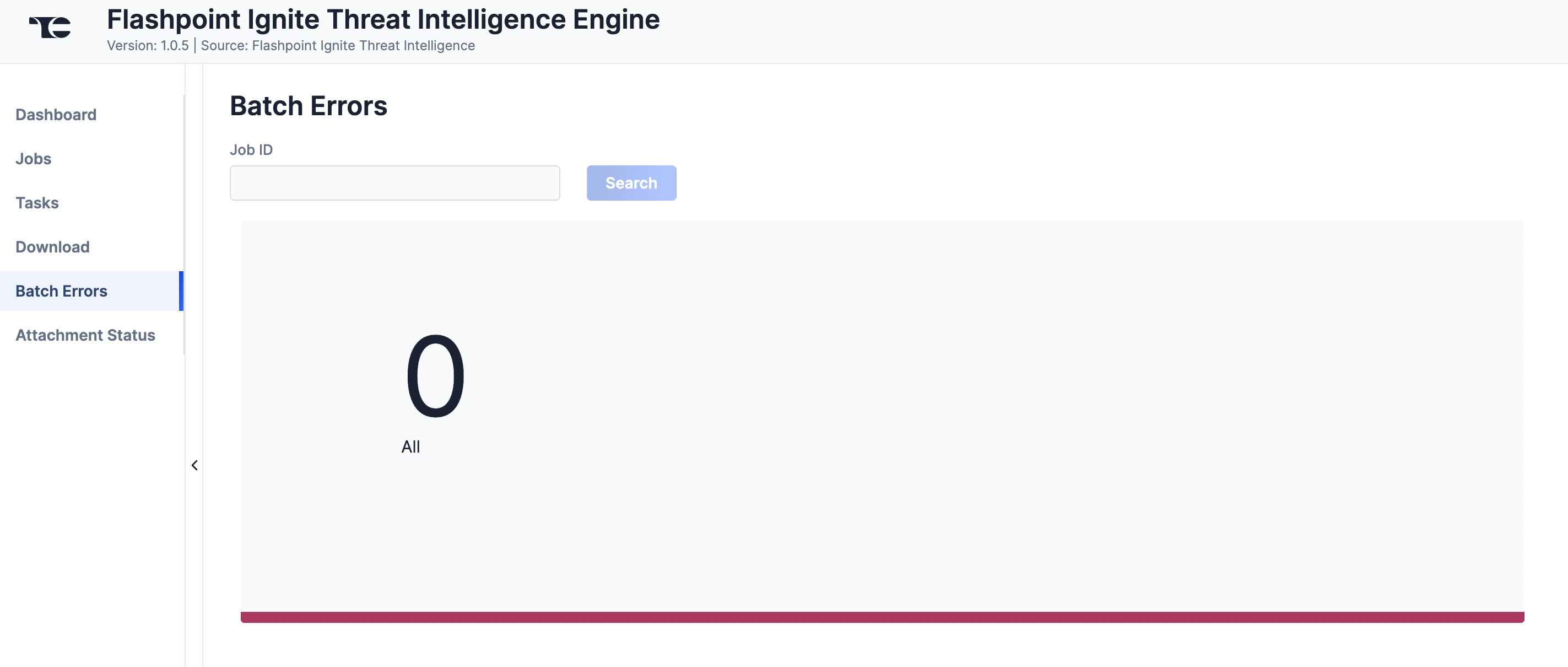
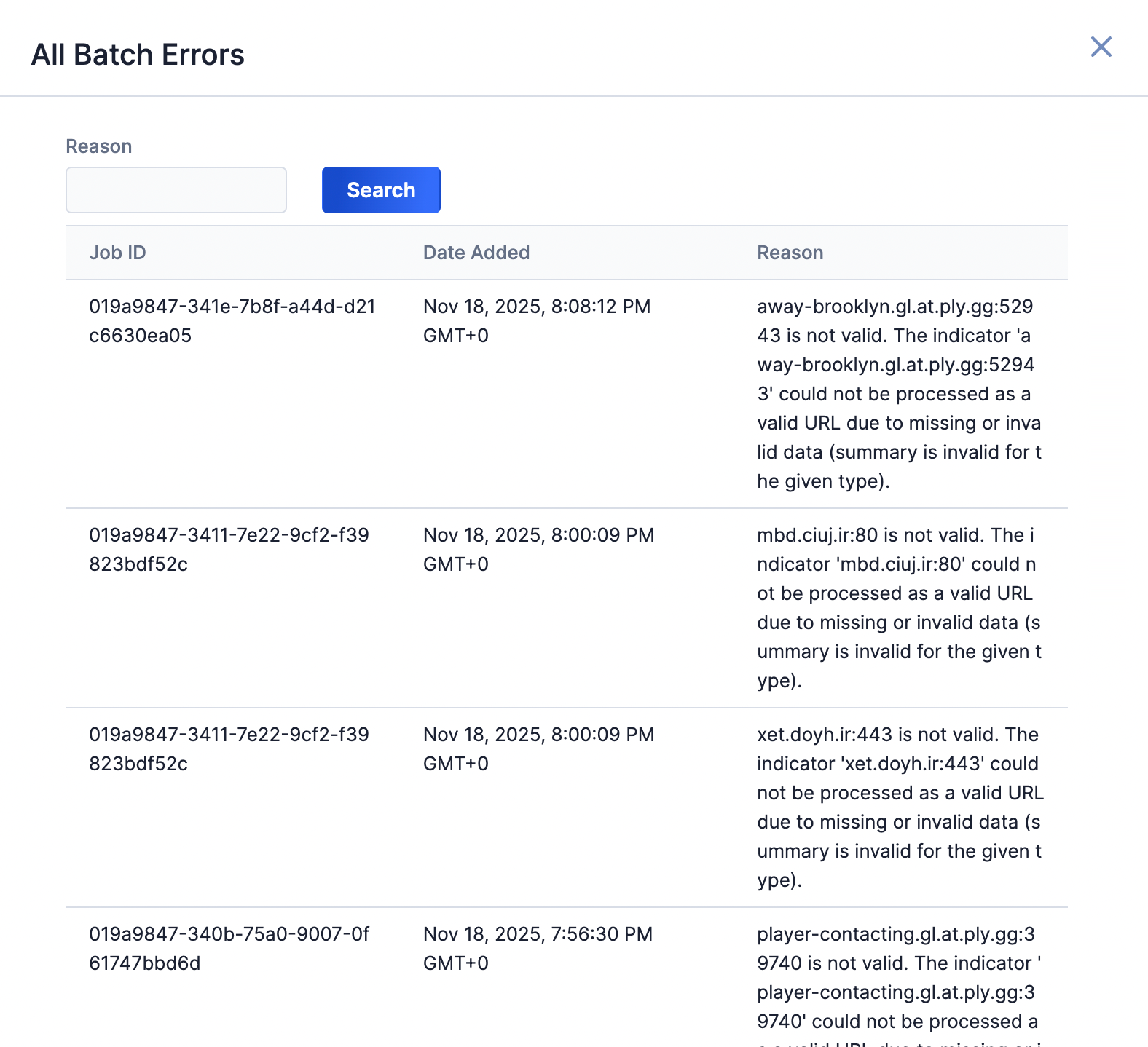
Select an error type to open a drawer containing a table with details on all batch errors of that type (Figure 8). You can enter keywords to filter by reason for error.
Attachment Status
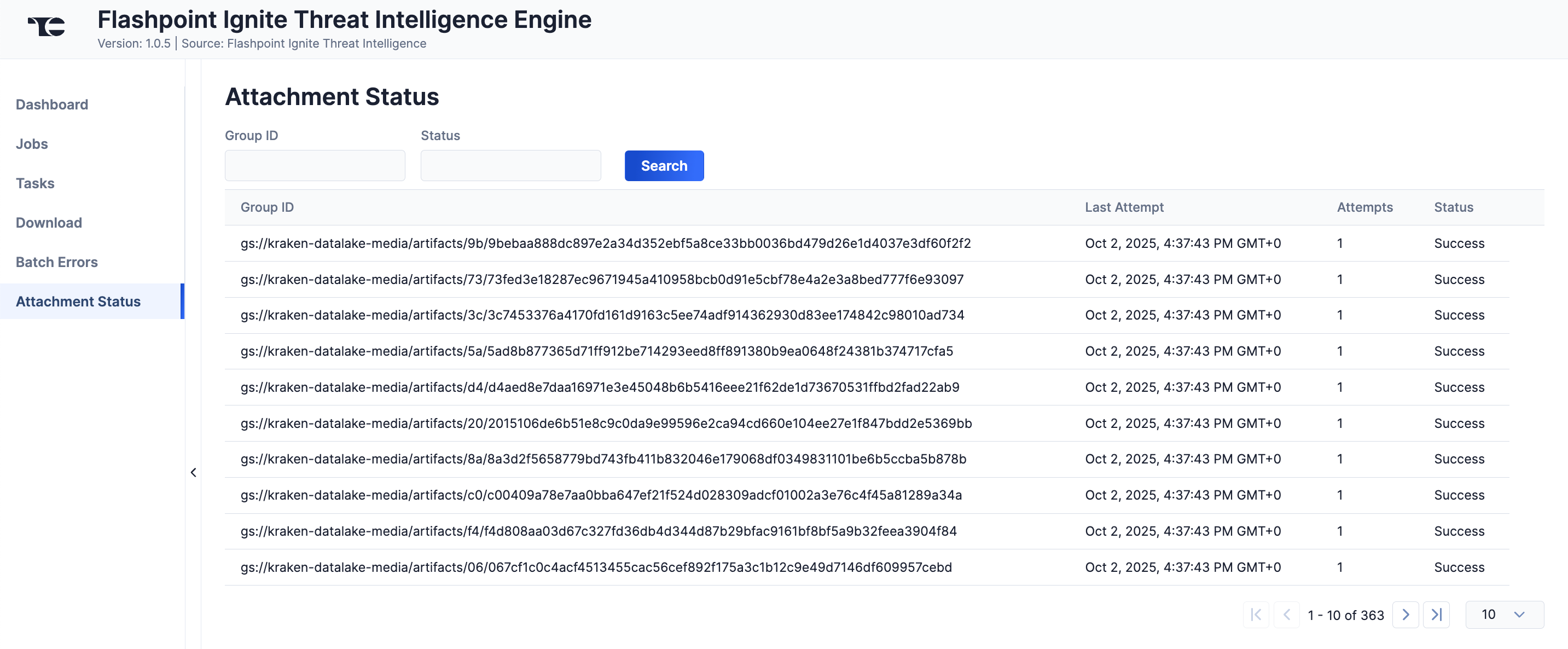
The Attachment Status screen (Figure 9) displays a table with details on ThreatConnect's attempts to download Report attachments from Flashpoint Ignite. You can filter the table by Flashpoint Ignite Group ID, which can be useful if you do not see a Flashpoint Ignite attachment in ThreatConnect as expected, or by status.
Data Mappings
The data mappings in Table 2 through Table 13 illustrate how data are mapped from Flashpoint Ignite API endpoints into the ThreatConnect data model.
Attribute (From Events Endpoint)
ThreatConnect object type: Indicator (Address, File, Host, or URL)
| Flashpoint Ignite API Field | ThreatConnect Field |
|---|---|
| Event.Attribute.category | Attribute: "Category" |
| Event.Attribute.fpid | Attribute: "External ID" |
| Event.Attribute.href | Attribute: "Source" |
| Event.Attribute.type | Indicator Type |
| Event.Attribute.value.X | Indicator Value [See the Table 3 in the “Value (From Events Endpoint)” section for details on how different Flashpoint data types are mapped in ThreatConnect] |
Value (From Events Endpoint)
ThreatConnect object type: Varies
| Flashpoint Data Type | ThreatConnect Object |
|---|---|
| AS | ASN Indicator |
| bte | Event Group
|
| domain | Host Indicator |
| email-dst | Email Address Indicator
|
| email-src | Email Address Indicator
|
| email-subject | Email Subject Indicator |
| filename | Event Group
|
| github-username | Event Group
|
| hostname | Host Group |
| ip-dst | Address Indicator
|
| ip-dst|port | Address Indicator
|
| ip-src | Address Indicator
|
| link | Event Group
|
| md5 | File Indicator |
| mutex | Mutex Indicator |
| other | Event Group
|
| regkey | Registry Key Indicator |
| regkey|value | Registry Key Indicator |
| sha1 | File Indicator |
| sha256 | File Indicator |
| threat-actor | Intrusion Set Group |
| twitter-id | Event Group
|
| url | URL Indicator |
| user-agent | User Agent Indicator |
| whois-registrant-email | Email Address Indicator
|
Event
ThreatConnect object type: Event Group
| Flashpoint Ignite API Field | ThreatConnect Field |
|---|---|
| Event.Tag.name | Tag
|
| Event.date | Event Date |
| Event.info | Name/Summary |
| Event.report | Associated Report Group |
| Event.publish_timestamp | Attribute: "Publish Date" |
| Event.timestamp | Attribute: "External Date Created" |
| Event.attack_ids | ATT&CK® Tag |
| Event.fpid | Attribute: "External ID" |
| href | Attribute: "Source" |
| Event.Attribute.reports.html | Associated Report Group
|
| reports.html | Associated Report Group |
| malware_description | Associated Malware Group
|
| actor_description | Associated Intrusion Set Group
|
Intelligence Report
ThreatConnect object type: Report Group
| Flashpoint Ignite API Field | ThreatConnect Field |
|---|---|
| data.id | Attribute: "External ID" |
| data.actors | Tag: "Intrusion Set: <Intrusion Set Name>" |
| data.title | Name/Summary |
| data.summary | Attribute: "Description" (default) |
| data.tags | Tag
|
| data.body | HTML File Attachment |
| data.ingested_at | Attribute: "Ingestion Date" |
| data.posted_at | Attribute: "Publish Date" |
| data.platform_url | Attribute: "Source" |
| data.notified_at | Attribute: "First Seen" |
| data.updated_at | Attribute: "External Date Last Modified" |
| data.published_status | Attribute: "Publish Status" |
Vulnerability Intelligence (Premium)
ThreatConnect object type: Threat Group
| Flashpoint Ignite API Field | ThreatConnect Field |
|---|---|
| id | Attribute: "External ID" |
| title | Name/Summary |
| description | Attribute: "Description" (default) |
| solution | Attribute: "Mitigations" |
| technical_description | Attribute: "Analyst Notes" |
| timelines.disclosed_at |
|
| timelines.published_at | Attribute: "Timeline" (Published Date row) |
| timelines.last_modified_at |
|
| timelines.exploit_published_at | Attribute: "Timeline" (Exploit Publish Date row) |
| timelines.discovered_at |
|
| timelines.vendor_informed_at | Attribute: "Timeline" (Vendor Inform Date row) |
| timelines.vendor_acknowledged_at | Attribute: "Timeline" (Vendor Acknowledge Date row) |
| timelines.third_party_solution_provided_at | Attribute: "Timeline" (Third Party Solution Date row) |
| timelines.solution_provided_at | Attribute: "Timeline" (Solution Date row) |
| scores.severity | Attribute: "Threat Level" |
| scores.ransomware_score | Attribute: "Ransomware Score" |
| vuln_status | Attribute: "Status" |
| exploits.value | Attribute: "Exploits" (Value column) |
| exploits.type | Attribute: "Exploits" (Type column) |
| cwes.cwe_id | Tag |
| ext_references.value | Attribute: "External Details" (Value column) |
| ext_references.type | Attribute: "External Details" (Type column) |
| ext_references.created_at | Attribute: "External Details" (External Date Created column) |
| classifications.longname | Attribute: "Classification" (Name column) |
| classifications.description | Attribute: "Classification" (Description column) |
| cvss_v2s.access_vector | Attribute: "CVSS Score Flashpoint" (Access Vector column) |
| cvss_v2s.access_complexity | Attribute: "CVSS Score Flashpoint" (Access Complexity column) |
| cvss_v2s.authentication | Attribute: "CVSS Score Flashpoint" (Authentication column) |
| cvss_v2s.confidentiality_impact | Attribute: "CVSS Score Flashpoint" (Confidentiality Impact column) |
| cvss_v2s.integrity_impact | Attribute: "CVSS Score Flashpoint" (Integrity Impact column) |
| cvss_v2s.availability_impact | Attribute: "CVSS Score Flashpoint" (Availability Impact column) |
| cvss_v2s.source | Attribute: "CVSS Score Flashpoint" (Source column) |
| cvss_v2s.generated_at | Attribute: "CVSS Score Flashpoint" (Generated At column) |
| cvss_v2s.score | Attribute: "CVSS Score Flashpoint" (Score column) |
| cvss_v2s.calculated_cvss_base_score | Attribute: "CVSS Score Flashpoint" (Calculated CVSS Base Score column) |
| cvss_v3s.attack_vector | Attribute: "CVSS Score Flashpoint" (Attack Vector row) |
| cvss_v3s.attack_complexity | Attribute: "CVSS Score Flashpoint" (Attack Complexity row) |
| cvss_v3s.privileges_required | Attribute: "CVSS Score Flashpoint" (Privileges Required row) |
| cvss_v3s.user_interaction | Attribute: "CVSS Score Flashpoint" (User Interaction row) |
| cvss_v3s.scope | Attribute: "CVSS Score Flashpoint" (Scope row) |
| cvss_v3s.confidentiality_impact | Attribute: "CVSS Score Flashpoint" (Confidentiality Impact row) |
| cvss_v3s.integrity_impact | Attribute: "CVSS Score Flashpoint" (Integrity Impact row) |
| cvss_v3s.availability_impact | Attribute: "CVSS Score Flashpoint" (Availability Impact row) |
| cvss_v3s.source | Attribute: "CVSS Score Flashpoint" (Source row) |
| cvss_v3s.generated_at | Attribute: "CVSS Score Flashpoint" (Generated At row) |
| cvss_v3s.score | Attribute: "CVSS Score Flashpoint" (Score row) |
| cvss_v3s.calculated_cvss_base_score | Attribute: "CVSS Score Flashpoint" (Calculated CVSSBase Score row) |
| cvss_v3s.vector_string | Attribute: "CVSS Score Flashpoint" (Vector String row) |
| cvss_v3s.version | Attribute: "CVSS Score Flashpoint" (Version row) |
| cvss_v3s.remediation_level | Attribute: "CVSS Score Flashpoint" (Remediation Level row) |
| cvss_v3s.report_confidence | Attribute: "CVSS Score Flashpoint" (Report Confidence row) |
| cvss_v3s.exploit_code_maturity | Attribute: "CVSS Score Flashpoint" (Exploit Code Maturity row) |
| cvss_v3s.temporal_score | Attribute: "CVSS Score Flashpoint" (Temporal Score row) |
| cvss_v3s.updated_at | Attribute: "CVSS Score Flashpoint" (Updated At row) |
| cvss_v4s.score | Attribute: "CVSS Score Flashpoint" (Score row) |
| cvss_v4s.threat_score | Attribute: "CVSS Score Flashpoint" (Threat Score row) |
| cvss_v4s.source | Attribute: "CVSS Score Flashpoint" (Source row) |
| cvss_v4s.generated_at | Attribute: "CVSS Score Flashpoint" (Generated At row) |
| cvss_v4s.updated_at | Attribute: "CVSS Score Flashpoint" (Updated At row) |
| cvss_v4s.vector_string | Attribute: "CVSS Score Flashpoint" (Vector String row) |
| cvss_v4s.version | Attribute: "CVSS Score Flashpoint" (Version row) |
| cvss_v4s.attack_vector | Attribute: "CVSS Score Flashpoint" (Attack Vector row) |
| cvss_v4s.attack_complexity | Attribute: "CVSS Score Flashpoint" (Attack Complexity row) |
| cvss_v4s.attack_requirements | Attribute: "CVSS Score Flashpoint" (Attack Requirements row) |
| cvss_v4s.privileges_required | Attribute: "CVSS Score Flashpoint" (Privileges Required row) |
| cvss_v4s.user_interaction | Attribute: "CVSS Score Flashpoint" (User Interaction row) |
| cvss_v4s.exploit_maturity | Attribute: "CVSS Score Flashpoint" (Exploit Maturity row) |
| cvss_v4s.vulnerable_system_confidentiality_impact | Attribute: "CVSS Score Flashpoint" (VS Confidentiality Impact row) |
| cvss_v4s.vulnerable_system_integrity_impact | Attribute: "CVSS Score Flashpoint" (VS Integrity Impact row) |
| cvss_v4s.vulnerable_system_availability_impact | Attribute: "CVSS Score Flashpoint" (VS Availability Impact row) |
| cvss_v4s.subsequent_system_confidentiality_impact | Attribute: "CVSS Score Flashpoint" (SS Confidentiality Impact row) |
| cvss_v4s.subsequent_system_integrity_impact | Attribute: "CVSS Score Flashpoint" (SS Integrity Impact row) |
| cvss_v4s.subsequent_system_availability_impact | Attribute: "CVSS Score Flashpoint" (SS Availability Impact row) |
| tags | Tag |
| products.name |
|
| products.versions.affected | Attribute: "Vulnerable CPE" (Affected column) |
| products.versions.cpes.name | Attribute: "Vulnerable CPE" (CPE column) |
| products.versions.cpes.source | Attribute: "Vulnerable CPE" (Source column) |
| vendors.name |
|
ThreatConnect object type: Vulnerability Group
| Flashpoint Ignite API Field | ThreatConnect Field |
|---|---|
| nvd_additional_information.cve_id |
|
| nvd_additional_information.summary | Attribute: "Description" (default) |
| nvd_additional_information.cwes.cwe_id | Tag: "Vulnerability: <CWE ID number>" |
| scores.epss_score | Attribute: "EPSS Score" |
| scores.epss_v1_score | Attribute: "EPSS v1 Score" |
| scores.severity | Attribute: "Threat Level" |
| scores.ransomware_score | Attribute: "Ransomware Score" |
| scores.social_risk_scores.cve_id | Attribute: "Metrics" (CVE ID row) |
| scores.social_risk_scores.numeric_score | Attribute: "Metrics" (Social Risk Numerical Score row) |
| scores.social_risk_scores.categorical_score | Attribute: "Metrics" (Social Risk Categorical Score row) |
| scores.social_risk_scores.score_date | Attribute: "Metrics" (Score Date row) |
| scores.social_risk_scores.todays_tweets | Attribute: "Metrics" (Number of Today's Tweets row) |
| scores.social_risk_scores.total_tweets | Attribute: "Metrics" (Total Number of Tweets row) |
| scores.social_risk_scores.unique_users | Attribute: "Metrics" (Number of Unique Users row) |
| nvd_additional_information.cvss_v2s.access_vector |
|
| nvd_additional_information.cvss_v2s.access_complexity |
|
| nvd_additional_information.cvss_v2s.authentication |
|
| nvd_additional_information.cvss_v2s.confidentiality_impact |
|
| nvd_additional_information.cvss_v2s.integrity_impact |
|
| nvd_additional_information.cvss_v2s.availability_impact |
|
| nvd_additional_information.cvss_v2s.score |
|
| nvd_additional_information.cvss_v3s.attack_vector |
|
| nvd_additional_information.cvss_v3s.attack_complexity |
|
| nvd_additional_information.cvss_v3s.privileges_required |
|
| nvd_additional_information.cvss_v3s.user_interaction |
|
| nvd_additional_information.cvss_v3s.scope |
|
| nvd_additional_information.cvss_v3s.confidentiality_impact |
|
| nvd_additional_information.cvss_v3s.integrity_impact |
|
| nvd_additional_information.cvss_v3s.availability_impact |
|
| nvd_additional_information.cvss_v3s.score |
|
| nvd_additional_information.cvss_v3s.vector_string |
|
| nvd_additional_information.cvss_v3s.version |
|
Alerts - Communities
ThreatConnect object type: Event Group
| Flashpoint Ignite API Field | ThreatConnect Field |
|---|---|
| reason.name | Attribute: "Alert Rule" |
| reason.id | Attribute: "Alert Rule ID" |
| resource.id |
|
| id | Attribute: "External ID" |
| created_at |
|
| resource.basetypes[] | Tag |
| tags | Tag |
| reason.details.sources[] | Tag |
| source | Tag |
| data_type | Tag |
| reason.origin | Tag |
| N/A | Tag: "Source: Flashpoint Alert" |
Alerts - Marketplace
ThreatConnect object type: Event Group
| Flashpoint Ignite API Field | ThreatConnect Field |
|---|---|
| reason.name | Attribute: "Alert Rule" |
| reason.id | Attribute: "Alert Rule ID" |
| resource.id |
|
| id | Attribute: "External ID" |
| created_at |
|
| resource.basetypes[] | Tag |
| tags | Tag |
| reason.details.sources[] | Tag |
| source | Tag |
| data_type | Tag |
| reason.origin | Tag |
| resource.site.title | Tag |
| N/A | Tag: "Source: Flashpoint Alert" |
Alerts - Media
ThreatConnect object type: Document Group
| Flashpoint Ignite API Field | ThreatConnect Field |
|---|---|
| reason.name | Attribute: "Alert Rule" |
| reason.id | Attribute: "Alert Rule ID" |
| resource.id |
|
| id | Attribute: "External ID" |
| created_at |
|
| resource.basetypes[] | Tag |
| tags | Tag |
| reason.details.sources[] | Tag |
| source | Tag |
| data_type | Tag |
| reason.origin | Tag |
| resource.site.title | Tag |
| N/A | Tag: "Source: Flashpoint Alert" |
Image Files From Alerts - Media
ThreatConnect object type: Document Group
| Flashpoint Ignite API Field | ThreatConnect Field |
|---|---|
| media_v2.sha1 | Attribute: "Description" (default) with additional custom mapping |
| media_v2.image_enrichment.enrichments | |
| media_v2.phash | Attribute: "Source" (default) with additional custom mapping |
| file_name | File Name with additional custom mapping |
| sha1 | Name/Summary with additional custom mapping |
| N/A | Tag: "Source: Flashpoint Alert" |
| N/A | Tag: "Alert Image Pending" Note This Tag is added while the file is uploading. After the file has uploaded, the Tag is removed. |
| file_type | Tag |
| xid | Attribute: "External ID" |
Alerts - News
ThreatConnect object type: Event Group
| Flashpoint Ignite API Field | ThreatConnect Field |
|---|---|
| reason.name | Attribute: "Alert Rule" |
| reason.id | Attribute: "Alert Rule ID" |
| resource.id |
|
| id | Attribute: "External ID" |
| created_at |
|
| resource.basetypes[] | Tag |
| reason.details.sources[] | Tag |
| source | Tag |
| tags | Tag |
| N/A | Tag: "Source: Flashpoint Alert" |
Alerts - Code Repositories
ThreatConnect object type: Event Group
| Flashpoint Ignite API Field | ThreatConnect Field |
|---|---|
| reason.name | Attribute: "Alert Rule" |
| reason.id | Attribute: "Alert Rule ID" |
| resource.id |
|
| resource.url | Attribute: "Source" (default) with additional custom mapping |
| id | Attribute: "External ID" |
| created_at |
|
| resource.basetypes[] | Tag |
| reason.details.sources[] | Tag |
| source | Tag |
| tags | Tag |
| data_type | Tag |
| reason.origin | Tag |
| resource.repo | Tag |
| N/A | Tag: "Source: Flashpoint Alert" |
Frequently Asked Questions (FAQ)
How are Flashpoint Ignite Vulnerability objects mapped to ThreatConnect objects?
Under Flashpoint Ignite’s Vulnerability structure, a single CVE-ID can be associated with multiple Flashpoint IDs (FPIDs), or multiple CVE-IDs can be associated with a single FPID. In version 1.0.0 of the Flashpoint Ignite Threat Intelligence Engine App, Flashpoint Ignite Vulnerabilities are mapped to Threat Groups in ThreatConnect. In version 1.0.1 and later versions, each CVE-ID representing a Flashpoint Ignite Vulnerability is mapped to a Vulnerability Group in ThreatConnect, and Common Weakness Enumeration (CWE™) IDs are mapped to Tags that are applied to Vulnerability and Threat Groups in ThreatConnect that correspond to Flashpoint Ignite Vulnerabilities.
Which Flashpoint Ignite data objects are modeled as Intrusion Sets in ThreatConnect?
The Flashpoint Ignite Threat Intelligence Engine App ingests and models the following Flashpoint Ignite data objects as Intrusion Set Groups in ThreatConnect:
- Actor descriptions from the Flashpoint Events API endpoint
- Actor Tags
- Actor Profile Tags applied to Flashpoint Reports
How can I ingest more historical data from Flashpoint Ignite?
You can ingest more historical data from Flashpoint Ignite via the Add Job button on the Jobs screen of the Flashpoint Ignite Threat Intelligence Engine UI (Figure 2). When adding a Job, select an appropriate date range from which to ingest historical Flashpoint Ignite data. For Reports, FP Attributes, and Events, it is recommended to use an ingestion date range of 90 days or fewer. For Vulnerabilities, any ad-hoc Jobs with an ingestion date range greater than 2 days may interrupt the daily scheduled Job runs if the daily limit of 5000 calls per day to the Vulnerability Flashpoint API endpoints is reached.
The Service for the Flashpoint Ignite Threat Intelligence Engine App is not starting, and I am getting an error saying, “Required attributes are missing. Shutting down Flashpoint Ignite app.” What should I do next?
Follow Steps 1–8 in the “Update the Flashpoint Ignite Threat Intelligence Engine App” section to retrieve the attributes.json file containing the most up-to-date Attribute Types for the Flashpoint Ignite Threat Intelligence Engine App and add those Attribute Types on the System level on your ThreatConnect instance.
Why do I not see any Vulnerability data from Flashpoint Ignite in the Source for the Flashpoint Ignite Threat Intelligence Engine App in ThreatConnect?
As of March 2025, Flashpoint Ignite does not support API access to Vulnerability data for Essential-tier membership. Vulnerability data are still available for users with the Vulnerability Intelligence Premium plan.
Why do I not see any Alert data from Flashpoint Ignite in the Source for the Flashpoint Ignite Threat Intelligence Engine App in ThreatConnect?
Double check that the Flashpoint Ignite API user associated with the Flashpoint Ignite token provided in the Flashpoint Ignite Threat Intelligence Engine App’s configuration is subscribed to each Alert Rule you want to ingest into ThreatConnect. See the “Flashpoint Ignite Dependencies” section for more information.
ThreatConnect® is a registered trademark, and TC Exchange™ is a trademark, of ThreatConnect, Inc.
Flashpoint® is a registered trademark of EJ2 Communications, Inc.
JavaScript® is a registered trademark of Oracle Corporation.
CVE® (Common Vulnerabilities and Exposures), MITRE ATT&CK®, and ATT&CK® are registered trademarks, and CWE™ (Common Weakness Enumeration) is a trademark, of The MITRE Corporation.
30089-04 EN Rev. A