Overview
The Threat Intelligence Engine for Recorded Future Feed API Service App in ThreatConnect® lets you ingest Recorded Future® Risk List entities (Domain, Hash, IP, URL, and Vulnerability), Threat Map entities (Malware and Actor), Alert (Standard and Playbook) entities, and Analyst Notes. It then creates corresponding objects with select Recorded Future metadata in ThreatConnect:
- Domains are created as Host Indicators in ThreatConnect.
- Hashes are created as File Indicators in ThreatConnect.
- IPs are created as Address Indicators in ThreatConnect.
- URLs are created as URL Indicators in ThreatConnect.
- Vulnerabilities are created as Vulnerability Groups in ThreatConnect.
- Malware is created as Malware Groups in ThreatConnect.
- Actors are created as Intrusion Set Groups in ThreatConnect.
- Standards Alerts are created as Event Groups in ThreatConnect.
- Playbook Alerts are created as Event Groups in ThreatConnect.
- Analyst Notes added to Risk List entities are created as Report Groups in ThreatConnect and associated to the ThreatConnect object corresponding to the Risk List entity. Daily Analyst Notes are created as Report Groups in ThreatConnect and associated to existing Indicators and Groups in ThreatConnect that were ingested from Recorded Future. Note Entities for Analyst Notes are created as Attributes and other data for the corresponding Report Group created for the Analyst Note in ThreatConnect.
- Note Entities are created as Report Groups in ThreatConnect.
Dependencies
ThreatConnect Dependencies
- Active ThreatConnect Application Programming Interface (API) key
- ThreatConnect instance with version 7.6.2 or newer installed
Recorded Future Dependencies
- Active Recorded Future API tokenImportantFollow the instructions in the “Setup” section of the Recorded Future Get Started guide to generate a Recorded Future API token. You must be an Enterprise Admin in Recorded Future to generate a Recorded Future API token. Refer to the Recorded Future Get Started guide for information on the entitlements assigned to the API token, based on the modules included in your Recorded Future subscription.
- Active Recorded Future module subscriptions:
- Risk List: SecOps Intelligence, Threat Intelligence, and/or Vulnerability Intelligence (see the “Risk List Types” row in Table 1 for more information)
- Threat Map: Threat Intelligence module
- Standard Alerts: The required subscription varies by module. Please refer to the Recorded Future documentation (requires a login to view) for more information.
- Playbook Alerts: The required subscription varies by module. Please refer to the Recorded Future documentation (requires a login to view) for more information.
Application Setup and Configuration
Follow these steps to install the ThreatConnect Intelligence Engine for Recorded Future App
- Identify the version of the ThreatConnect integration with Recorded Future you have deployed as a Service on your ThreatConnect instance.
- If Version 1 is deployed as a Service, turn off and delete the Service for Version 1.
- Install and deploy Version 2.
Step 1: Identify Deployed App Version
There are two versions of the ThreatConnect integration with Recorded Future:
- Version 1: Recorded Future Intelligence Engine 1.0.x (deprecated)
- Version 2: Threat Intelligence Engine for Recorded Future 2.0.x (formerly Recorded Future Intelligence Engine 2.0.x)
Follow these steps to determine the version of the ThreatConnect integration with Recorded Future that is deployed as a Service on your ThreatConnect instance:
- Log into ThreatConnect with a System Administrator account.
- From the Automation & Feeds menu on the top navigation bar, select Services.
- Enter
recorded futurein the Name search bar at the top of the Services screen. The App name returned by the search results (Recorded Future Intelligence Engine for Version 1; Threat Intelligence Engine for Recorded Future for Version 2) identifies the version of the ThreatConnect integration with Recorded Future that is deployed as a Service on your ThreatConnect instance (or, if no results are returned, then you do not have any version of the App deployed as a Service on your ThreatConnect instance):- Recorded Future Intelligence Engine: Version 1
- Threat Intelligence Engine for Recorded Future: Version 2
Step 2: Turn Off and Delete the Service for Version 1
Follow these steps to turn off and delete the Service for the Recorded Future Intelligence Engine (Version 1) App:
- Log into ThreatConnect with a System Administrator account.
- From the Automation & Feeds dropdown on the top navigation bar, select Services.
- Locate the Recorded Future Intelligence Engine Feed Service.
- Turn off the toggle in the Type column.
- Select Delete from the Options⋮ menu for the Service.
- Click Delete in the Delete Service? window to delete the Service for Recorded Future Intelligence Engine.
Step 3: Install and Deploy Version 2
The Threat Intelligence Engine for Recorded Future App leverages the Feed Deployer to create a Source for data ingestion from Recorded Future in an Organization and to configure the corresponding Service’s ingestion and authentication parameters. After you install the Threat Intelligence Engine for Recorded Future App on your ThreatConnect instance, you can deploy it to any Organization. It must be deployed separately for each Organization in which you want to create a Source for data ingestion and a corresponding Service.
Install the Threat Intelligence Engine for Recorded Future App
Follow these steps to install the Threat Intelligence Engine for Recorded Future (Version 2) App on your ThreatConnect instance:
- Log into ThreatConnect with a System Administrator account.
- From the Settings
 menu on the top navigation bar, select TC Exchange Settings.
 - Select the Catalog tab on the TC Exchange™ Settings screen.
- Locate the Threat Intelligence Engine for Recorded Future App on the Catalog tab.
- Click Install
 in the Options column for the App.
 - Click INSTALL in the App’s Release Notes window.
- After you install the Threat Intelligence Engine for Recorded Future App, the Feed Deployer opens. Follow the procedure in the “Deploy the Threat Intelligence Engine for Recorded Future App to an Organization” section to deploy the Threat Intelligence Engine for Recorded Future App to a Source in an Organization and configure the corresponding Service.
Deploy the Threat Intelligence Engine for Recorded Future App to an Organization
Follow these steps to deploy the Threat Intelligence Engine for Recorded Future App to an Organization:
- Log into ThreatConnect with a System Administrator account.
- From the Settingsmenu on the top navigation bar, select TC Exchange Settings.
- Locate the Threat Intelligence Engine for Recorded Future App on the Installed tab. Then select Deploy from the Options ⋮ dropdown.
- Follow the instructions in Table 1 to fill out the fields in the Feed Deployer window for a deployment of the Threat Intelligence Engine for Recorded FutureApp.
Name Description Required? Source Tab Sources to Create Enter the name of the Source for the feed. ImportantIf you turned off and deleted the Service for the Recorded Future Intelligence Engine (Version 1) App when setting up and configuring the Threat Intelligence Engine for Recorded Future (Version 2) App, make sure to enter the name of the Source used for the Recorded Future Intelligence Engine App so that you redeploy the feed to the existing Source. If you enter a different name, then a new Source will be created for data ingestion from the Threat Intelligence Engine for Recorded Future (Version 2) App.
If you are not redeploying the feed to an existing Source in an Organization, then the name of the Source must be unique on your ThreatConnect instance. It is recommended to add the Organization’s name to the end of the default Source name (e.g., Threat Intelligence Engine for Recorded Future - Demo Organization) for easy identification of the Source’s owner.Required Owner Select the Organization in which the Source will be created. Required Activate Deprecation Select this checkbox to allow confidence deprecation rules to be created and applied to Indicators in the Source. Optional Create Attributes Select this checkbox to allow custom Attribute Types for the Threat Intelligence Engine for Recorded Future App to be created on the System level of your ThreatConnect instance. ImportantIt is recommended that you keep this checkbox selected. If you deselect it, data from the Threat Intelligence Engine for Recorded Future App mapped to those Attribute Types will not be ingested.Optional Parameters Tab Launch Server Select tc-job as the launch server for the Feed API Service. Required Minimum Risk Score for items being collected.* Select the minimum risk score that Risk List entities must have to be ingested into ThreatConnect. For example, if you select 80 from the dropdown, the App will ignore all Risk List entities with a risk score less than 80. The default value is 65. Required Risk List Types Select one or more Recorded Future Risk List entity types to ingest. Available choices include the following: - Domain
- Hash
- IP
- URL
- Vulnerability
NoteThe Domain, Hash, IP, and URL Risk List types are included in the SecOps Intelligence and Threat Intelligence modules available in the Recorded Future subscription. Because these modules are the most common, these Risk List types are selected by default. The Vulnerability Risk List type is not selected by default because it is included in the Vulnerability Intelligence module, which must be purchased separately from your Recorded Future subscription.
For assistance with managing your Recorded Future module subscriptions, please contact your Recorded Future Customer Success Representative.
NoteEach option available for the Risk List Types parameter (Domain, Hash, IP, URL, and Vulnerability) determines how links are followed during the integration's operational processes, as the integration will attempt to follow links for only the selected types.
For example, if you select only IP and Hash from the Risk List Types dropdown and the integration sees an Address Indicator with links to an IP, a Hash, and a URL, the integration will follow only the IP and Hash links for the Address Indicator.Optional Collect Indicators Linked in Recorded Future Less Than the Minimum Risk Score Select this checkbox to ingest associated Indicators with a risk score less than the minimum risk score (i.e., the value for the Minimum Risk Score parameter) for entities linked to Risk List types. If this checkbox is cleared, the App will ignore all associated objects whose risk score is less than the minimum risk score. By default, this checkbox is cleared. Optional Threat Map Types Select one or more Recorded Future Threat Map entity types to ingest. Available choices include the following: - Malware
- Actor
Optional Collect Threat Map Links in Recorded Future Less Than the Minimum Risk Score Select this checkbox to ingest associated Indicators with a risk score less than the minimum risk score (i.e., the value for the Minimum Risk Score parameter) for entities linked to Threat Map types. If this checkbox is cleared, the App will ignore all associated objects whose risk score is less than the minimum risk score. By default, this checkbox is cleared. Optional Alert Types Select one or more Recorded Future Alert entity types to ingest. Available choices include the following: - Standard Alert
- Standard Alert
- Playbook Alert: Domain Abuse
- Playbook Alert: Vulnerability
- Playbook Alert: Third Party Risk
- Playbook Alert: Data Leak on Code Repo
- Playbook Alert: Malware Report
- Playbook Alert: Geopolitics Facility
- Playbook Alert: Identity Novel Exposures
Optional Playbook Alert Priority Levels Select one or more Recorded Future Playbook Alert priority levels. Only Playbook Alerts with the selected priority levels will be ingested. Available choices include the following: - High
- Moderate
- Informational
Optional Collect Standard Alert Entities in Recorded Future Less Than the Minimum Risk Score Select this checkbox to ingest associated Indicators with a risk score less than the minimum risk score (i.e., the value for the Minimum Risk Score parameter) for entities linked to Standard Alert types. If this checkbox is cleared, the App will ignore all associated objects whose risk score is less than the minimum risk score. By default, this checkbox is cleared. Optional Standard Alert Assignee (one email address only) Enter the assignee’s email address to use for filtering Standard Alerts. If you enter an email address in this field, only Standard Alerts assigned to that email address will be ingested. NoteYou can enter only one email address in this field. If you enter an email address in this field and a Standard Alert Rule ID in the Standard Alert Rule (ID) field, then only Standard Alerts for that Alert Rule that are assigned to the email address will be ingested.Optional Standard Alert Rule (ID) Enter the Alert Rule ID to use for filtering Standard Alerts. If you enter an Alert Rule ID in this field, only Standard Alerts for that Alert Rule will be ingested. NoteYou can enter only one Alert Rule ID in this field. If you enter an Alert Rule ID in this field and an email address in the Standard Alert Assignee (one email address only) field, then only Standard Alerts for that Alert Rule that are assigned to the email address will be ingested.Optional Playbook Alert Assignees (one or more uhash) Enter one or more uhash values for assignees to use for filtering Playbook Alerts. If you enter uhash values in this field, only Playbook Alerts assigned to those uhash values will be ingested. Optional Advanced Settings WarningConfigure this field with caution and only when necessary. In ThreatConnect, an Indicator’s Confidence Rating is one of the factors used to calculate the Indicator’s ThreatAssess score. If you are an existing user of the Threat Intelligence Engine for Recorded Future App or the Recorded Future Threat Intelligence Engine App and you have never configured this field—which was introduced in version 2.0.7—before, then all Indicators in the Source configured for the App were ingested with a Confidence Rating of 0 (Unassessed). Configuring newly ingested Indicators to have a different default Confidence Rating will cause discrepancies in the way the ThreatAssess score is calculated for new Indicators versus the way it is calculated for existing Indicators. It is recommended that existing users assign Confidence Rating to Indicators individually after examination rather than configure a default Confidence Rating in the Advanced Settings field.
If you have not previously ingested data from either version of the ThreatConnect integration with Recorded Future, then it is recommended to set the default Confidence Rating torisk_score.The Advanced Settings field allows you to specify a default Confidence Rating for all Indicators ingested from Recorded Future. Configure this field in one of the following three ways:
- (Recommended for existing integrations) Leave the field blank. All ingested Indicators will have a Confidence Rating of 0 (Unassessed).
- (Recommended for newly installed integrations) Enter
default_confidence=risk_score. Each ingested Indicator will have a Confidence Rating that matches its risk score in Recorded Future. - Enter
default_confidence=<number>, where<number>is a whole number from 0 to 100. All ingested Indicators will have a Confidence Rating of the provided number. Example:default_confidence=37.
NoteThe value entered in the Advanced Settings field will also be used in ad-hoc Job requests.Optional Variables Tab Recorded Future API Token Enter the Recorded Future API token. Required Confirm Tab Run Feeds after deployment Select this checkbox to run the Threat Intelligence Engine for Recorded Future Service immediately after you click DEPLOY on the Feed Deployer window). Optional Confirm Deployment Over Existing Source This checkbox and a warning message are displayed on the Confirm tab if the Source name entered on the Source tab is already used by a Source owned by the selected Organization. To confirm redeploying the App to the existing Source, select the checkbox. This will activate the DEPLOY button. Otherwise, you must return to the Sourcetab and either change the Source name or select a different Organization. WarningWhen you redeploy a Feed API Service to a Source, existing data in the Source may be overwritten. Redeployment will also create a new Service for the Feed API Service App. It is recommended that you delete the previous Service for the Feed API Service App after the new one is created.Optional - Click DEPLOY on the Confirm tab of the Feed Deployer window to deploy the Threat Intelligence Engine for Recorded Future App in the Organization, which will create a Source for the feed in the Organization and a corresponding Feed API Service.
Threat Intelligence Engine for Recorded Future UI
After installing the Threat Intelligence Engine for Recorded Future App and deploying it to an Organization, you can access the Threat Intelligence Engine for Recorded Future user interface (UI), where you can manage data ingestion from Recorded Future into the Source created in the Organization.
Follow these steps to access the Threat Intelligence Engine for Recorded Future UI:
- Log into ThreatConnect with a System Administrator account or a user account in the Organization with an Organization role of Organization Administrator.
- From the Automation & Feeds dropdown on the top navigation bar, select Services.
- Locate the row for the Threat Intelligence Engine for Recorded Future Feed Service.HintYou can select Feed Service from the Service Type dropdown at the upper right to filter the screen to show only Feed API Services.
- Turn on the slider in the Enable column if the Service is not already enabled.
- Click the link in the Service’s API Path field to open the Threat Intelligence Engine for Recorded Future UI.
The following screens are available in the Threat Intelligence Engine for Recorded Future UI:
Dashboard
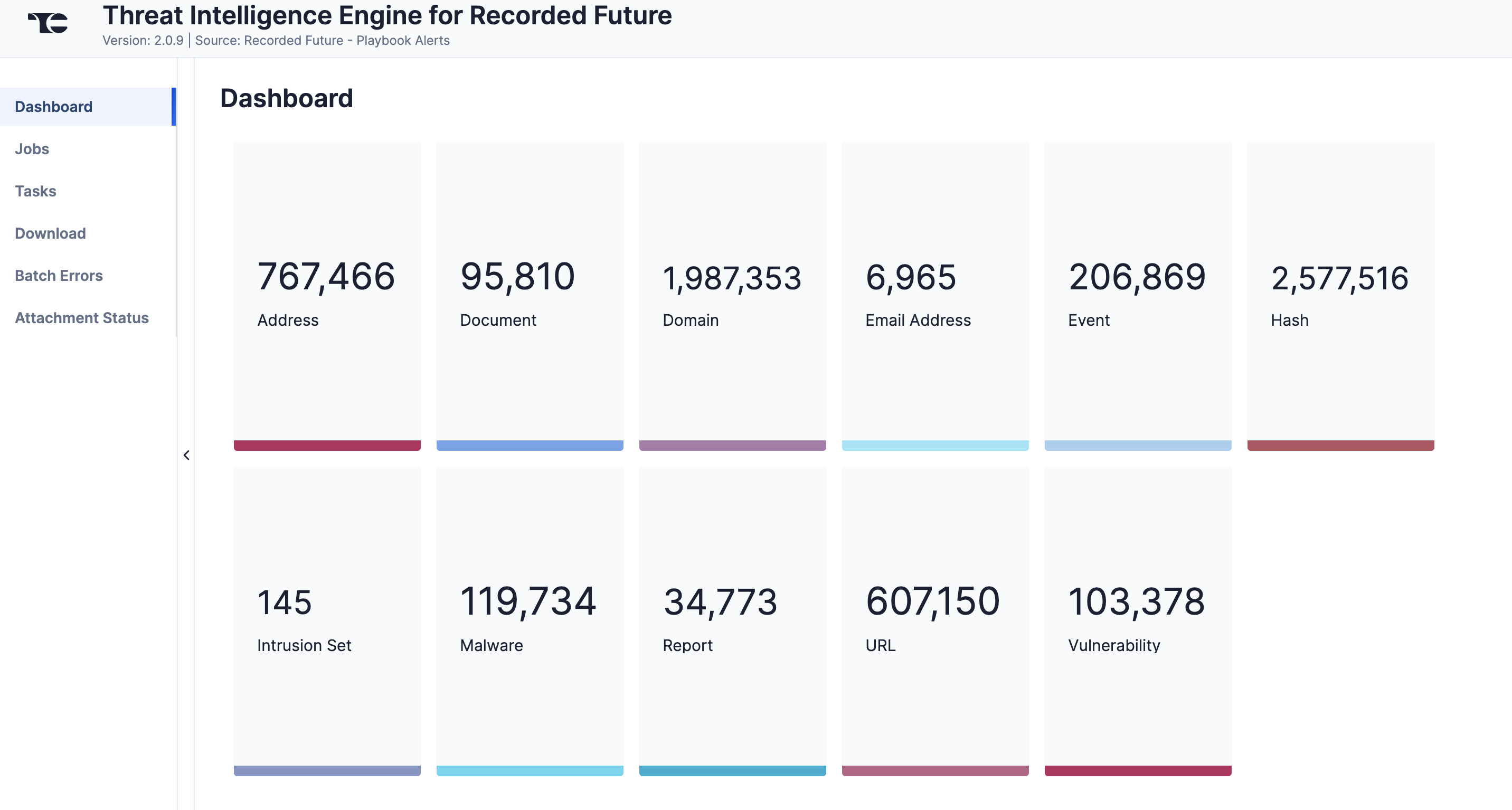
The Dashboard screen (Figure 1) provides an overview of the total number of Risk List entities (Domain, Hash, IP, URL, and Vulnerability), Threat Map entities (Malware and Intrusion Set), Alert entities (Event and Document) and Analyst Notes (Report, Email Address, Domain, Hash, IP, URL, Vulnerability, Malware, and Intrusion Set) retrieved from Recorded Future. Depending on the available data, cards representing all or a subset of these object types will be displayed on the Dashboard screen.
Jobs
The Jobs screen (Figure 2) breaks down the ingestion of Recorded Future data into manageable Job-like tasks, displaying all processes that are pending, in progress, complete, and failed. The ⋯ menu in a Job’s row provides the following options:
- Details: View details for the Job, such as counts of downloaded and batched Groups and start and end times for Alert monitoring, download, and upload.
- Download Files: Download metadata files for all Jobs and data (convert, download, and upload) files for completed Jobs.
- Batch Errors: View errors that have occurred for the Job on the Batch Errors screen.
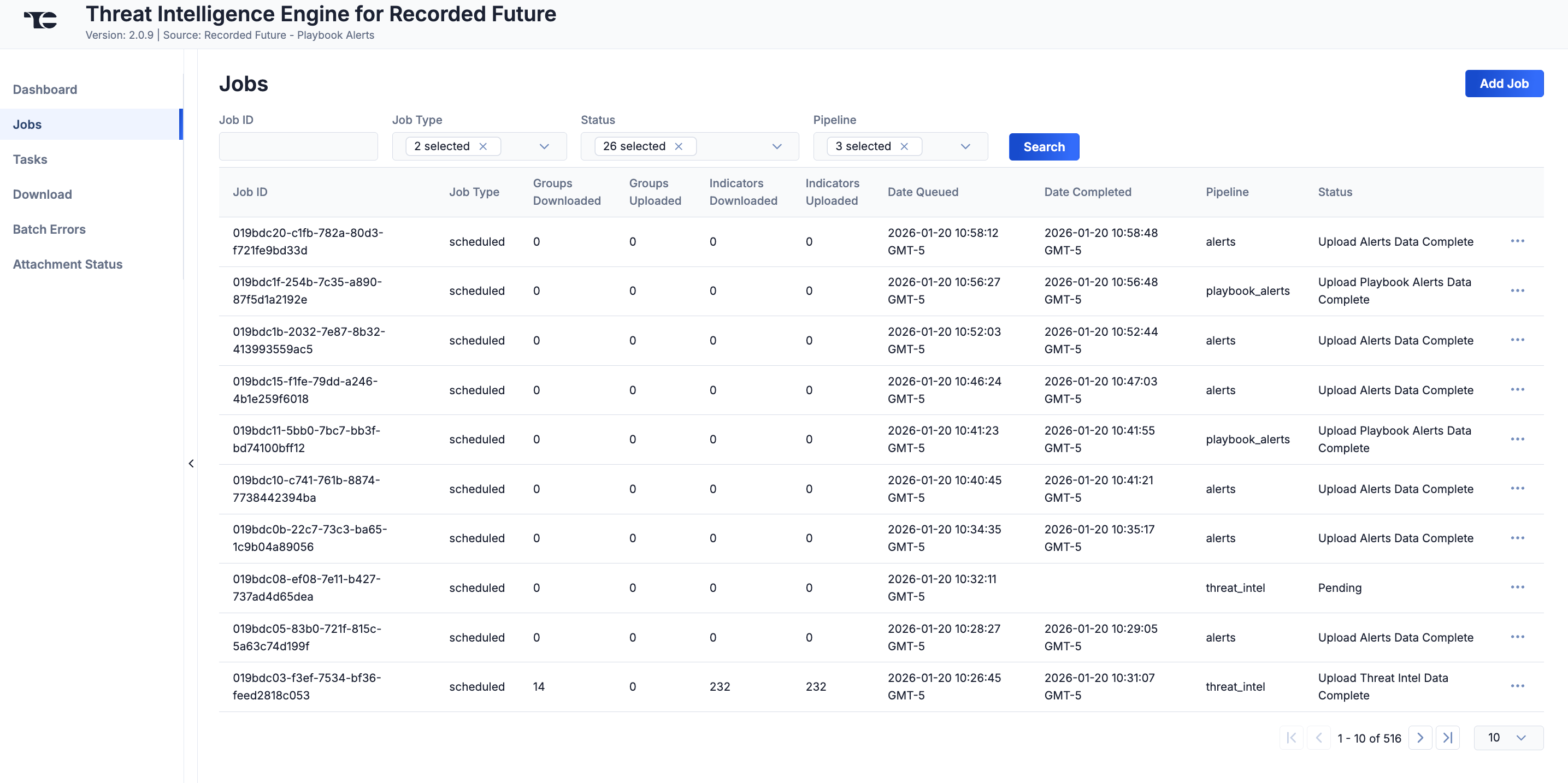
You can filter Threat Intelligence Engine for Recorded Future App Jobs by the following elements:
- Job ID: Enter text into this box to search for a Job by its Job ID.
- Job Type: Select Job types to display on the Jobs screen.
- Status: Select Job statuses to display on the Jobs screen.
- Pipeline: Select the pipeline types to display on the Jobsscreen:
- alerts: Alert entities
- analyst_note: Analyst Note entities
- threat_intel: Risk List and Threat Map entities
Add a Job
You can add ad-hoc Jobs on the Jobs screen. Follow these steps to create a request for an ad-hoc Job for the Threat Intelligence Engine for Recorded Future App:
- Click Add Job (Figure 2).
- Fill out the fields on the Add Job drawer (Figure 3) as follows:
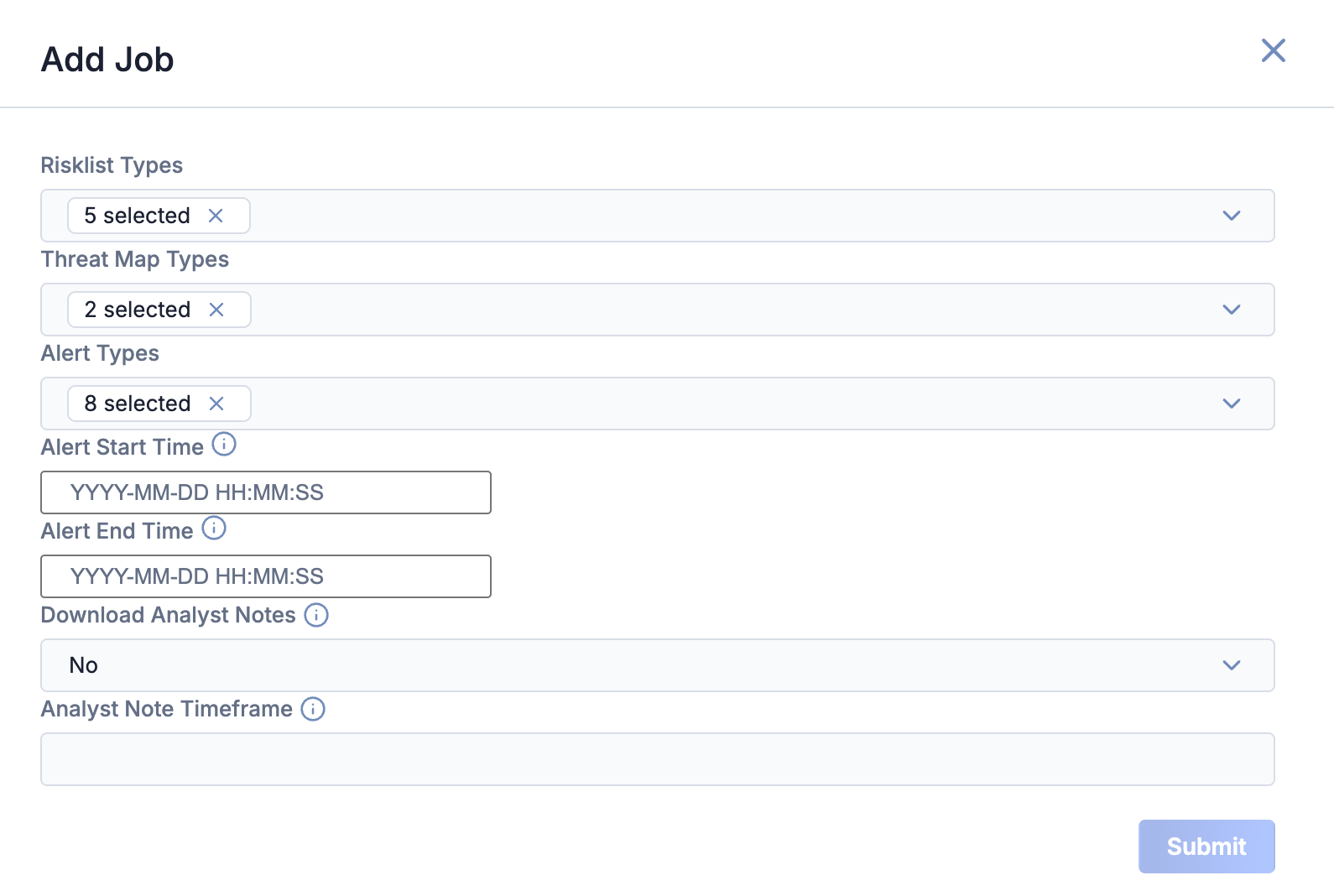
- Risklist Types: (Optional) Select the Risk List entity types to include in the ad-hoc Job.
- Threat Map Types: (Optional) Select the Threat Map entity types to include in the ad-hoc Job.
- Alert Types: (Optional) Select the Alert entity types to include in the ad-hoc Job.
- Alert Start Time: (Optional) Enter the time at which monitoring for triggered Alerts should start.NoteAlert Start Time applies only to Alert entities. If no value is specified, the 1000 most recent Alerts will be downloaded.
- Alert End Time: (Optional) Enter the time at which monitoring for triggered Alerts should end.NoteAlert End Time applies only to Alert entities. If no value is specified, the 1000 most recent Alerts will be downloaded.
- Download Analyst Notes: (Optional) Select Yes to download Analyst Notes for the selected Risklist Types.
- Analyst Note Timeframe: (Optional) Enter the timeframe for which Analyst Notes should be downloaded, using one of the following formats:NoteIf you do not enter a value, then the default value of
-1dwill be used.- Absolute date: Enter a date in YYYYMMDD format. Analyst Notes published on or after that date will be downloaded.ExampleThe following format variations provide valid input:
202509082025-09-082025-9-8
- Relative date: Enter a lookback time window. Analyst Notes published on or after the date and time at which the lookback window begins will be downloaded. The lookback window must start with a minus sign (-) to indicate that the window is historic.ExampleThe following format variations provide valid input:
-3d-2d 50m-0d 50m 30s
- Absolute date: Enter a date in YYYYMMDD format. Analyst Notes published on or after that date will be downloaded.
- Click Submit to submit the request for the ad-hoc Job.
Tasks
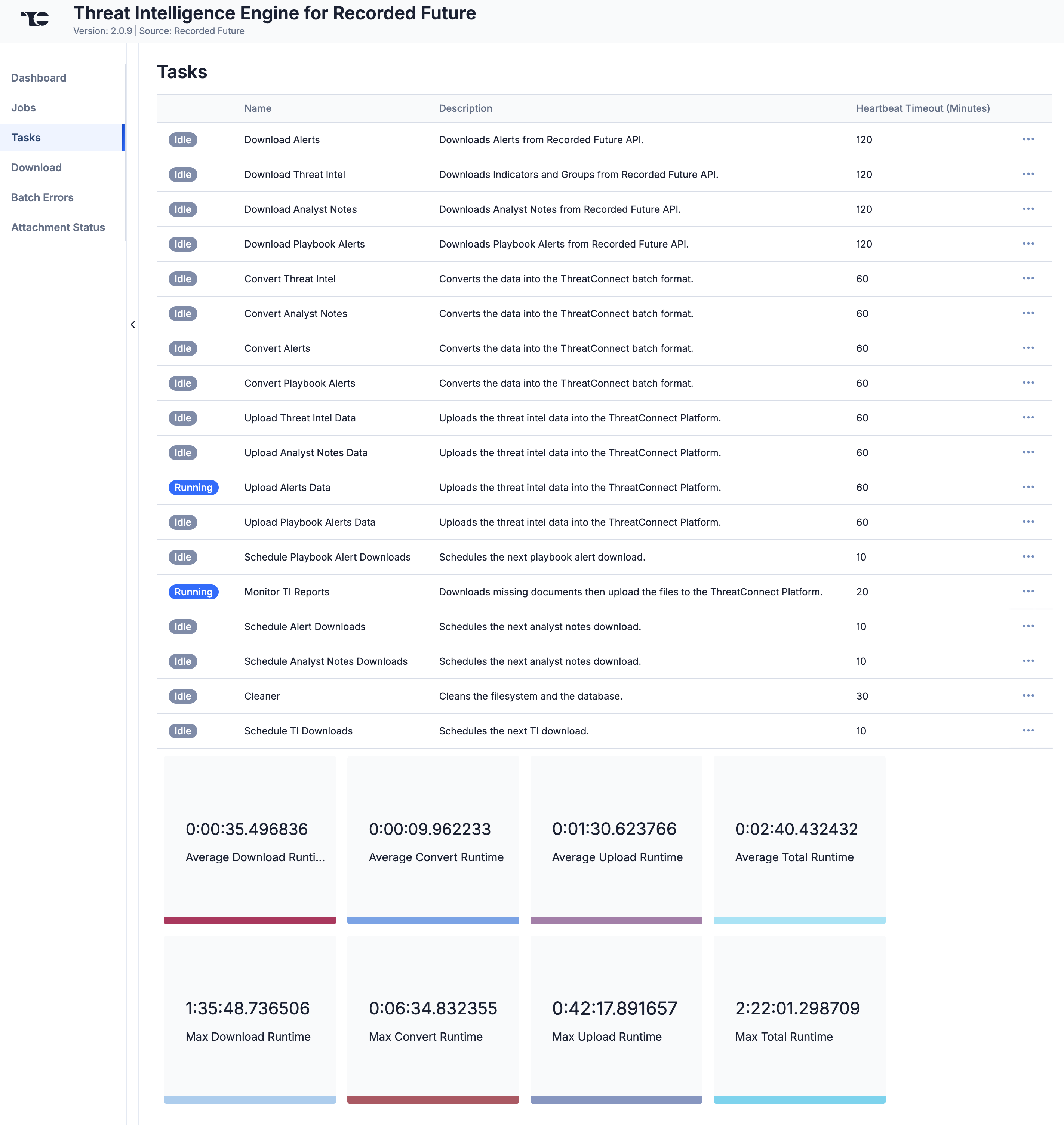
The Tasks screen (Figure 4) displays all Tasks that may be part of a Job, including each step of the download, convert, and upload processes, as well as Tasks for the Threat Intelligence Engine for Recorded Future App, such as Monitor, Scheduler, and Cleaner. The current status (Idle, Paused, or Running), name, description, and heartbeat timeout length, in minutes, are displayed for each Task. The ⋯ menu in a Task’s row provides the following options, depending on the Task’s status:
- Run (idle and paused Tasks only)
- Pause (idle and running Tasks only)
- Resume (paused Tasks only)
- Kill (running Tasks only)
Under the table is a dashboard where you can view runtime analytics.
Download
The Download screen (Figure 5) lets you download JavaScript® Object Notation (JSON) data for Recorded Future entities and then upload the data into ThreatConnect.
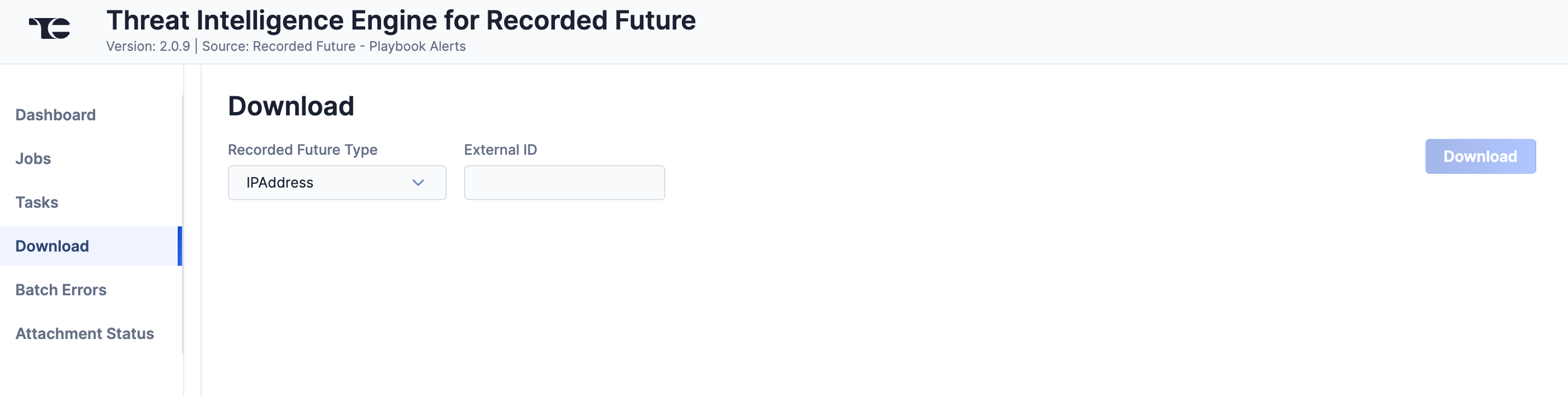
Follow these steps to download JSON data for a Recorded Future entity on the Download screen and then upload the data into ThreatConnect:
- Recorded Future Type: Select a Recorded Future entity type from the following options: IPAddress (IP), URL, Hash, InternetDomainName (Domain), CyberVulnerability (Vulnerability), Analyst Note, Malware, Actor, StandardAlert, Playbook Alert: Domain Abuse, Playbook Alert: Vulnerability, Playbook Alert: Third Party Risk, Playbook Alert: Data Leak On Code Repo, Playbook Alert: Malware Report, Playbook Alert: Geopolitics Facility, and Playbook Alert: Identity Novel Exposures.
- External ID: Enter the ID for the Recorded Future entity of the selected type. For IP, URL, Hash, and Domain Risk List entities, prepend
ip:,url:,hash:, andidn:, respectively, to the entity's ID. For Vulnerability Risk List entities, use the CVE ID or Recorded Future ID. The following examples demonstrate the ID format for each Recorded Future entity type:- IPAddress:
ip:124.71.84.65 - URL:
url:https://send.exploit.in/ - Hash:
hash:092910024190a2521f21658be849c4ac9ae6fa4d5f2ecd44c9055cc353a26875 - InternetDomainName:
idn:efavengh.com - CyberVulnerability:
CVE-2019-0841orZgFn9x - Analyst Note:
4gSsx8 - Malware:
l3moPJ - Actor:
eTMnra - StandardAlert:
-QfHWt - Playbook Alerts:
task:09e6c192-0f88-4f3e-813c-f6b73bbc95a4NoteAll Playbook Alert types have the same ID format.
- IPAddress:
- Click Download. The JSON data will be displayed in two columns: Results (raw JSON data) and Converted (JSON data in ThreatConnect batch format) (Figure 6).
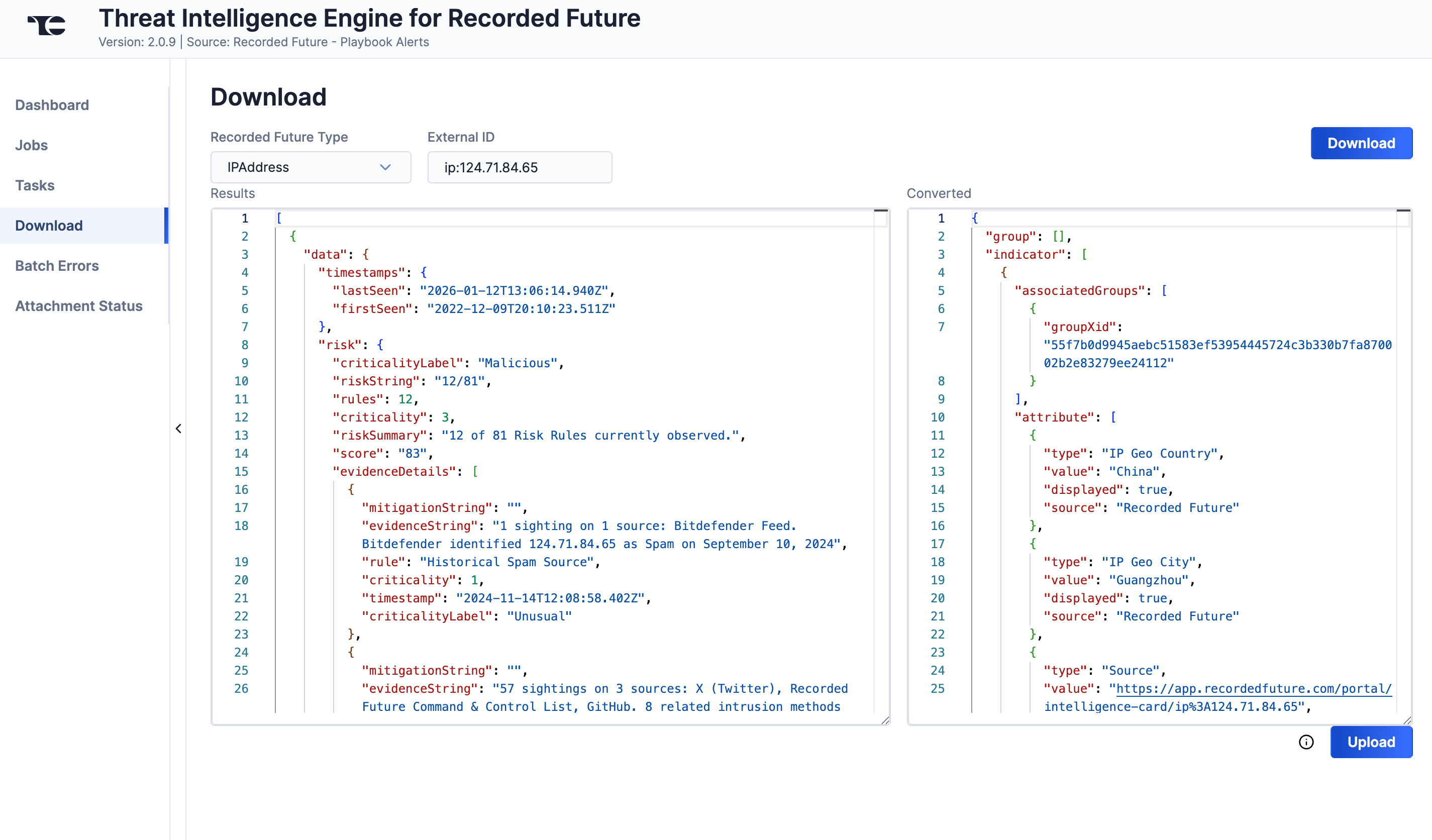
- Click Upload to submit the converted threat intelligence data via the ThreatConnect Batch API.
Batch Errors
The Batch Errors screen (Figure 7) displays an overview of the batch error types that have occurred for Job requests. You can enter keywords to filter by Job ID.
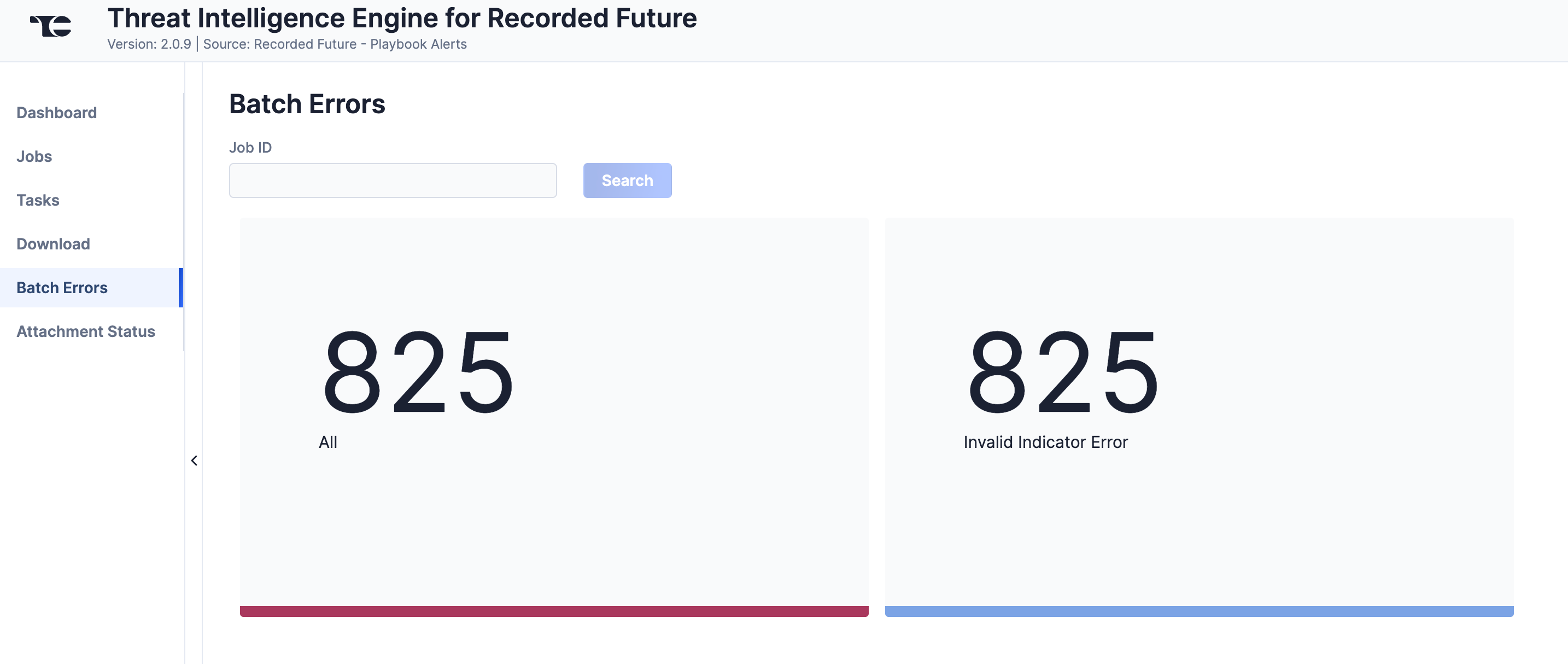
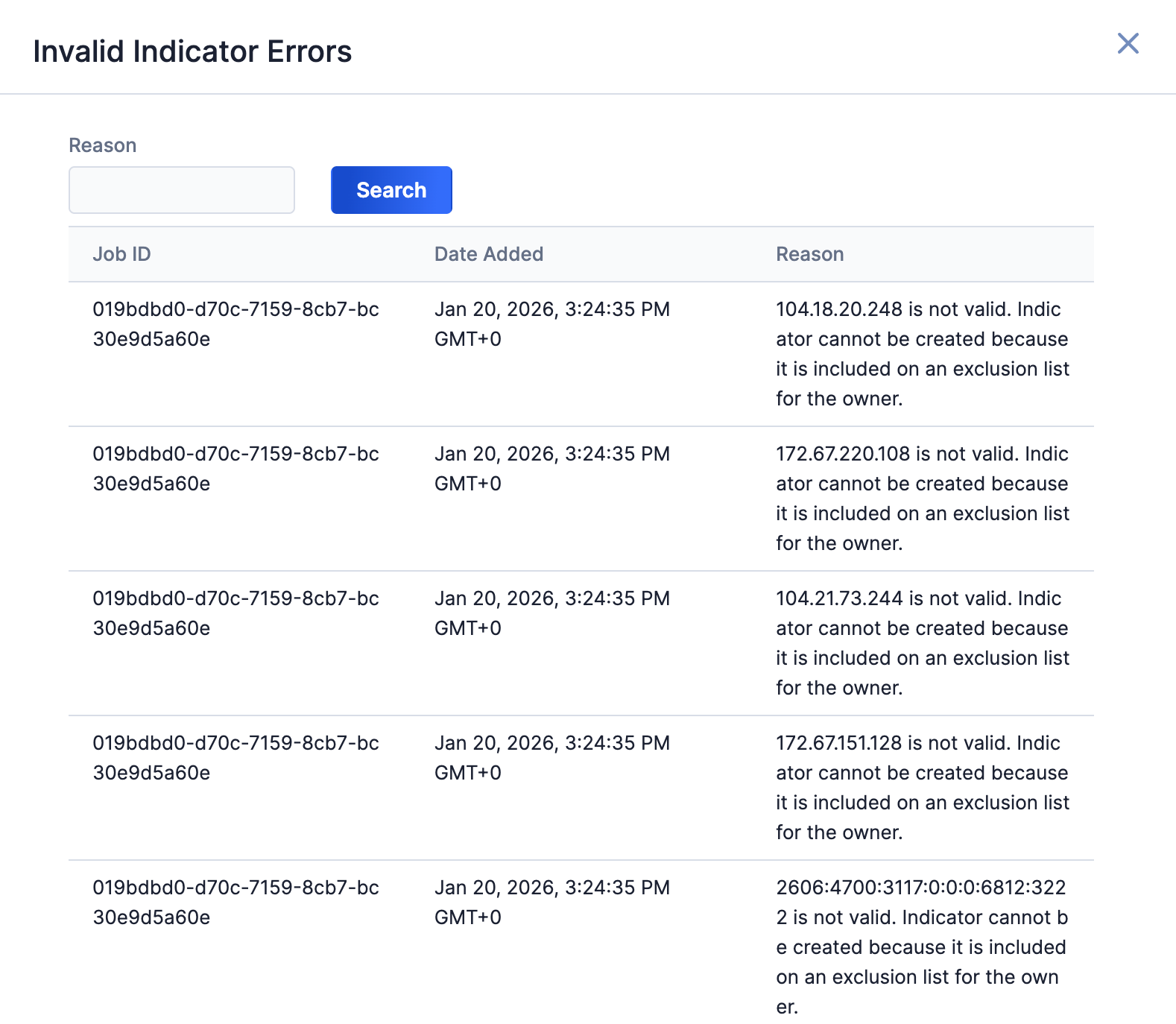
Select an error type to open a drawer containing a table with details on all batch errors of that type (Figure 8). You can enter keywords to filter by reason for error.
Attachment Status
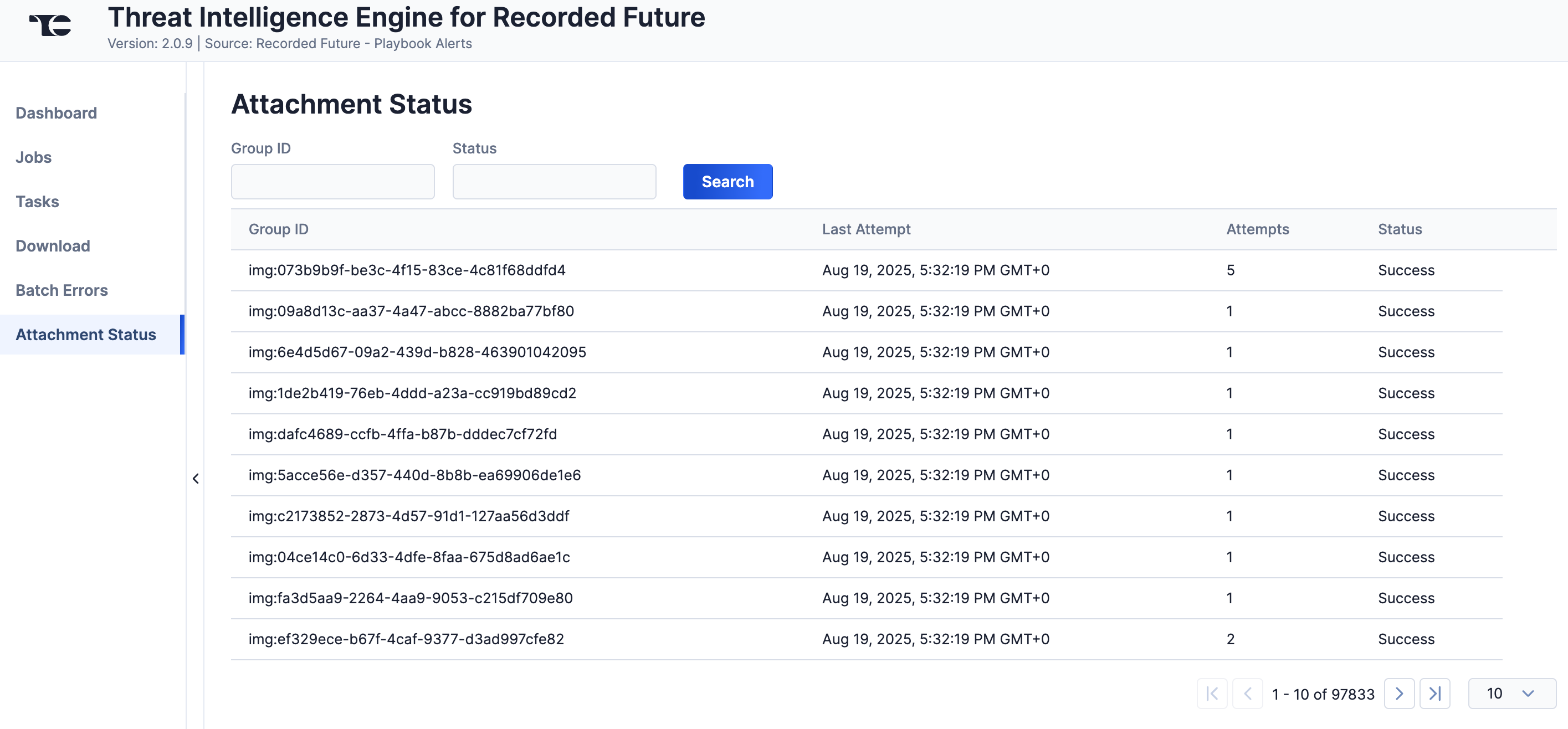
The Attachment Status screen (Figure 9) displays a table with details on ThreatConnect's attempts to download Report attachments from Recorded Future. You can enter keywords to filter the table by the Recorded Future Group ID, which can be useful if you do not see a Recorded Future attachment in ThreatConnect as expected, or by status.
Data Mappings
The data mappings in Table 2 through Table 18 illustrate how data are mapped from Recorded Future Intelligence API endpoints into the ThreatConnect data model.
Domain
ThreatConnect object type: Host Indicator
| Recorded Future API Field | ThreatConnect Field |
|---|---|
| entity/id | Attribute: "External ID" |
| entity/name | Name/Summary |
| entity/note_entities | See the “Note Entity” section for more information. |
| analystNotes/attributes/validated_on | Host-to-Report Association (see the “Analyst Note” section for more information on how data are mapped to the associated Report Group) |
| analystNotes/attributes/published | |
| analystNotes/attributes/text | |
| analystNotes/attributes/topic/name | |
| analystNotes/attributes/validation_urls/name | |
| analystNotes/attributes/title | |
| analystNotes/attributes/note_entities/name | |
| analystNotes/source/name | |
| analystNotes/id | |
| links/hits/sections/lists/entities/id | Tag |
| links/hits/sections/lists/entities/type | ATT&CK® Tag (if type = MitreAttackIdentifier) |
| timestamps/firstSeen | Attribute: "First Seen" |
| timestamps/lastSeen | Attribute: "Last Seen" |
| intelCard | Source |
| risk/score |
|
| risk/evidenceDetails/rule | Attribute: "Evidence" Note Each risk rule serves as evidence that explains the Indicator’s level of risk. Because there are often many risk rules associated with a Recorded Future Risk List entity, the risk rules are presented in a tabular format for better readability. |
| risk/evidenceDetails/evidenceString | |
| risk/evidenceDetails/criticality | |
| risk/evidenceDetails/timestamp |
Hash
ThreatConnect object type: File Indicator
| Recorded Future API Field | ThreatConnect Field |
|---|---|
| entity/id | Attribute: "External ID" |
| entity/name | Name/Summary |
| entity/note_entities | See the “Note Entity” section for more information. |
| analystNotes/attributes/validated_on | File-to-Report Association (see the “Analyst Note” section for more information on how data are mapped to the associated Report Group) |
| analystNotes/attributes/published | |
| analystNotes/attributes/text | |
| analystNotes/attributes/topic/name | |
| analystNotes/attributes/validation_urls/name | |
| analystNotes/attributes/title | |
| analystNotes/attributes/note_entities/name | |
| analystNotes/source/name | |
| analystNotes/id | |
| links/hits/sections/lists/entities/id | Tag |
| links/hits/sections/lists/entities/type | ATT&CK Tag (if type = MitreAttackIdentifier) |
| timestamps/firstSeen | Attribute: "First Seen" |
| timestamps/lastSeen | Attribute: "Last Seen" |
| intelCard | Source |
| risk/score |
|
| risk/evidenceDetails/rule | Attribute: "Evidence" Note Each risk rule serves as evidence that explains the Indicator’s level of risk. Because there are often many risk rules associated with a Recorded Future Risk List entity, the risk rules are presented in a tabular format for better readability. |
| risk/evidenceDetails/evidenceString | |
| risk/evidenceDetails/criticality | |
| risk/evidenceDetails/timestamp |
IP
ThreatConnect object type: Address Indicator
| Recorded Future API Field | ThreatConnect Field |
|---|---|
| entity/id | Attribute: "External ID" |
| entity/name | Name/Summary |
| entity/note_entities | See the “Note Entity” section for more information. |
| analystNotes/attributes/validated_on | Address-to-Report Association (see the “Analyst Note” section for more information on how data are mapped to the associated Report Group) |
| analystNotes/attributes/published | |
| analystNotes/attributes/text | |
| analystNotes/attributes/topic/name | |
| analystNotes/attributes/validation_urls/name | |
| analystNotes/attributes/title | |
| analystNotes/attributes/note_entities/name | |
| analystNotes/source/name | |
| analystNotes/id | |
| links/hits/sections/lists/entities/id | Tag |
| location/asn | |
| location/cidr/name | |
| links/hits/sections/lists/entities/type | ATT&CK Tag (if type = MitreAttackIdentifier) |
| timestamps/firstSeen | Attribute: "First Seen" |
| timestamps/lastSeen | Attribute: "Last Seen" |
| intelCard | Source |
| risk/score |
|
| risk/evidenceDetails/rule | Attribute: "Evidence" Note Each risk rule serves as evidence that explains the Indicator’s level of risk. Because there are often many risk rules associated with a Recorded Future Risk List entity, the risk rules are presented in a tabular format for better readability. |
| risk/evidenceDetails/evidenceString | |
| risk/evidenceDetails/criticality | |
| risk/evidenceDetails/timestamp | |
| location/location/country | Attribute: "IP Geo Country" |
| location/location/city | Attribute: "IP Geo City" |
URL
ThreatConnect object type: URL Indicator
| Recorded Future API Field | ThreatConnect Field |
|---|---|
| entity/id | Attribute: "External ID" |
| entity/name | Name/Summary |
| entity/note_entities | See the “Note Entity” section for more information. |
| analystNotes/attributes/validated_on | URL-to-Report Association (see the “Analyst Note” section for more information on how data are mapped to the associated Report Group) |
| analystNotes/attributes/published | |
| analystNotes/attributes/text | |
| analystNotes/attributes/topic/name | |
| analystNotes/attributes/validation_urls/name | |
| analystNotes/attributes/title | |
| analystNotes/attributes/note_entities/name | |
| analystNotes/source/name | |
| analystNotes/id | |
| links/hits/sections/lists/entities/id | Tag |
| links/hits/sections/lists/entities/type | ATT&CK Tag (if type = MitreAttackIdentifier) |
| timestamps/firstSeen | Attribute: "First Seen" |
| timestamps/lastSeen | Attribute: "Last Seen" |
| intelCard | Source |
| risk/score |
|
| risk/evidenceDetails/rule | Attribute: "Evidence" Note Each risk rule serves as evidence that explains the Indicator’s level of risk. Because there are often many risk rules associated with a Recorded Future Risk List entity, the risk rules are presented in a tabular format for better readability. |
| risk/evidenceDetails/evidenceString | |
| risk/evidenceDetails/criticality | |
| risk/evidenceDetails/timestamp |
Vulnerability
ThreatConnect object type: Vulnerability Group
| Recorded Future API Field | ThreatConnect Field |
|---|---|
| entity/id | Attribute: "External ID" |
| entity/name | Name/Summary |
| entity/note_entities | See the “Note Entity” section for more information. |
| analystNotes/attributes/validated_on | Vulnerability-to-Report Association (see the “Analyst Note” section for more information on how data are mapped to the associated Report Group) |
| analystNotes/attributes/published | |
| analystNotes/attributes/text | |
| analystNotes/attributes/topic/name | |
| analystNotes/attributes/validation_urls/name | |
| analystNotes/attributes/title | |
| analystNotes/attributes/note_entities/name | |
| analystNotes/source/name | |
| analystNotes/id | |
| links/hits/sections/lists/entities/id | Tag |
| links/hits/sections/lists/entities/type | ATT&CK Tag (if type = MitreAttackIdentifier) |
| timestamps/firstSeen | Attribute: "First Seen" |
| timestamps/lastSeen | Attribute: "Last Seen" |
| intelCard | Source |
| risk/score | Attribute: "Risk Score" |
| risk/criticalityLabel | Attribute: “Criticality" |
| risk/evidenceDetails/rule | Attribute: "Evidence" Note Each risk rule serves as evidence that explains the Group’s level of risk. Because there are often many risk rules associated with a Recorded Future Risk List entity, the risk rules are presented in a tabular format for better readability. |
| risk/evidenceDetails/evidenceString | |
| risk/evidenceDetails/criticality | |
| risk/evidenceDetails/timestamp | |
| cvssv3/scope | Attribute: "CVSS v3 Scope" |
| cvssv3/exploitabilityScore | Attribute: "CVSS v3 Exploitability Score" |
| cvssv3/modified | Attribute: "CVSS v3 Modified" |
| cvssv3/baseSeverity | Attribute: "CVSS v3 Base Severity" |
| cvssv3/baseScore | Attribute: "CVSS v3 Score" |
| cvssv3/privilegesRequired | Attribute: "CVSS v3 Privileges Required" |
| cvssv3/userInteraction | Attribute: "CVSS v3 User Interaction" |
| cvssv3/impactScore | Attribute: "CVSS v3 Impact Score" |
| cvssv3/attackVector | Attribute: "CVSS v3 Attack Vector" |
| cvssv3/integrityImpact | Attribute: "CVSS v3 Integrity Impact" |
| cvssv3/confidentialityImpact | Attribute: "CVSS v3 Confidentiality Impact" |
| cvssv3/vectorString | Attribute: "CVSS v3 Vector String" |
| cvssv3/attackComplexity | Attribute: "CVSS v3 Attack Complexity" |
| cvssv3/created | Attribute: "CVSS v3 Created" |
| cvssv3/availabilityImpact | Attribute: "CVSS v3 Availability Impact" |
| cvss/accessVector | Attribute: "CVSS v2 Access Vector" |
| cvss/lastModified | Attribute: "CVSS v2 Last Modified" |
| cvss/published | Attribute: "CVSS v2 Published" |
| cvss/score | Attribute: "CVSS v2 CVSS Score" |
| cvss/availability | Attribute: "CVSS v2 Availability" |
| cvss/authentication | Attribute: "CVSS v2 Authentication" |
| cvss/accessComplexity | Attribute: "CVSS v2 Access Complexity" |
| cvss/integrity | Attribute: "CVSS v2 Integrity" |
| cvss/confidentiality | Attribute: "CVSS v2 Confidentiality" |
| cpe | Attribute: "CPE" |
Analyst Note
ThreatConnect object type: Report Group
| Recorded Future API Field | ThreatConnect Field |
|---|---|
| analystNotes/attributes/validated_on |
|
| analystNotes/attributes/published | Attribute: "Publish Date" |
| analystNotes/attributes/text | Attribute: "Report Text" |
| analystNotes/attributes/topic/name | Attribute: "Report Type" |
| analystNotes/attributes/validation_urls/name | Attribute: "External References" |
| analystNotes/attributes/title | Name/Summary |
| analystNotes/attributes/note_entities/name | See the “Note Entity” section for more information. |
| analystNotes/source/name | Source |
| analystNotes/id | Attribute: "External ID" |
Note Entity
ThreatConnect object type: Report Group
| Recorded Future Note Entity Type | ThreatConnect Field |
|---|---|
| ASNumber | Attribute: "Autonomous System Number" |
| AWSAccessKey | Attribute: "AWS Access Key" |
| Aircraft | Attribute: "Aircraft" |
| Airport | Attribute: "Airport" |
| AnalystNote | Association to Report Group |
| Anniversary | Attribute: "Anniversary" |
| AttackVector | Attribute: "Attack Vector" |
| BankIdentificationNumber | Attribute: "Bank Identification Number" |
| BitcoinAddress | Attribute: "Bitcoin Address" |
| BusinessIdentifierCode | Attribute: "Business Identifier Code" |
| Case | Attribute: "Case" |
| Category | Attribute: "Category" |
| City | Attribute: "City" |
| CodeIdentifier | Attribute: "Code Identifier" |
| Commodity | Attribute: "Commodity" |
| Company | Attribute: "Company" |
| ContentType | Attribute: "Content Type" |
| Continent | Attribute: "Continent" |
| Country | Attribute: "Country" |
| Currency | Attribute: "Currency" |
| CurrencyPair | Attribute: "Currency Pair" |
| CyberExploitTargetCategory | Attribute: "Cyber Exploit Target Category" |
| CyberSecurityCategory | Attribute: "Cyber Security Category" |
| CyberThreatActorCategory | Attribute: "Cyber Threat Actor Category" |
| CyberVulnerability | Association to Vulnerability Group |
| DEANumber | Attribute: "DEA Number" |
| Dataset | Attribute: "Dataset" |
| DetectionRule | Attribute: "Detection Rule" |
| Document | Attribute: "Document" |
| EconomicIndicator | Attribute: "Economic Indicator" |
| EmailAddress | Attribute: "Email Address" |
| Embassy | Association to Email Address Indicator |
| Emoji | Attribute: "Emoji" |
| EntertainmentAwardEvent | Attribute: "Entertainment Award Event" |
| Entity | Attribute: "Entity" |
| EntityAlias | Attribute: "Alias" |
| EntityList | Attribute: "Entity List" |
| EntityRange | Attribute: "Entity Range" |
| EntityRelation | Attribute: "Entity Relation" |
| ExternalIdentifier | Attribute: "External ID" |
| Facility | Attribute: "Facility" |
| FaxNumber | Attribute: "Fax Number" |
| Feature | Attribute: "Feature" |
| FileContent | Attribute: "File Content" |
| FileName | Attribute: "File Name" |
| FileNameExtension | Attribute: "File Extension" |
| FileType | Attribute: "File Type" |
| GeoBoundingBox | Attribute: "Geo Bounding Box" |
| GeoEntity | Attribute: "Geo Entity" |
| Hash | Association to File Indicator |
| HashAlgorithm | One of the following algorithms:
|
| Hashtag | Attribute: "Hashtag" |
| Holiday | Attribute: "Holiday" |
| IRCNetwork | Attribute: "IRC Network" |
| Identifier | Attribute: "Identifier" |
| Image | Attribute: "Image" |
| IncidentImpactCategory | Attribute: "Incident Impact Category" |
| Industry | Attribute: "Industry" |
| IndustryTerm | Attribute: "Industry Term" |
| IntegrationApplication | Attribute: "Integration Application" |
| IntegrationUser | Attribute: "Integration User" |
| InternetDomainName | Association to Host Indicator |
| IpAddress | Association to Address Indicator |
| Keyword | Attribute: "Keyword" |
| Language | Attribute: "Language" |
| LinkReport | Attribute: "Link Report" |
| Logotype | Attribute: "Logotype" |
| MICR | Attribute: "Magnetic Ink Character Recognition" |
| Malware | Attribute: "Malware" |
| MalwareCategory | Attribute: "Malware Family" |
| MalwareMutex | Attribute: "Mutex" |
| MalwareSignature | Attribute: "Malware Signature" |
| MarketIndex | Attribute: "Market Index" |
| MedicalCondition | Attribute: "Medical Condition" |
| MedicalTreatment | Attribute: "Medical Treatment" |
| MetaAttribute | Attribute: "Meta Attribute" |
| MetaType | Attribute: "Meta Type" |
| MilitaryBase | Attribute: "Military Base" |
| MilitaryExercise | Attribute: "Military Exercise" |
| MitreAttackIdentifier | ATT&CK Tag |
| Movie | Attribute: "Movie" |
| MusicAlbum | Attribute: "Music Album" |
| MusicGroup | Attribute: "Music Group" |
| Nationality | Attribute: "Nationality" |
| NaturalFeature | Attribute: "Natural Feature" |
| Neighborhood | Attribute: "Neighborhood" |
| NetworkPort | Attribute: "Network Port" |
| NetworkProtocol | Attribute: "Network Protocol" |
| NumericIdentifier | Attribute: "Numeric Identifier" |
| OperatingSystem | Attribute: "Operating System" |
| Operation | Attribute: "Operation" |
| OrgEntity | Attribute: "Org Entity" |
| Organization | Attribute: "Organization" |
| PaymentCardNumber | Attribute: "Payment Card Number" |
| Person | Attribute: "Person" |
| PhoneNumber | Attribute: "Phone" |
| Port | Attribute: "Port" |
| Position | Attribute: "Position" |
| Identifier | Attribute: "Product Identifier" |
| Module | Attribute: "Product Module" |
| ModuleAddon | Attribute: "Product Module Addon" |
| Version | Attribute: "Product Version" |
| ProgrammingLanguage | Attribute: "Programming Language" |
| ProvinceOrState | Attribute: "Province or State" |
| PublishedMedium | Attribute: "Published Medium" |
| RadioProgram | Attribute: "Radio Program" |
| RadioStation | Attribute: "Radio Station" |
| Region | Attribute: "Region" |
| Religion | Attribute: "Religion" |
| ReportEntity | Attribute: "Report Entity" |
| ReportingEntity | Attribute: "Reporting Entity" |
| RiskContext | Attribute: "Risk Context" |
| RiskRule | Attribute: "Risk Rule" |
| Sector | Attribute: "Sector" |
| SnortDetectionRule | Attribute: "Snort Detection Rule" |
| SocialSecurityNumber | Attribute: "Social Security Number" |
| Source | Attribute: "Source" |
| SourceMediaType | Attribute: "Source Media Type" |
| SportsEvent | Attribute: "Sports Event" |
| SportsGame | Attribute: "Sports Game" |
| SportsLeague | Attribute: "Sports League" |
| TVShow | Attribute: "TV Show" |
| TVStation | Attribute: "TV Station" |
| Task | Attribute: "Task" |
| Technology | Attribute: "Technology" |
| TechnologyArea | Attribute: "Technology Area" |
| Thread | Attribute: "Thread" |
| Threat Actor | Attribute: "Threat Actor" |
| Topic | Attribute: "Report Type" |
| UPSTrackingNumber | Attribute: "UPS Tracking Number" |
| URL | Association to URL Indicator |
| USPSTrackingNumber | Attribute: "USPS Tracking Number" |
| UUID | Attribute: "UUID" |
| UseCaseConfiguration | Attribute: "Use Case Configuration" |
| UseCaseReport | Attribute: "Use Case Report" |
| User | Attribute: "User" |
| UserEnterprise | Attribute: "User Enterprise" |
| UserEntity | Attribute: "User Entity" |
| UserGroup | Attribute: "User Group" |
| UserLabel | Attribute: "User Label" |
| UserModuleGroup | Attribute: "User Module Group" |
| UserModuleRoleGroup | Attribute: "User Module Role Group" |
| UserOrganization | Attribute: "User Organization" |
| UserRole | Attribute: "User Role" |
| Username | Attribute: "Username" |
| Vessel | Attribute: "Vessel" |
| WebMoneyID | Attribute: "WebMoney ID" |
| WinRegKey | Attribute: "Registry Key" |
| YaraDetectionRule | Attribute: "Yara Detection Rule" |
Actor
ThreatConnect object type: Intrusion Set Group
| Recorded Future API Field | ThreatConnect Field |
|---|---|
| threat_map/id | xid |
| threat_map/name | Name/Summary |
| threat_map/alias | Tag: "Intrusion Set: " |
| threat_map/intent | Attribute: "Threat Map Intent" |
| threat_map/opportunity | Attribute: "Threat Map Opportunity" |
| threat_map/categories | Tag: "Category: " |
Malware
ThreatConnect object type: Malware Group
| Recorded Future API Field | ThreatConnect Field |
|---|---|
| threat_map/id | xid |
| threat_map/name | Name/Summary |
| threat_map/alias | Tag: "Intrusion Set: " |
| threat_map/prevalence | Attribute: "Threat Map Prevalence" |
| threat_map/opportunity | Attribute: "Threat Map Opportunity" |
| threat_map/categories | Tag: "Category: " |
| relatedEntities/entities/name | See the “Note Entity” section for more information. |
| timestamps/firstSeen | Attribute: "First Seen" |
| timestamps/lastSeen | Attribute: "Last Seen" |
Standard Alerts
ThreatConnect object type: Event Group
| Recorded Future API Field | ThreatConnect Field |
|---|---|
| hits/entities/name |
|
hits/document/title | Attribute: "Reference" |
| hits/document/source/name | |
| hits/document/url | |
| fragment | |
| entities | |
| id | xid |
| hits/entities/type | Attribute: "Entity List" |
| review/status | Status |
| rule/id |
|
| rule/name | Attribute: "Alert Rule" |
| title | Name/Summary |
| triggered_by/entity_path/entity | Attribute: "Triggered By" |
| triggered_by/entity_paths/entity/name |
|
| url/api | Attribute: "Source" |
owner_organisation_details.organisations/organisation_name | Attribute: "Description" |
| id | |
| title | |
| review/status_in_portal | |
| review/assignee | |
| review/note | |
| url/portal | |
| ai_insights/text | |
| review/status_in_portal |
|
Playbook Alerts: Domain Abuse
ThreatConnect object type: Event Group
| Recorded Future API Field | ThreatConnect Field |
|---|---|
| playbook_alert_id |
|
| panel_status.case_rule_label | Name/Summary |
| panel_status.entity_name | |
| panel_status.case_rule_label | Attribute: "Alert Rule" |
| panel_evidence_dns.ip_list[] | Attribute: "DNS Record" |
| panel_evidence_dns.mx_list[] | |
| panel_evidence_dns.ns_list[] | |
| panel_evidence_summary.phishing_malicious_behavior.threatTypes[] | Attribute: "Threat Type" |
| panel_evidence_summary.reregistration.expiration | Attribute: "Registration Expiration Date" |
| panel_evidence_summary.reregistration.registrar_name | Attribute: "Registration Name" |
| panel_evidence_summary.resolved_record_list[] | Attribute: "Risk Rule" |
| panel_evidence_summary.screenshot_mentions[].mentioned_custom_keywords[] | Attribute: "Reference" |
| panel_evidence_summary.screenshot_mentions[] | |
| panel_evidence_summary.screenshots[] | |
| panel_evidence_summary.screenshots[].tag | Tag |
| tags[] | |
| panel_evidence_whois.body | Attribute: "Whois Record" |
| panel_status.actions_taken[] | Attribute: "Course of Action Taken" |
| panel_status.created |
|
| panel_status.priority | Attribute: "Priority" |
| panel_status.risk_score | Attribute: "Risk Score" |
| panel_status.status |
|
| panel_status.updated | External Last Modified |
Playbook Alerts: Vulnerability
ThreatConnect object type: Event Group
| Recorded Future API Field | ThreatConnect Field |
|---|---|
| playbook_alert_id |
|
| panel_status.case_rule_label | Name/Summary |
| panel_status.entity_name | |
| panel_status.case_rule_label | Attribute: "Alert Rule" |
| panel_evidence_summary | Attribute: "Vulnerable Products" |
| panel_evidence_summary.summary.lifecycle_stage | Tag |
| panel_evidence_summary.summary.targets[].name | |
| panel_status.entity_name | |
| tags[] | |
| panel_evidence_summary.summary.risk_rules[].rule |
|
| panel_status.actions_taken[] | Attribute: "Course of Action Taken" |
| panel_status.created |
|
| panel_status.priority | Attribute: "Priority" |
| panel_status.risk_score | Attribute: "Risk Score" |
| panel_status.status |
|
| panel_status.updated | External Last Modified |
Playbook Alerts: Third Party Risk
ThreatConnect object type: Event Group
| Recorded Future API Field | ThreatConnect Field |
|---|---|
| playbook_alert_id |
|
| panel_status.case_rule_label | Name/Summary |
| panel_status.entity_name | |
| panel_status.case_rule_label | Attribute: "Alert Rule" |
| panel_evidence_summary.assessments[] | Attribute: "Risk Rule" |
| panel_status.actions_taken | Attribute: "Course of Action Taken" |
| panel_status.created |
|
| panel_status.entity_criticality | Attribute: "Criticality" |
| panel_status.priority | Attribute: "Priority" |
| panel_status.risk_score | Attribute: "Risk Score" |
| panel_status.status |
|
| panel_status.updated | External Last Modified |
| tags[] | Tag |
Playbook Alerts: Data Leak on Code Repo
ThreatConnect object type: Event Group
| Recorded Future API Field | ThreatConnect Field |
|---|---|
| playbook_alert_id |
|
| panel_status.case_rule_label | Name/Summary |
| panel_status.entity_name | |
| panel_status.case_rule_label | Attribute: "Alert Rule" |
| panel_evidence_summary.assessments[] | Attribute: "Risk Rule" |
| panel_status.actions_taken | Attribute: "Course of Action Taken" |
| panel_status.created |
|
| panel_status.entity_criticality | Attribute: "Criticality" |
| panel_status.priority | Attribute: "Priority" |
| panel_status.risk_score | Attribute: "Risk Score" |
| panel_status.status |
|
| panel_status.updated | External Last Modified |
| tags[] | Tag |
Playbook Alerts: Malware Report
ThreatConnect object type: Event Group
| Recorded Future API Field | ThreatConnect Field |
|---|---|
| playbook_alert_id |
|
| panel_status.case_rule_label | Name/Summary |
| panel_status.entity_name | |
| panel_status.case_rule_label | Attribute: "Alert Rule" |
| panel_evidence_summary.assessments[] | Attribute: "Risk Rule" |
| panel_status.actions_taken | Attribute: "Course of Action Taken" |
| panel_status.created |
|
| panel_status.entity_criticality | Attribute: "Criticality" |
| panel_status.priority | Attribute: "Priority" |
| panel_status.risk_score | Attribute: "Risk Score" |
| panel_status.status |
|
| panel_status.updated | External Last Modified |
| tags[] | Tag |
Playbook Alerts: Geopolitics Facility
ThreatConnect object type: Event Group
| Recorded Future API Field | ThreatConnect Field |
|---|---|
| playbook_alert_id |
|
| panel_status.case_rule_label | Name/Summary |
| panel_status.entity_name | |
| panel_status.case_rule_label | Attribute: "Alert Rule" |
| panel_evidence_summary.assessments[] | Attribute: "Risk Rule" |
| panel_status.actions_taken | Attribute: "Course of Action Taken" |
| panel_status.created |
|
| panel_status.entity_criticality | Attribute: "Criticality" |
| panel_status.priority | Attribute: "Priority" |
| panel_status.risk_score | Attribute: "Risk Score" |
| panel_status.status |
|
| panel_status.updated | External Last Modified |
| tags[] | Tag |
Playbook Alerts: Identity Novel Exposures
ThreatConnect object type: Event Group
| Recorded Future API Field | ThreatConnect Field |
|---|---|
| playbook_alert_id |
|
| panel_status.case_rule_label | Name/Summary |
| panel_status.entity_name | |
| panel_status.case_rule_label | Attribute: "Alert Rule" |
| panel_evidence_summary.assessments[] | Attribute: "Risk Rule" |
| panel_status.actions_taken | Attribute: "Course of Action Taken" |
| panel_status.created |
|
| panel_status.entity_criticality | Attribute: "Criticality" |
| panel_status.priority | Attribute: "Priority" |
| panel_status.risk_score | Attribute: "Risk Score" |
| panel_status.status |
|
| panel_status.updated | External Last Modified |
| tags[] | Tag |
Risk Score Mappings
ThreatConnect follows the Criticality mapping in Recorded Future when assigning a Threat Rating to data ingested from Recorded Future; however, because the Recorded Future Criticality rating goes only from 0–4, it has been augmented by 1 in ThreatConnect to fit the 0–5 scale for Threat Rating. Table 19 shows how the Recorded Future risk scores are mapped to Threat Rating in ThreatConnect.
| Recorded Future Risk Score | ThreatConnect Threat Rating |
|---|---|
| 90–99 | 5 |
| 85–89 | 4 |
| 25–64 | 3 |
| 5–24 | 2 |
| 1–4 | 1 |
| 0 or Unknown | 0 or Unknown |
Frequently Asked Questions (FAQ)
Why are there several URL errors in the batch errors report? (e.g., [xyz.com] could not be processed as a valid URL due to missing or invalid data (summary is invalid for the given type))
URL errors occur when URL objects coming from Recorded Future use an invalid URL format. Some examples of this behavior include the following:
- ww3.xyz.com: This URL is missing the protocol, such as http://.
- http:ww2.xyz.com/page#: This URL is terminated with a special character.
URL objects with an invalid URL format will not be imported into ThreatConnect. Note that this issue occurs rarely.
Why are Indicators with risk scores that are less than the minimum risk score being ingested into ThreatConnect?
Indicators with risk scores that are less than the minimum risk score are ingested because they exist as links from other Risk List entities. To prevent Indicators with a risk score less than the minimum risk score (i.e., the value for the App's Minimum Risk Score parameter) from being ingested, clear the Collect Indicators Linked in Recorded Future Less Than the Minimum Risk Score checkbox in the Feed Deployer when configuring and deploying the App.
How does the Threat Intelligence Engine for Recorded Future Feed API Service App differ from the Recorded Future Risk List Job App?
The Recorded Future Risk List Job App does the following:
- collects data from Risk List entities
- creates Indicators with evidence details
- maps evidence details to a Description Attribute and risk rules to Tags
The Threat Intelligence Engine for Recorded Future Feed API Service App collects data in the following ways:
- ingests Risk List entities with several of their Attributes
- ingests all of the Analyst Notes and attached PDFs associated with Risk List entities
- ingests associated Risk List entities and allows you to view the first-level associations created between the entities and Analyst Notes (i.e., the actual link)
- obtains a link to each Risk List entity's Recorded Future Intelligence Card
- ingests Analyst Notes that have been published in the last 24 hours daily
For more information on how Feed API Service Apps function in ThreatConnect, see Feed API Services.
How long does the Threat Intelligence Engine for Recorded Future Feed API Service App take to ingest a complete set of data on its initial run?
In most cases, the Threat Intelligence Engine for Recorded Future App takes 2–4 days to complete the initial data ingestion, depending on how you configure risk score and which Risk List entity types you select to ingest in the Feed Deployer.
In which order are Risk List entities ingested on the initial run?
On the initial run of the Threat Intelligence Engine for Recorded Future App, Risk List entities are ingested in the following order:
- Domain
- Hash
- IP
- URL
- Vulnerability
You will likely see Risk List entities ingested in chunks along with the associated or linked entities. Note that there may be delays between the creation of the Risk List source entities and the Risk List link entities in ThreatConnect.
How often does the Threat Intelligence Engine for Recorded Future App ingest each Risk List entity type after the initial run?
See Table 20 for each Risk List entity type's download frequency. Analyst Notes are downloaded daily.
| Recorded Future Risk List | Download Frequency (Hours) |
|---|---|
| Domain | 2 |
| Hash | 24 |
| IP | 1 |
| URL | 2 |
| Vulnerability | 24 |
How can I identify where the Threat Intelligence Engine for Recorded Future App collected Indicators and Groups from in Recorded Future?
The following "Source: " Tags, which are applied to Indicators and Groups in ThreatConnect that were ingested from Recorded Future, indicate where the integration collected them from in Recorded Future:
- Source: Risk List: The entity was ingested from a Risk List.
- Source: Risk List Link: The entity was ingested as a linked entity from a Risk List entity.
- Source: Analyst Note: The entity was ingested from an Analyst Note.
- Source: Analyst Note Link: The entity was ingested as a linked entity from an Analyst Note.
- Source: RF Alert: The entity was ingested from a Standard Alert.
- Source: RF Alert Link: The entity was ingested as a linked entity from a Standard Alert.
- Source: RF Threat Map: The entity was ingested from a Threat Map entity.
- Source: RF Threat Map Link: The entity was ingested as a linked entity from a Threat Map entity.
- Source: RF PB Alert: The entity was ingested from a Playbook Alert.
- Source: RF PB Alert Link: The entity was ingested as a linked entity from Playbook Alert.
Note that an Indicator or Group may have more than one of these Tags applied to them, as the corresponding entities could be associated to one another.
ThreatConnect® is a registered trademark, and TC Exchange™ is a trademark, of ThreatConnect, Inc.
JavaScript® is a registered trademark of Oracle Corporation.
Recorded Future® is a registered trademark of Recorded Future, Inc.
MITRE ATT&CK® and ATT&CK® are registered trademarks of The MITRE Corporation.
30083-04 EN Rev. A