New Features and Functionality
Version 8.0 marks a significant milestone in ThreatConnect’s evolution. This release introduces the Agentic Threat Intelligence Platform—a reimagining of what a threat intelligence platform can do for your team. Rather than requiring you to know what to search for, build your own automations, or spend hours assembling reports manually, ThreatConnect 8.0 introduces pre-built AI agents that do the heavy lifting for you: answering questions about your data in plain language, generating threat models with a single prompt, drafting intelligence reports in seconds, and even helping you build well-structured Intelligence Requirements (IRs) through a guided conversation. Alongside these agentic capabilities, 8.0 delivers an improved case management experience; table customization features across the platform; and a cleaner, more transparent set of CAL™ feature controls—all building toward a faster, more intuitive platform that lets your team spend more time on analysis and less time on everything else.
Agentic AI [BETA]
ThreatConnect 8.0 introduces the platform’s first suite of purpose-built AI agents. These agents are designed to automate defined use cases and give you a natural way to interact with your data—without requiring you to build playbooks, write ThreatConnect Query Language (TQL) queries, or hire technical resources to create automations on your behalf. These agents are built on ThreatConnect’s proven playbook architecture, combining an LLM reasoning layer with direct access to your ThreatConnect intelligence and workflow data.
Version 8.0 includes four agents, which you can easily access by clicking ✨Ask AI at the upper right of the top navigation bar. The agentic AI system processes the question or directive you enter into the Ask AI drawer and determines the agent best equipped to respond to the request.
| Agent | Description |
|---|---|
| ThreatConnect Query Agent | The ThreatConnect Query Agent can access active security investigations and surface relevant threat intelligence to support your defensive workflow, including related Indicators of Compromise (IOCs), similar attack patterns, affected assets, recommended response actions, and contextual threat data. It prioritizes that information by relevance and urgency to enable quick defensive decisions. |
| STRIDE Threat Modeling Agent | The STRIDE Threat Modeling Agent takes the name of a threat actor group or malware family and generates a Threat Model report using the STRIDE framework, which breaks down threats into the following categories: Spoofing, Tampering, Repudiation, Information Disclosure, Denial of Service, and Elevation of Privilege. By using these categories to identify the threat posed by a given threat actor group or malware, cyber defenders can implement security controls to mitigate the threats. |
| Intelligence Report Generator Agent | The Intelligence Report Generator produces tailored threat intelligence reports in three formats: executive, technical analysis, and deep-dive. Each report type is optimized for its target audience, ranging from business-focused summaries with impact assessments for leadership, to IOC-rich technical briefs for SOC and IR teams, to comprehensive deep-dive reports covering threat actor background, attribution, and detection guidance suitable for mixed audiences |
| Intelligence Requirement Creator Agent | The Intelligence Requirement Creator guides you through a conversational, step-by-step process to create Intelligence Requirements (IRs) in ThreatConnect, asking targeted questions and suggesting keywords to help define priorities. Especially valuable for less mature programs, this agent lowers the barrier to entry for the intelligence life cycle by ensuring that you have the right information captured before anything is created. |
ThreatConnect Query Agent
The ThreatConnect Query Agent provides a chat-based interface for asking questions about the data in your ThreatConnect instance and receiving natural-language responses. Rather than navigating to a specific object or building a search query, you can describe what you want to know and let the agent find and summarize the relevant information for you.
- Tell me about the [CYBERSECURITY EVENT] in [MONTH YEAR]
- What do we know about [TOPIC]?
- Tell me about [THREAT INTELLIGENCE OBJECT]
- What’s new since [TIMEFRAME]?
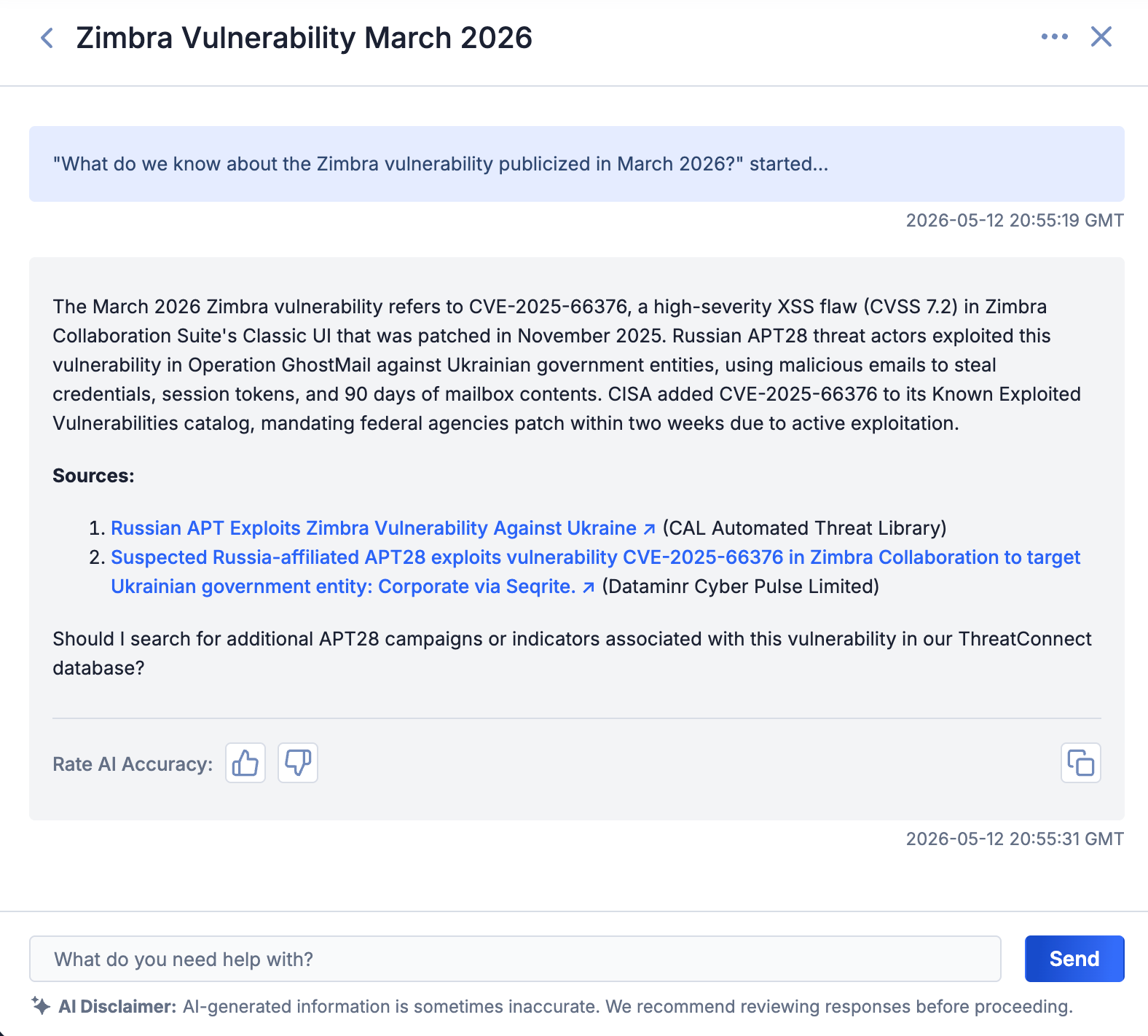
The ThreatConnect Query Agent summarizes your ThreatConnect data on a particular topic
ThreatConnect Query Agent responses include source links so you can easily verify the information and drill deeper when needed. You can also copy responses directly for inclusion in finished intelligence products. After each response, you can rate the accuracy of the agent’s answer to help improve its performance over time.
STRIDE Threat Modeling Agent
The STRIDE Threat Modeling Agent generates structured threat models from a prompt in the Ask AI drawer or via a dedicated ✨ Create STRIDE Threat Modeling Agent Report dropdown on Threat Actor Profiles’ (unified view) Details screens. To use the agent from the Ask AI drawer, ask for a STRIDE report for a named threat actor group or malware family, and the agent will produce a comprehensive threat model that includes relevant MITRE ATT&CK® techniques, mitigation strategies, detection examples, and—in Organizations that have the ATT&CK RQ Financial Impact feature configured in the ATT&CK Visualizer—customized industry firmographics. Options for copying and rating the accuracy of the report are available at the bottom of the response.
- Give me a stride report for [THREAT ACTOR]
- STRIDE report for [MALWARE]
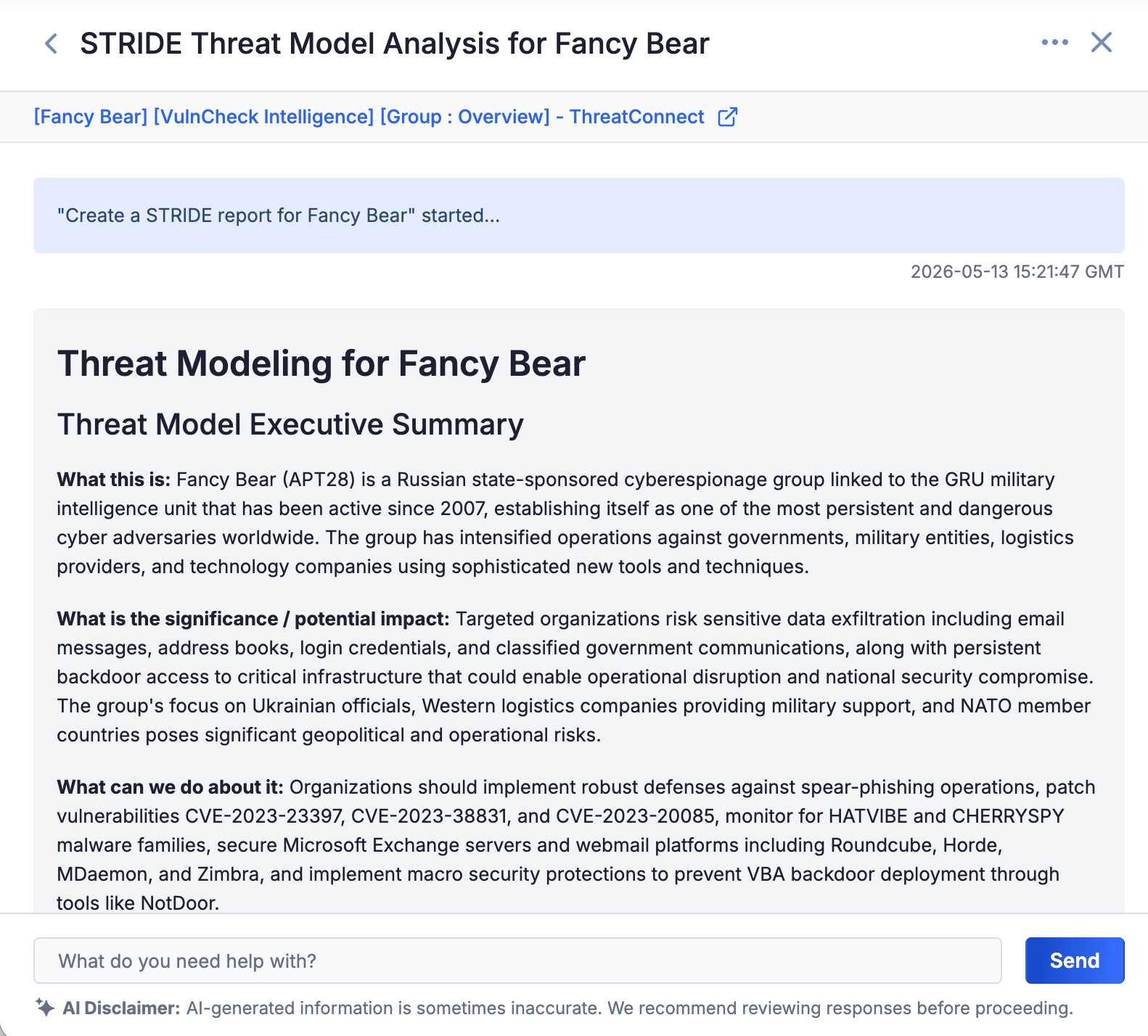
The STRIDE Threat Modeling Agent creates a report directly in the Ask AI drawer
To use the agent from a Threat Actor Profile’s Details screen, click the ✨ Create STRIDE Threat Modeling Agent Report button, and the agent will automatically create and open the report in the ThreatConnect report editor, where you can customize, save, publish, or export it.
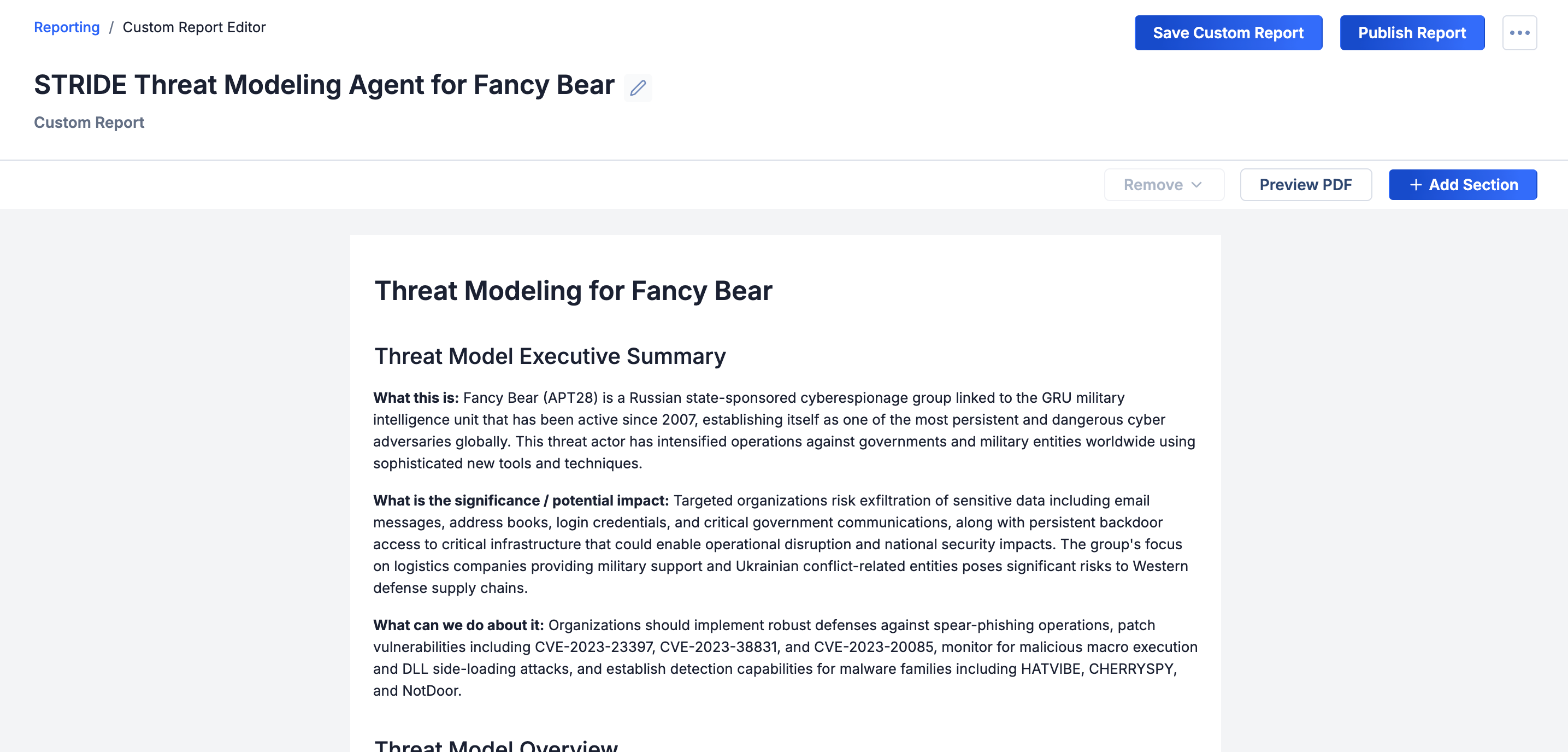
The STRIDE Threat Modeling Agent creates a report in the ThreatConnect report editor
Intelligence Report Generator Agent
The Intelligence Report Generator Agent drafts finished intelligence reports from your ThreatConnect data. You choose the report type and topic, and the agent provides a report with the appropriate format and level of detail for the intended audience: executive-level briefs for leadership, technical analysis reports for SOC and IR teams, and deep-dive, strategic reports for stakeholders who need a holistic understanding of a threat.
- Build a technical-analysis report about [TOPIC]
- Build an executive-level report on activity of [ACTOR] from [DATE RANGE]
- Build a deep-dive report on [TOPIC]
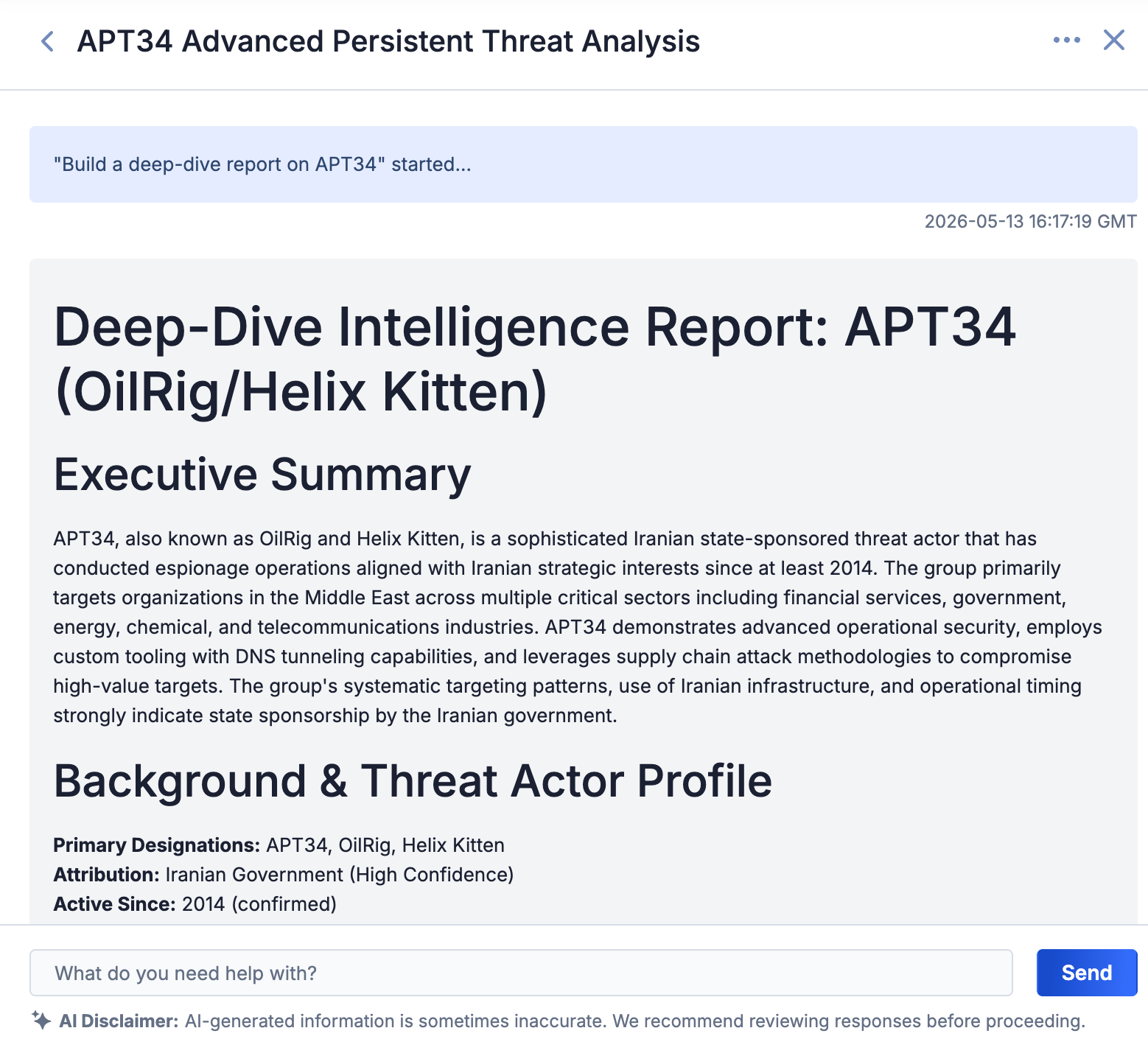
The Intelligence Report Generator Agent creates a fully finished report on a specified topic for your intended audience
Intelligence Requirement Creator Agent
Building well-structured IRs can be challenging. The Intelligence Requirement Creator Agent guides you through the process via a conversational interface: asking clarifying questions, suggesting keywords and metadata, checking for conflicts with existing IRs, and ultimately creating a complete, well-defined, actionable IR on your behalf.
- I need to create an intelligence requirement about [TOPIC]
- Help me create an intelligence requirement for threats to [INDUSTRY]
- Help me create an intelligence requirement for threats to [INDUSTRY] in [LOCATION]
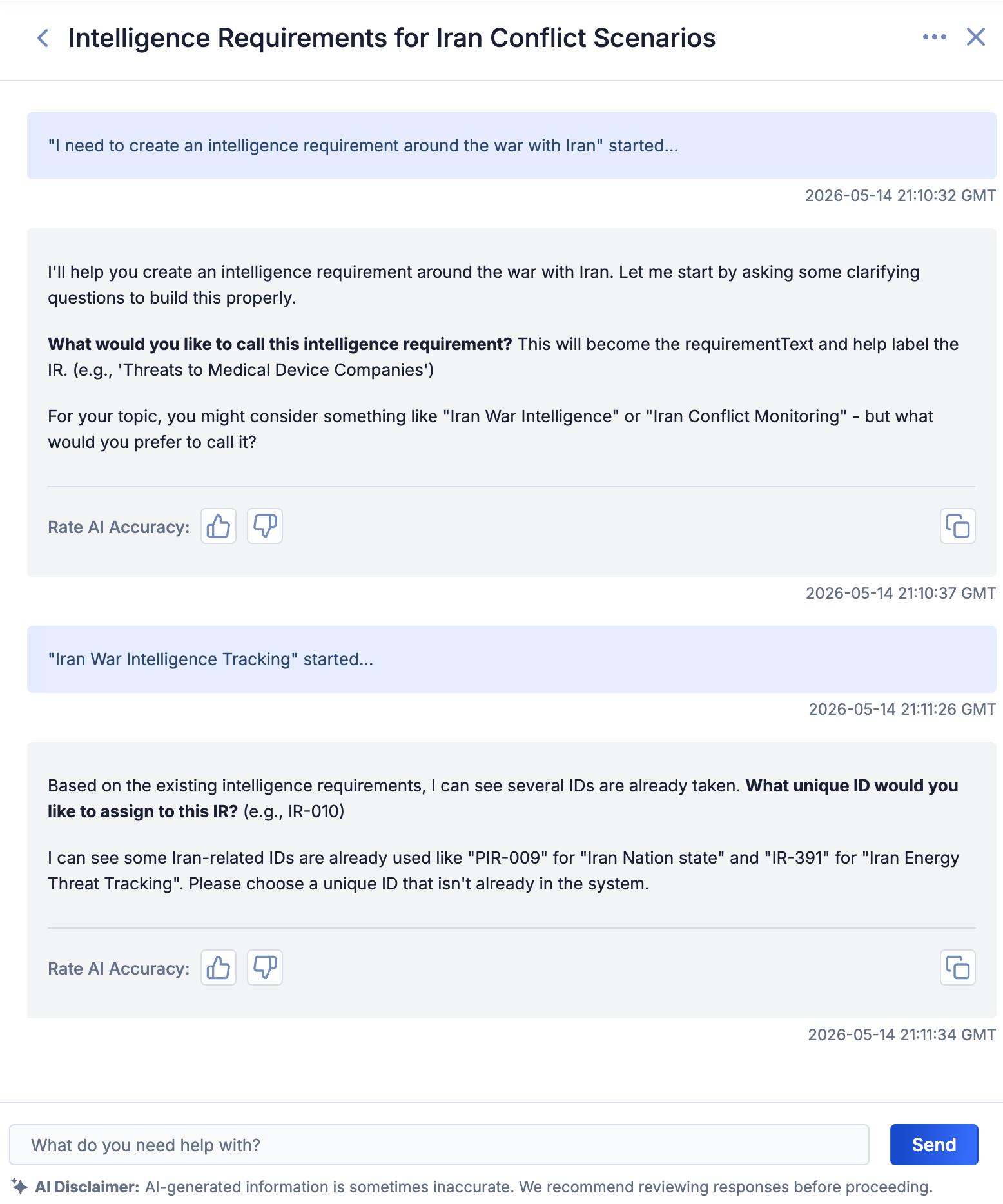
The Intelligence Requirement Creator Agent guides you through creating an IR
Playbooks: Route and Parameter Sets
ThreatConnect 8.0 includes two additions to the playbooks experience that make it easier to build, maintain, and reuse automation logic.
Playbook Routes
The playbook routes feature introduces a switch-statement branching pattern to playbook node connections, eliminating the need to chain multiple If/Else operators when branching on the value of a single output variable. Instead of building a cascade of Boolean conditions to route execution, you can now define named routes directly on an app’s outgoing connections, making the branching logic immediately visible in the canvas.
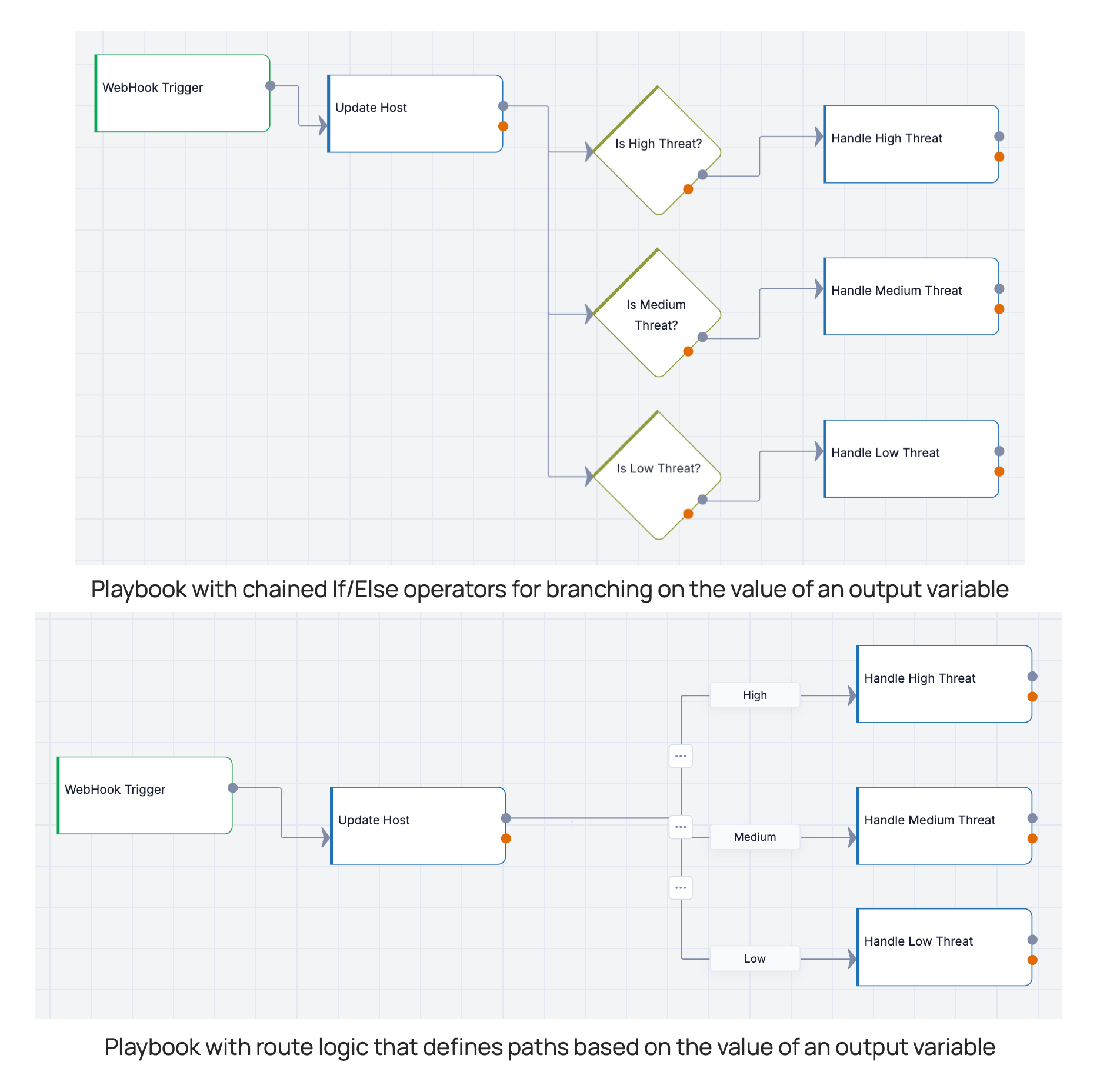
Routes are clearer and more efficient than chained If/Else operators
Routes offer several productivity benefits over chained If/Else operators: They reduce the number of nodes in a playbook; make branch logic visible directly on the connections themselves; and allow you to add, remove, or rename a branch by editing a single route label rather than restructuring a chain of condition nodes.
When defining routes for an app, select the output variable whose value will determine the path of execution. For each value that corresponds to a path, add a route name that matches the value. (Matches are case insensitive, but must otherwise be exact.) Every app with routes also includes a non-removable Default route that handles any output not explicitly named.
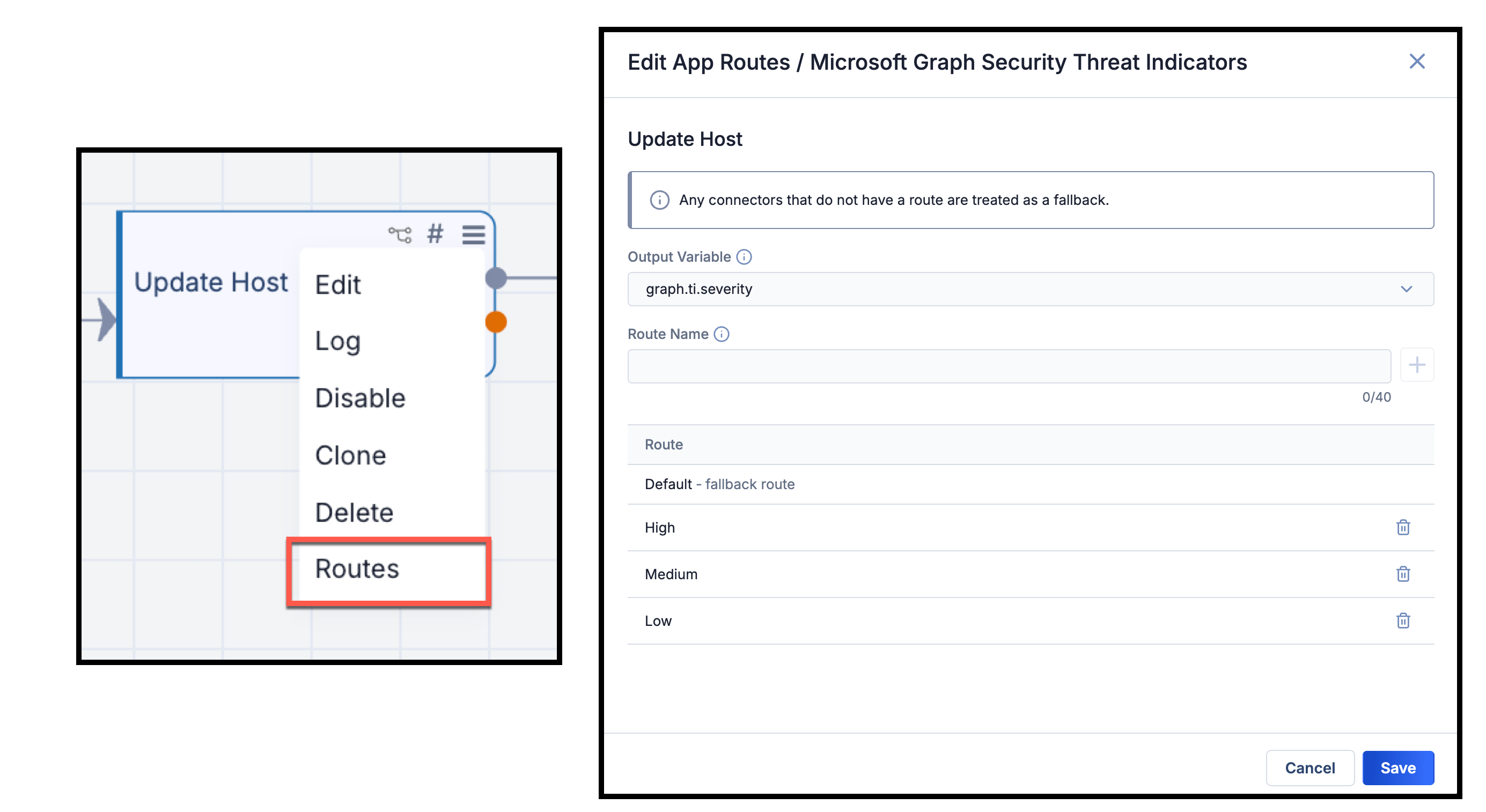
Define routes for app’s downstream execution based on an output variable’s value
Parameter Sets
Parameter sets allow you to create, manage, and reuse collections of pre-configured app parameters across playbooks in your Organization. Rather than configuring the same app settings repeatedly across different playbooks, you configure a single parameter set once and apply it wherever needed.
You can define a parameter set in the Parameter Sets tab of the new Configurations drawer or from the app’s configuration. Once you’ve selected an app, just give the parameter set a name, select the parameters to include in the set, provide the values for those parameters, and save the parameter set. Then, whenever you configure that app in a playbook, select the parameter set to automatically fill in the defined values in the app’s configuration. Saved parameter sets are available for all users who can build playbooks in your Organization.
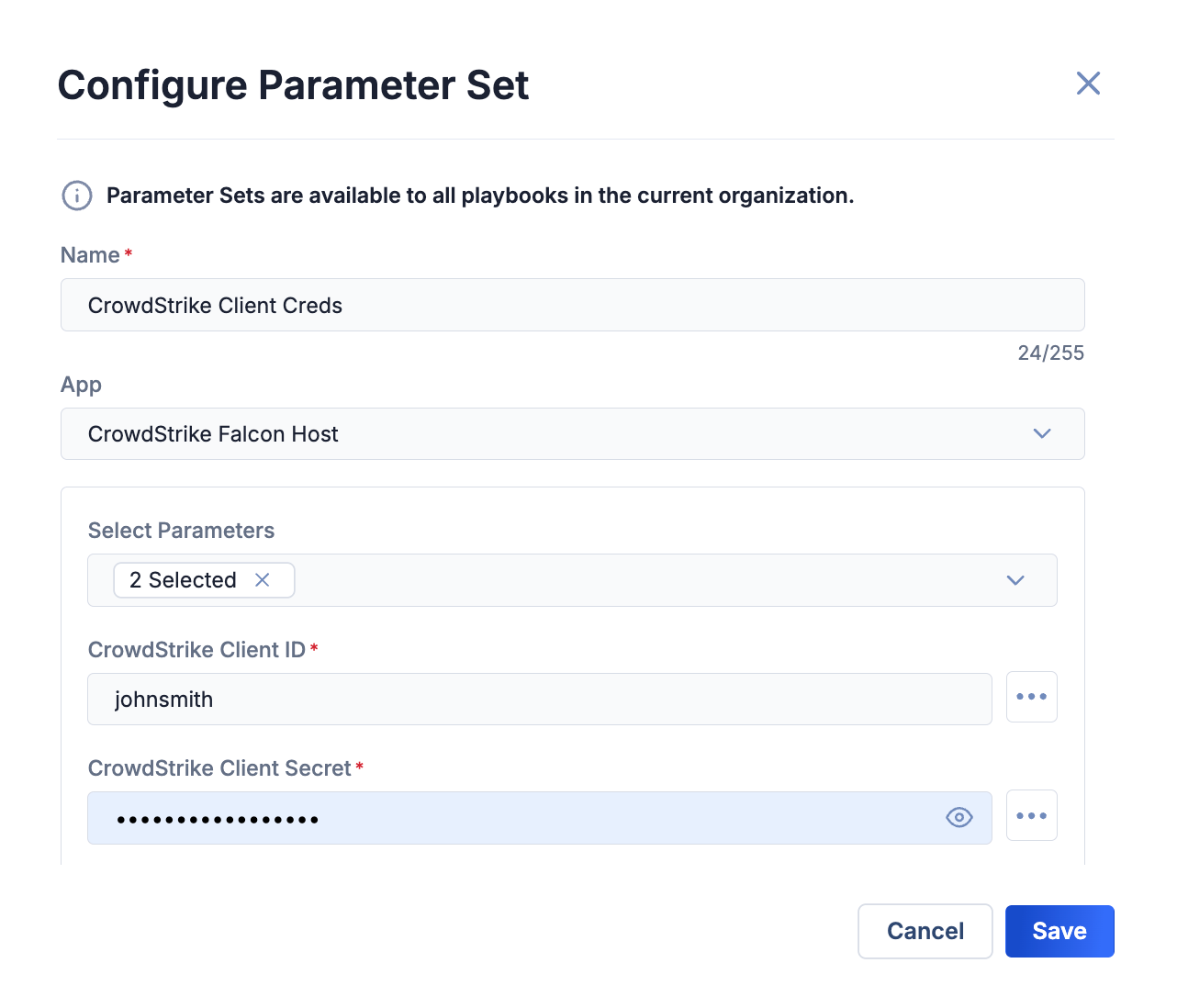
Pre-configure parameters that can be used in an app across playbooks
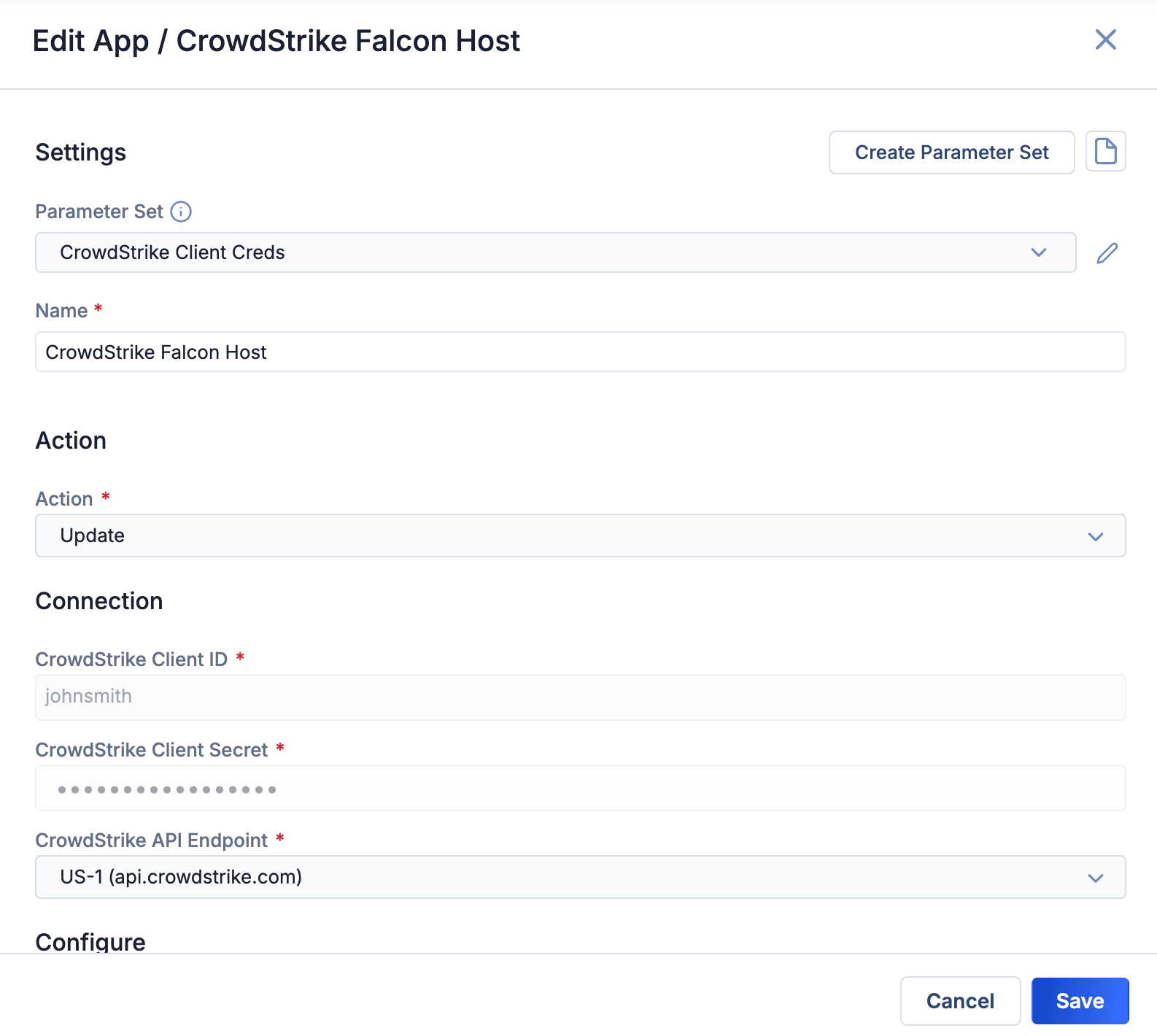
When configuring an app, select a parameter set to autofill its defined values
This feature also includes guardrails that warn you when you attempt to modify a parameter set currently in use by active playbooks, as well as app versioning logic that ensures parameter sets are always created against the latest installed version.
Case Details Screen Improvements
ThreatConnect 8.0 substantially improves the Case Details screen, reducing visual clutter and bringing it into closer alignment with the experience you already have on threat intelligence Details screens.
New Tabular Layout
The Case Details screen has been redesigned with the familiar tabular layout from the Indicator, Group, and IR Details screens. In particular, the timeline and associations cards, which previously occupied space on the crowded main Case Details screen, now have their own dedicated tabs. This reorganization gives you a more consistent experience and makes it easier to find the information you need while significantly reducing the need to scroll.
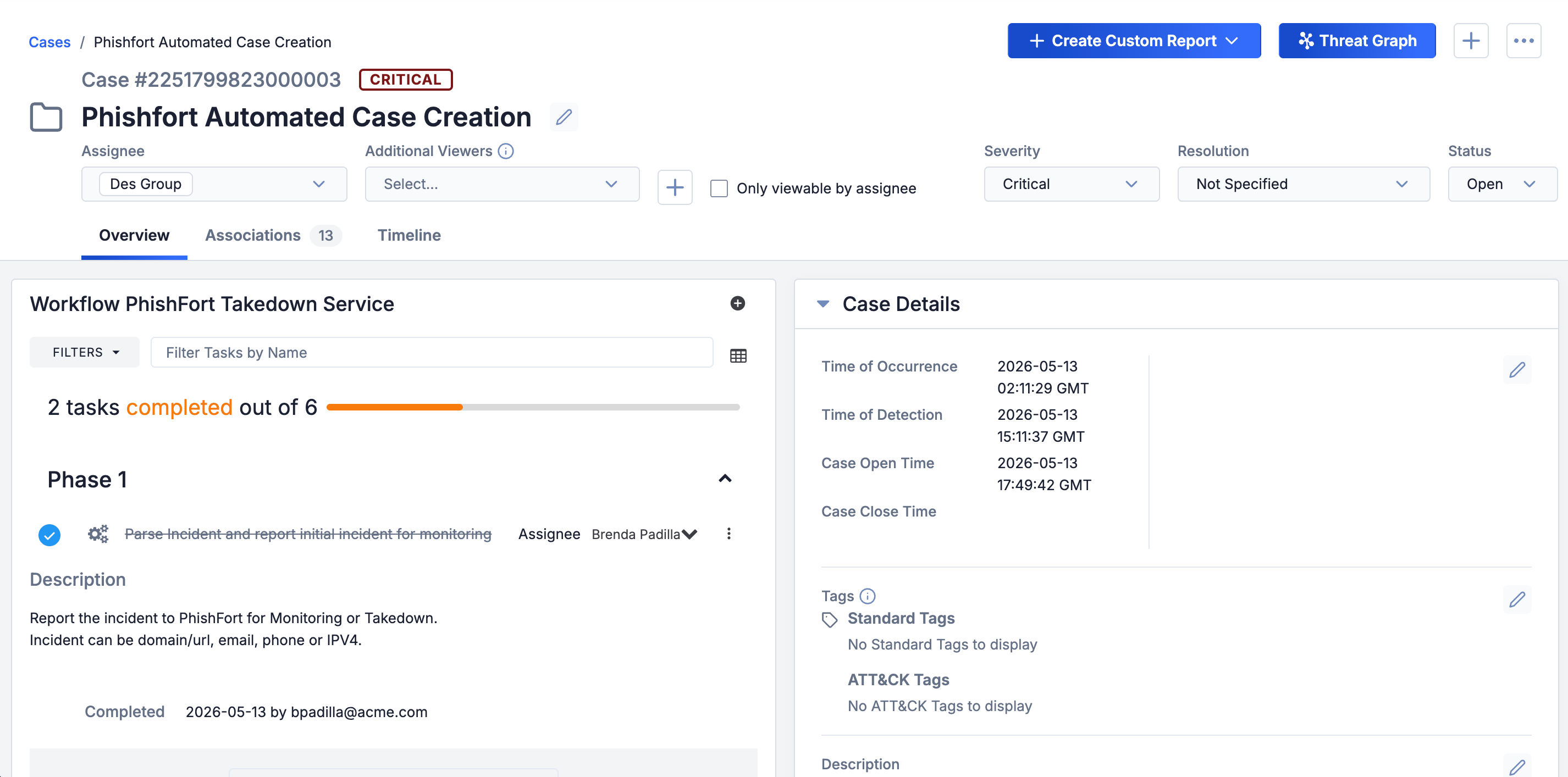
The Case Details screen’s familiar tabbed layout makes it easier to view and find data
Indicator Association Enhancements
When adding Indicator associations on the Case Details screen’s new Associations tab, you now have the same experience as on Group and IR Details screens:
- You can create new Indicators and add them as associations to a Case in the same step, without leaving the Case.
- You can bulk-create and associate Indicators to a Case by uploading a file (with the option to add the file as an associated Document Group) or entering them in a list.
- You can use TQL to filter and associate existing Indicators in bulk.
Column Reordering and Resizing
ThreatConnect 8.0 gives you control over table layouts across the platform. You can now manually resize columns and reorder them via drag-and-drop in the following areas:
- All Search screens
- All tables on the Associations tab of Indicator, Group, and IR Details screens except the TQL Queries tables
Column configurations—both width and order—persist across sessions, so your layout is preserved the next time you return. You can reset any table to its default configuration at any time.
Defined CAL-Related Feature Flags
Managing CAL-related system settings has historically been confusing; a single CALEnabled setting served as a catch-all switch for fundamentally different capabilities, and some features had no clear way to be disabled independently. ThreatConnect 8.0 replaces this model with two distinct, clearly labeled controls that map to feature areas CAL provides to ThreatConnect.
CALIndicatorEnrichment
The CALEnabled system setting has been renamed as CALIndicatorEnrichment. This is the master switch for global CAL telemetry and Indicator enrichment. When it is enabled, ThreatConnect shares anonymized Indicator telemetry data with CAL in exchange for enrichment data for the Indicators on your instance. When it is disabled, no telemetry is shared and no CAL Indicator enrichment is provided. This setting applies to Indicators only.
CALServices (New)
CAL services are now configurable via a new CALServices system setting with four discrete levels. Each level builds on the previous one—you cannot enable a higher level without its prerequisites. The levels are as follows:
- Disable CAL Services: This level turns off all CAL services. Individually enabled OSINT feeds such as the CAL Automated Threat Library continue to function.
- CAL Context: This level provides read-only access to CAL data with no customer data processing. The provided services at this level are Vulnerability and threat actor data for the Vulnerability and Threat Actor Profile unified view features, respectively, as well as the ATT&CK Tags that power the ATT&CK Visualizer.
- CAL Data Processing: This level includes all CAL Context services and non-AI data processing. It enables the non-AI-powered capabilities of Document Parsing Import and Intelligence Requirement keyword suggestions.
- CAL AI Processing: This level includes all CAL Context and CAL Data Processing services and AI-powered analysis and enrichment services. In particular, it enables AI-powered MITRE ATT&CK technique and sub-technique detection in Document Parsing Import, replacing the aiPoweredImportEnabled system setting.
Turning off the Enable CAL Data permission for an Organization (Account Settings > edit an Organization > Organization Information > Permissions) on a ThreatConnect instance that has CAL Indicator enrichment turned on and the highest level of CAL services (CAL AI Processing) enabled will do the following:
- CAL Indicator enrichment data will not display for users in that home Organization.
- Only the CAL Context services will be provided to users in that home Organization. CAL Data Processing and CAL AI Processing services will not be available to those users.
Unified View Support for On Premises Deployments
Unified views for Vulnerability Groups and Threat Actor Profiles, introduced in ThreatConnect 7.10 and 7.11, respectively, previously required a live connection to CAL to retrieve the baseline data that power these features. As a result, some On Premises instances were unable to take advantage of them.
ThreatConnect 8.0 resolves this problem with two new content packs that deliver the baseline data for Unified Views:
- The Vulnerabilities content pack provides the CAL vulnerability data that power unified views for Vulnerability Groups. Due to the continuous publication of new vulnerability data, updated Vulnerabilities content packs will be made available at a regular interval going forward.
- The Threat Actor Profiles content pack provides the CAL threat actor data that power Threat Actor Profile features. These data are currently based on the MITRE dataset. As such, the content pack will be updated when MITRE releases updates; at present, this occurs twice each year.
Installation and update of both content packs follow the same process as for existing MITRE ATT&CK content packs. Customers without a live CAL connection should contact their Customer Success representative for instructions on obtaining and installing the new content packs.
Improvements
Threat Intelligence
- You can now add an Indicator to your Organization from the Indicator’s Details screen by selecting the Add to My Organization option from the Options⋯ menu at the upper right corner.
- The External Last Modified, External Date Added, and External Date Expires fields now display full timestamps rather than date-only values, providing greater data transparency for objects added and updated via third-party feeds. This change is available on the Group and Indicator Details screen and on the Search: Groups and Search: Indicators screens.
- Filters applied to IR results now persist between sessions for individual IRs, so you don’t have to reconfigure your view each time you return to an IR.
- Attribute types that support a pre-configured list of values now allow you to select multiple values at once when adding an attribute, enabling you to bulk-create a set of attributes of that type. Previously, each value had to be added through a separate operation.
- Threat Actor Profile aliases are no longer case sensitive on Postgres® instances. Groups that are part of a particular alias are included in that alias regardless of the case of their name.
- The This Indicator Does Not Exist in Your Organization infotip on the Indicator Details screen now has a Do not show this again checkbox. If you select this checkbox, you will not see the infotip for any Indicators. The Reset All Notifications button at the upper right of the My Account screen allows you to resume the infotip’s display. These settings apply to individual user accounts only.
- The Details screen now has an Affected Products card for Vulnerability Groups, including in the unified view. In version 8.0.0 of ThreatConnect, this card is an empty placeholder. In an upcoming version, it will display vendor, product, and Common Platform Enumeration (CPE) data for products affected by the Vulnerability.
- TQL now includes a new
hasCommonVulnerability()nested query parameter, which allows you to query specifically on Vulnerability Groups that have a unified view. This parameter complements thehasCommonGroup()nested query parameter, which applies to all Group types that have a unified view (Adversary, Intrusion Set, Threat, Vulnerability), and thehasThreatActorProfile()nested query parameter, which applies to all Group types that have a Threat Actor Profile (Adversary, Intrusion Set, Threat). - A new
sameNameAsTQL operator has been added to efficiently query Indicators by ID number rather than by their full summary string, resolving potential issues with browser URL length limits when working with long URL Indicators. An Indicator’s ID number can be found after/indicators/when viewing the Indicator’s Details screen. When using TQL in an advanced query on Indicators, you can usesameNameAs=<Indicator ID number>in place ofsummary="<Indicator name/summary>".
ATT&CK Visualizer
- The infotip on the Imported Views tab of the ATT&CK screen and the Imported View... option of the + Create ATT&CK View dropdown now clarify that only single-layer JavaScript® Object Notation (JSON) files can be imported.
Playbooks
- A new system setting—playbooksUIInteractiveMode—was added to configure interactive mode and run profiles. If this system setting is turned on, interactive mode and run profiles are available. If this system setting is turned off, the Design Mode / Interactive Mode / Active dropdown in the Playbook Designer is replaced with an Activate toggle, and the Run Profiles option is not displayed.
- In the Playbook Designer, playbook settings—Run As user, log level, execution server, priority, ROI, and failure notifications—are now accessed via a new Settings… option in the Options ⋯ menu at the upper right.
Administration & Settings
- The Activity screen under Automation & Feeds has been redesigned with a streamlined, more consistent layout.
- Two new system settings—APIAnalyticsEnabled and appMetricsEnabled—were added to configure the collection of anonymized metrics related to the functioning of installed applications and integrations. It is recommended to keep these system settings turned on to enable more targeted and efficient update prioritization and troubleshooting. The data gathered through these features are used only for diagnostic purposes and are not shared or used in any analytics features. Note that the collection of these metrics is not a new feature. These new settings were added to streamline the feature’s configuration.
Bug Fixes
Workflow
- On the Case Details screen, attributes are now sorted by Last Modified in descending order by default. This update fixes an issue that was causing attributes to be reordered when navigating between result pages.
Administration & Settings
- New users are now prevented from creating a pseudonym that already belongs to another user on the instance.
- An issue causing database passwords with special characters to break certain deployment scripts was fixed.
Dependencies & Library Changes
- All On Premises containerized deployments are now running Redis® version 8.2.6.
Maintenance Releases Changelog
2026-07-29 8.0.2-M0729R [Latest]
Bug Fixes
- An issue causing slow performance was resolved.
2026-07-02 8.0.2
Improvements
- Feed API service app failure notifications are not emailed by default anymore. Instead, they are sent to your Notifications Center, where you can adjust your settings to receive them with your preferred frequency and delivery method.
- System Administrators can now use the new intelReqResultsRefreshUpdateFrequency system setting to determine how often new results are retrieved and added to IRs. Previously, the monitor ran every 24 hours. This new setting allows you to customize this interval to a number of hours between 1 and 24 (default: 24).
- Performance improvements were made for some nested Indicator and Group TQL queries when running unfiltered (that is, with no parameters in the parentheses for the nested query).
- Indicator confidence ratings now differentiate clearly between a null state (that is, the confidence rating has not yet been set) and a confidence rating that has been set to 0. Previously, both states were shown as 0 - unassessed. Now, a null confidence rating is shown as Not yet assessed and a 0 confidence rating is shown as 0 - discredited.
Bug Fixes
- The playbooksUIInteractiveMode system setting was being automatically turned off for some instances that had used interactive mode within the 30-day window prior to instance upgrade. This behavior was corrected.
- The three v3 API turbo mode system settings were missing from new (not migrated) SingleStore® instances. This issue has been corrected.
- Enablement of user-generated AI summaries for Document and Report Groups is now fully transferred to the CAL AI Processing level of the CALServices system setting instead of the aiSummaryEnabled system setting.
- The Search: Indicators screen was showing the object count from its previous state when loading a new results set. This issue has been resolved.
- Artifact fields requiring a single choice from a dropdown in Case tasks were not registering the selected choice, preventing task completion. This issue has been fixed.
- An issue preventing the Workflow and Component options from displaying in the Trigger Types filter on the Playbooks screen was fixed.
- When cloning a playbook from a Component, the trigger was removed and the Triggers sidebar option was grayed out, preventing configuration of a trigger for the playbook until the screen was refreshed. This issue has been resolved.
- Super Users and Limited Super Users were not always presented with the option to choose the owning Organization and Run As user when importing Playbooks and Components. This issue was corrected.
- An issue causing latency and an error to occur when creating a new Community or Source was fixed.
- An issue that was causing instability on instances containing Indicators with a large number of duplicate attributes was fixed.
- Memory leaks relating to playbook executions that were causing system instability and out-of-memory errors were resolved.
- An issue causing playbook logs to be overly verbose was fixed.
- In owners in which confidence rating overrides are configured for calculation of ThreatAssess score for Indicators with no confidence rating, the overrides were also being applied to Indicators with a set confidence rating of 0. This issue has been resolved.
2026-06-11 8.0.1-M0611R
Bug Fixes
- Updates were made to improve product security.
- An issue causing an error to occur when reporting a recently imported Indicator as a false positive via the v3 API was fixed.
2026-06-03 8.0.1
Improvements
- The Affected Products card on the Details screen for Vulnerability Groups, including in the unified view, now populates with vendor, product, and Common Platform Enumeration (CPE) data for products affected by the Vulnerability. When interacting with Vulnerability Groups via the v3 API, you can return affected-product data by setting the
fieldsquery parameter’s value tocommonandaffectedProducts. You can also use TQL to filter Vulnerability Groups by affected product data in the UI and v3 API. - The CAL Doc Analysis Service now powers AI summarization for Report and Document Groups, giving you a more consistent experience between custom AI content populated by the Generate button on the Details screen and AI insights provided for Reports in the CAL Automated Threat Library Source. To turn on this feature, set the CALServices system setting to the CAL AI Processing level and turn on the aiSummaryEnabled system setting.
- AI summaries returned via the Generate button on the Report and Document Group Details screen are now populated in the
customAiContentv3 API object for Groups, with theaiProviderset toCAL Doc Analysis. API users can also write directly to thecustomAiContentobject and its attributes. - You can provide feedback on content delivered by CAL Doc Analysis in the AI Insights card on the Details screen.
- A new CALPersistentProcessing system setting was added to allow you to turn persistent CAL data processing for relevant features on or off on your ThreatConnect instance. Currently, this setting powers global results for IRs. When it is turned on, the Global table that provides IR results from the ThreatConnect Global Intelligence Dataset is available when creating an IR and viewing an IR’s Details screen. When it is turned off, the Global results set is not provided in either location.
- The playbooksUIInteractiveMode system setting is automatically turned off for instances on which interactive mode was not used within the 30 days prior to upgrade to version 8.0.1.
- The following fields now accept a value of
nullin the v3 API:eventDate(Event and Incident Groups)publishDate(Report Groups)firstSeen(Campaign Groups)
- The following fields now accept a value of
nullornonein the v3 APIstatus(Event Group)eventType(Event Group)
- The Last Modified date and activity log for Groups in a Threat Actor Profile or unified Vulnerability Group are now updated when the unified Group is updated via monitor or content pack.
Bug Fixes
- Recent API specification changes on the provider side were preventing retrieval of data from urlscan.io on the Enrichment tab of the Details screen for URL Indicators. This issue was resolved.
- An issue preventing installation of content packs on On Premises instances was resolved.
- An issue preventing IRs from being created on instances that aren’t connected to CAL was fixed.
- The ID field for IRs created through the v3 API was being saved with an empty value. This issue has been corrected.
- An issue preventing updates of results for IRs created by user accounts that have been inactivated or deleted was fixed.
- Saving Tags no longer triggers a full page refresh that overwrites unsaved edits to other fields on the Event Group Details screen.
- The Event Date field on the Details screen for Event Groups was displaying as one day off for some users due to conversion from UTC to the timezone set on the user’s computer. Now Event Dates are rendered as is in UTC without applying local timezone conversion.
- The following intermittent issues with the top navigation search bar were resolved:
- The last character of the query was being truncated.
- The Enter key had to be pressed multiple times to display search results.
- Search history results required a page refresh to load.
- A performance issue introduced in version 7.12.3 affecting the creation and updating of Groups via the v3 API has been resolved.
- The
hasIndicator()andhasCustomAssociation()TQL parameters have been optimized to execute more efficiently and prevent out-of-memory errors, particularly on SingleStore instances. - The system health check now correctly validates email connectivity and no longer reports a false failure when Amazon™ Simple Email Service (SES) is configured.
- The Last Used field for a Tag was not tracking applications of the Tag by feeds for a Source. This issue has been corrected.
- Some Indicator enrichment fields retrieved from VirusTotal™/Google® TI in the ThreatConnect UI were not being returned by the v3 API, particularly for File, Host, and URL Indicators. This issue has been corrected.
2026-05-18 8.0.0-M0518R
Bug Fixes
- Issues preventing the Add Indicators window on the Associations tab of the new Case Details screen from working properly were resolved. This fix also corrected issues causing duplicate Indicators to be created from the Add Indicators window on the Associations tab of the Details screen for other object types.
ThreatConnect® is a registered trademark, and CAL™ is a trademark, of ThreatConnect, Inc.
Amazon Simple Email Service (SES)™ is a trademark of Amazon Web Services, Inc.
Google® is a registered trademark, and VirusTotal™ is a trademark, of Google LLC.
MITRE ATT&CK® and ATT&CK® are registered trademarks of The MITRE Corporation.
JavaScript® is a registered trademark of Oracle Corporation.
Postgres® is a registered trademark of PostgreSQL Community Association of Canada.
Redis® is a registered trademark of Redis Ltd.
SingleStore® is a registered trademark of SingleStore, Inc.