Overview
The AbuseIPDB built-in enrichment in ThreatConnect® allows you to check the real-time enrichment of IP addresses with the Confidence of Abuse percentage provided by AbuseIPDB. You can use this information to determine the risk level of IP addresses interacting with your network or systems to prevent future attacks.
This article describes how to enable and configure the AbuseIPDB Indicator enrichment service and view data from the enrichment on the Enrichment tab of an Address Indicator’s Details screen.
Before You Start
User Roles
- To enable and configure the AbuseIPDB enrichment, your user account must have a System role of Administrator.
- To view and retrieve AbuseIPDB data on the Enrichment tab of an Indicator’s Details screen for an Indicator in your home Organization, your user account can have any Organization role.
- To view and retrieve AbuseIPDB data on the Enrichment tab of an Indicator’s Details screen for an Indicator in any Organization on your ThreatConnect instance, your user account must have a System role of Super User.
- To view and retrieve AbuseIPDB data on the Enrichment tab of an Indicator’s Details screen for an Indicator in a Community or Source, your user account can have any Community role except Banned in that Community or Source.
Prerequisites
- To be able to enable the AbuseIPDB enrichment service on your ThreatConnect instance, you must have a valid AbuseIPDB API key.
- To be able to view AbuseIPDB enrichment data for Address Indicators, the AbuseIPDB enrichment must be enabled for that Indicator type on your ThreatConnect instance (must be a System Administrator to perform this action).
Enabling the AbuseIPDB Enrichment
Follow these steps to enable and configure the AbuseIPDB enrichment on your ThreatConnect instance:
- From the Settings
 menu on the top navigation bar, select System Settings.
- Select the Indicators tab.
- Select the Enrichment Tools from the left sidebar.
- Select Edit
 in the Options column for AbuseIPDB and fill out the fields on the Edit Vendor window (Figure 1) as follows:
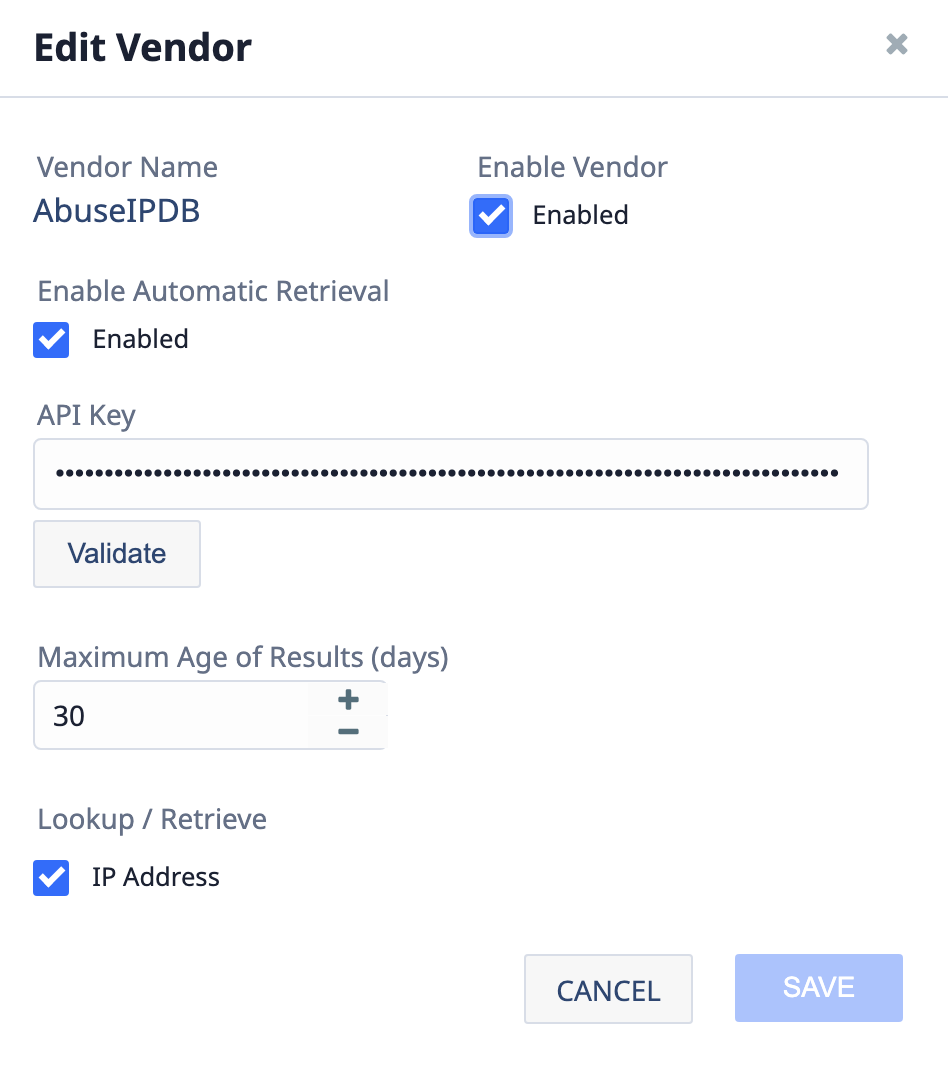
- Enable Vendor: Select this checkbox to enable AbuseIPDB.
- Enable Automatic Retrieval: Select this checkbox to enable automatic data retrieval for AbuseIPDB. If automatic data retrieval is enabled, AbuseIPDB data automatically populate when a user opens an Address Indicator’s Enrichment tab for the first time.ImportantThe API key entered in the next field is used each time data are retrieved from AbuseIPDB for an Indicator. To limit API credential usage to manual retrieval only, select this checkbox.
- API Key: Enter the API key to retrieve data from AbuseIPDB.HintYou can create a free AbuseIPDB API user account at https://www.abuseipdb.com/register.
- VALIDATE: Select this button to validate the AbuseIPDB API key. If the API key is accepted, the VALIDATE label changes to VALID.
- Maximum Age of Results (days): Enter the maximum number of days in the past for which AbuseIPDB should query for results. Limiting results based on age helps avoid false positives and ensures that returned data remain relevant and actionable.
- Lookup/Retrieve: Select IP Address to retrieve data from AbuseIPDB for Address Indicators.
- Click SAVE.
Data Overview
The Overview section of the AbuseIPDB card (Figure 2) on the Enrichment tab of an Address Indicator’s Details screen provides a summary of data retrieved from AbuseIPDB for the Indicator and the date and time the data were last retrieved.
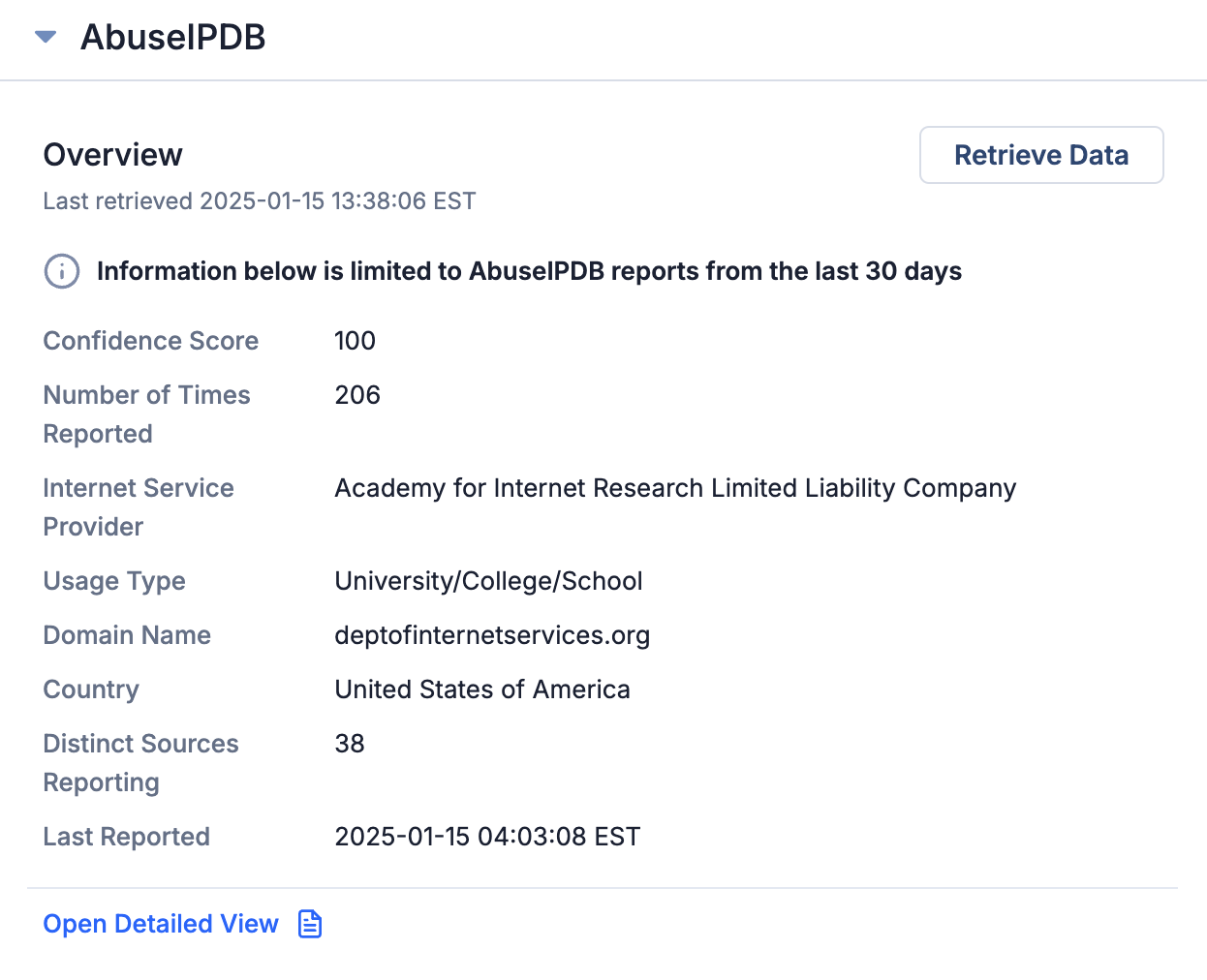
- Confidence Score: The Confidence of Abuse percentage calculated by AbuseIPDB. It is a rating, from 0 to 100, of how confident AbuseIPDB is, based on user reports, that an IP address is entirely malicious.
- Number of Times Reported: The number of times the Address was reported to AbuseIPDB during the time period for which data were retrieved.
- Internet Service Provider: The Internet Service Provider for the Address.
- Usage Type: The type of entity using the Address.
- Domain Name: The domain name for the Address.
- Country: The country in which the Address is registered.
- Distinct Sources Reporting: The number of unique reporters of the Address for the time period for which data were retrieved.
- Last Reported: The date and time when the Address was last reported to AbuseIPDB.
AbuseIPDB Detailed View
Click Open Detailed View on the AbuseIPDB card to open the AbuseIPDB Detailed View drawer (Figure 3), which displays cards with additional data retrieved from AbuseIPDB.
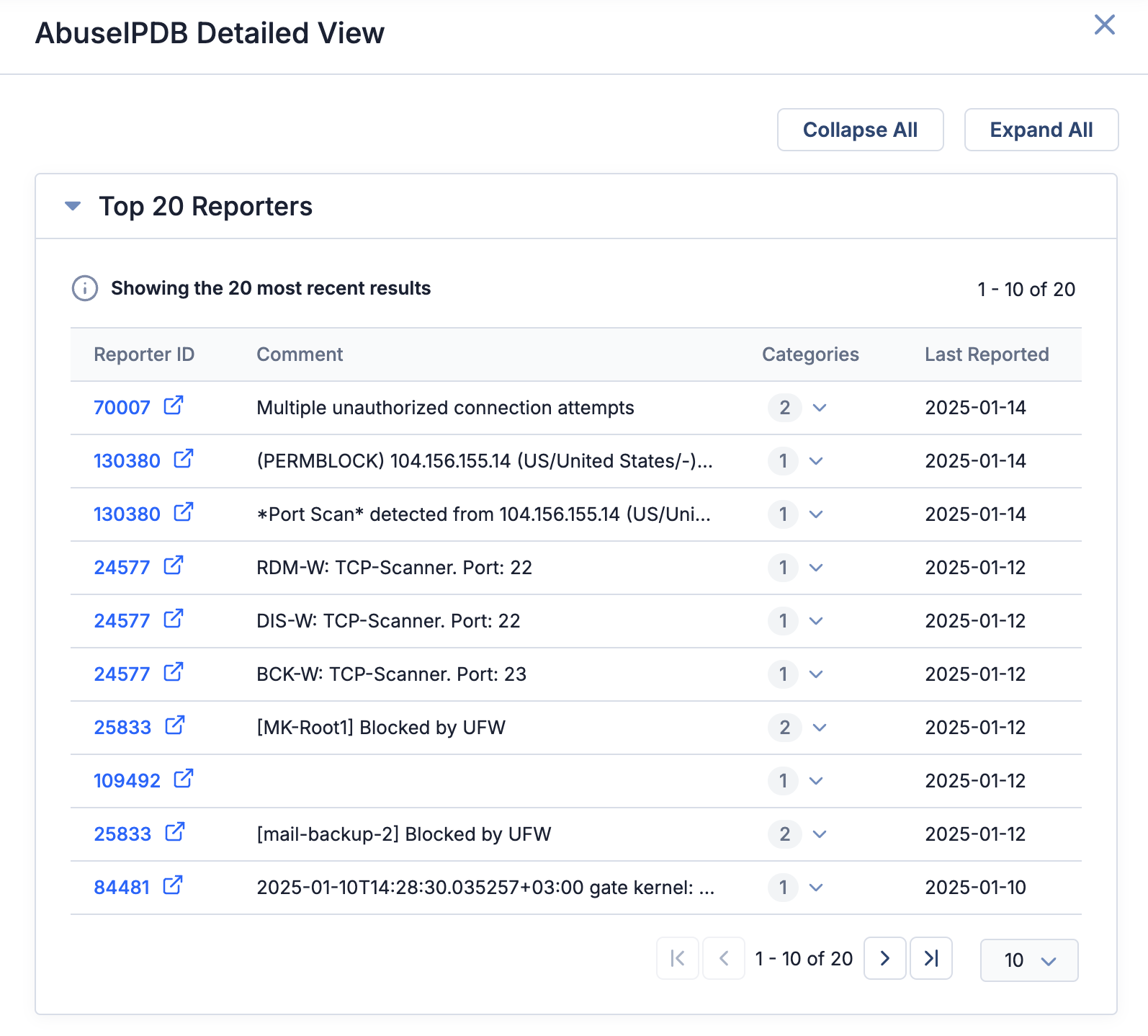
- Top 20 Reporters: This card displays details about the 20 most recent reports submitted by different users (or automated systems) about potentially malicious activity for the Address. Details displayed include a unique identifier assigned to the individual or system that submitted the report (click to view the reporter’s AbuseIPDB profile page), a comment detailing the malicious activity associated with the Address as described by the reporter, the number and names of the malicious activity types reported for the Address, and the date when the report was submitted.
Retrieving Data Manually
When you open an Indicator’s Enrichment tab for the first time, data are automatically retrieved from AbuseIPDB and displayed on the AbuseIPDB card if your System Administrator enabled automatic data retrieval for AbuseIPDB. If no data are displayed, click Retrieve Data on the card to retrieve data manually. Once data are retrieved, they are cached for a period of time configured by your System Administrator. Each time you revisit that Indicator’s Enrichment tab, the cached AbuseIPDB data are displayed until this period of time has passed. You can click Retrieve Data to update the displayed data at any time.
Enriching Indicators Using the ThreatConnect API
You can also use the ThreatConnect v3 API to enrich Address Indicators with data from AbuseIPDB. For instructions on using the ThreatConnect v3 API to enrich Indicators, see Indicator Enrichment Overview.
ThreatConnect® is a registered trademark of ThreatConnect, Inc.
20146-09 v.02.A