v5.4.4 (Latest)
About Latest Release
v5.4.4 rolls up everything since v5.3.5: a rewrite of the global shortcut/hotkey engine across every supported platform, a new native platform-integration layer, threat actor entity recognition, accessibility improvements (keyboard navigation and screen reader support), Spanish language support, native Wayland support for KDE Plasma, and a long list of stability and packaging fixes - including an OCR fix that restores document text extraction on Windows and Linux, which had been silently failing, and a rewrite of the screen-capture pipeline that fixes Focus Mode highlight placement on multi-monitor and mixed-DPI setups.
New Feature Updates
Global Shortcut Engine Rewrite - The keyboard shortcut and gesture engine has been rebuilt across Windows, macOS, X11, and Wayland. Adds chord sequences, hold gestures, and double-tap leader keys; Wayland now registers shortcuts through the desktop portal instead of best-effort local capture; X11 key translation is layout-aware; Windows correctly distinguishes AltGr from Ctrl+ Alt; macOS recovers cleanly from stale modifier state after lock/fast-user-switch.
Native Platform Integration Plugin - Introduces a dedicated platform plugin on top of Qt's own platform layer, replacing a set of window-representation workarounds PX previously had to maintain itself. This also resolves a long-standing incompatibility between Qt's standard platform plugin and the way PX embeds in macOS NSPanel views.
Native Wayland / KDE Plasma Support - PolarityX can now run as a true native Wayland client under KDE Plasma instead of being routed through XWayland. Adds a KWin-scripting bridge for window enumeration, cursor position, global shortcuts, keep-above/topmost window stacking, and surface activation.
Linux System Permissions Page - A new screen, reachable from the Linux Help menu, shows per-permission, per-display grant state with a working Reset action - replacing a prior binary "capture failed, check your settings" experience. Screen-recording and input-monitoring consent is now tracked per physical display rather than as a single shared grant. Includes a working screen-recording Enable button (previously a dead click).
Threat Actor Entity Recognition - An updated parsing library (parselarity) adds threat actor names as a first-class recognized entity type, so they are now parsed and routed through enrichment in the same way as IPs, domains, and hashes.
New Setting: Parse Exact Domains Only - A new client setting lets you control whether the client extracts subdomains from parsed content or restricts parsing to exact/base domains only.
Spanish Language Support - The client UI is now available in Spanish.
Keyboard Navigation and Screen Reader Support - Accessibility improvements to keyboard navigation and screen reader (VoiceOver) support, including the notification window's navigation bar.
Screen-Share Tab Highlighting and Redirect Rules - Chrome tabs now highlight while a Google Meet screen share is active. Also adds default redirect entries and wildcard string matching for URL handling.
Print From Web View - Web content inside PX can now trigger native printing via window.print().
Other Features and Functionality
Rewritten Capture Engines (Windows and macOS) - The Windows capture stack was rebuilt around three purpose-built adapters (PrintWindow, GDI screen area, and a legacy fallback) that share a common health-tracking and stale-entry eviction layer. macOS gained a modern ScreenCaptureKit-based capture adapter. Both feed into the multi-monitor fix listed under Issues Addressed below.
Shape-Following Popup Shadows - Menus and tooltips now use a shadow that follows their actual shape, replacing the previous hard window-rectangle shadow.
Smarter QR Code Detection - Increased padding around QR code detection to improve recognition reliability.
Cleaner Web Bridge to the Overlay UI - Removed legacy JavaScript bridge calls to the Neontetra web app that duplicated data already delivered via the Qt-signal bridge, and fixed client-version detection for the Securonix build variant so it no longer falls back to the old, slower code path.
Removed WebEngine Compatibility Mitigations on macOS - Cleaned up mitigations that are no longer needed on current macOS/WebEngine versions.
No More Console Window on Windows Launch - PolarityX, PolarityXP, and the crash reporter now build as proper Windows GUI executables instead of console applications, so launching PX no longer opens a background console window.
Issues Addressed
Fixed: Multi-Monitor and Mixed-DPI Capture / Focus Mode Highlight Placement. Screen identity, DPI, and index were being re-derived independently on multiple threads, and any unresolved value silently fell back to the primary screen, index 0, or a 1.0 device pixel ratio instead of failing, so a capture could succeed against the wrong display and place the Focus Mode highlight using the wrong screen's geometry. Screen facts are now resolved once on the GUI thread and propagated through the pipeline; every capture adapter on every platform consumes that resolved value instead of querying the OS independently. Verified on-device on Ubuntu GNOME Wayland at 200% scale (46 delivered frames, 0 rejections, highlights confirmed correctly placed) and on Windows at 150% and 175% scale. Known residual: at 175% scale on Windows, a 2-device-pixel rounding error remains in the window-origin coordinate round-trip, tracked separately and not yet resolved. Hardening continued through release day, including a fix for portal capture sessions not reopening when a capture switched displays, and comparable "highlight never appears" and startup fixes in the new native-Wayland/KDE path.
Fixed: The notification/sign-in overlay's username and password fields could not accept keyboard input in certain states on Windows and X11.
Fixed: The notification overlay could steal keyboard focus away from whatever the user was actively working in, at application startup.
Fixed: Non-activating windows on Windows drew two overlapping titlebars.
Fixed: Windows window chrome was hand-emulated rather than using a real system frame, causing maximize to snap to the wrong size and position with a white border, the web view surface to not match the window bounds, the taskbar badge to render at twice its correct size, and closing certain windows to tear down native rendering surfaces application-wide.
Fixed: On macOS, closing certain windows could unexpectedly quit the entire application because every visible PolarityX window is an NSPanel and cannot become the system's "main" window. The app now explicitly refuses a system-initiated quit while any real window is still on screen.
Fixed: A tooltip open/close flicker loop, a context menu vanishing when opened while another app held a fullscreen Space, and the web view refusing input after a titlebar menu was used, on macOS.
Fixed: On some Wayland/Linux configurations, menus could be entirely invisible, or a clickable overlay window could have no path to the keyboard at all.
Fixed: Untrusted TLS transports could be treated as settled before full validation; they are now rejected before settlement. TLS trust decisions are now applied consistently to WebSocket connections.
Fixed: Update dialog content became squished when the window height was reduced.
Fixed: Incorrect overlay window and global mouse coordinate calculations on Windows.
Fixed: Arrow menus showed a transparency artifact through the app window on Windows.
Fixed: WebSocket reconnection could reuse a stale session token after a login failure, leaving the client stuck with no recovery path.
Fixed: The client incorrectly showed the disconnect/error screen for recoverable, transient errors (e.g., short-lived 401s) that the web app already handles internally.
Fixed: The system cursor did not reliably hide when entering focus/capture mode via keyboard shortcut, particularly across a monitor change.
Fixed: The session token renewal timer never started for sessions with a long expiration window (over approximately 24.8 days), so renewal silently failed to schedule.
Fixed: A missing
config.jsonwas logged as an error.Fixed: An incorrect Nuance OCR license path and a macOS crash on quit.
Fixed: A macOS crash during app teardown caused by a stale window reference in the platform integration layer.
Fixed: Titlebar Upload/Focus button icons could shrink to an unreadably small size when the window was narrowed.
Fixed: OCR (document text extraction) failed on every attempt on Windows and Linux - the required recognizer modules and data files were missing from the shipped package. Also fixed a related crash during app shutdown while OCR was tearing down.
Platform and Packaging
Linux native Wayland/KDE Plasma is now a first-class supported session type; Qt's Wayland and xdg-shell plugins are bundled with the package.
Desktop-entry identity is now unified across build variants. No longer collide with each other.
Linux builds now target
glibc 2.34, restoring compatibility with RHEL, Rocky Linux, AlmaLinux, and CentOS Stream 9 and newer. OpenSSL is bumped to 3.5.7.Fixed the Linux package being shipped without the required platform-plugin dependencies, which could prevent the app from loading on some systems.
Added an automated package-completeness check to CI to catch missing runtime dependencies before release.
v5.3.5
About Latest Release
Version 5.3.5 is a new client version that addresses issues with focus mode and adds styling to match Dataminr's. We also added a new page that lets macOS users check whether keyboard shortcuts and screen recording are enabled so they can take advantage of Polarity OCR and keyboard commands.
New Feature Updates
macOS System Permissions → New page under the About section that allows analysts to see if they have “Screen Recording” and “Input Monitoring” set.

Updated Styling → The desktop app was also updated to match that of the web for the new styling upgrades to match the now Polarity by Dataminr styles.
Issues Addressed
Focus Mode screenshot issues on Windows → Addressed an issue with timing between when a screenshot is called and the Polarity OCR kicks in to reduce issues.
Focus Mode URL extraction → Addressed an issue where URL extraction was not working correctly when using focus mode.
Focus Mode calling DoLookup twice → Addressed an issue where focus mode was calling the doLookup function in Polarity twice.
v5.3.4
About Latest Release
Version 5.3.4 is a hotfix on the 5.3.x release. We patched an issue with on-demand parsers not running in focus mode, as well as an issue with parsing HTML files for document searching, where, in some cases, the files would take hours to process. We also added support for .msg email messages and .htm HTML files for Windows.
New Feature Updates
Document Searching - Added support for .msg email message formats and .htm html message formats.
Issues Addressed
On-Demand parsers are not running when using Focus Mode
HTML processing time from hours to less than a few minutes
v5.3.3
About Latest Release
Version 5.3.3 introduces some great new functionality for analysts. Users can now take advantage of a new search mode called Document Searching, where they can drag a document onto the client and get results in a new search window! We have also added a new OCR language support for French, where analysts can now recognize French-accented characters with our OCR modes!
New Features and Functionality
Document Searching
When an analyst comes across a document, instead of opening it and searching everything inside it. Analysts can now just drag the file into Polarity, and it will automatically search all indicators in the document.
Note: There is a file limit of 1GB per file
Document Searching will support the following document types:
.pdf
.csv
.xlsx
.docx
.xml
.json
.png
.jpeg
.key
.pptx
.eml
.txt
.mp4
.mov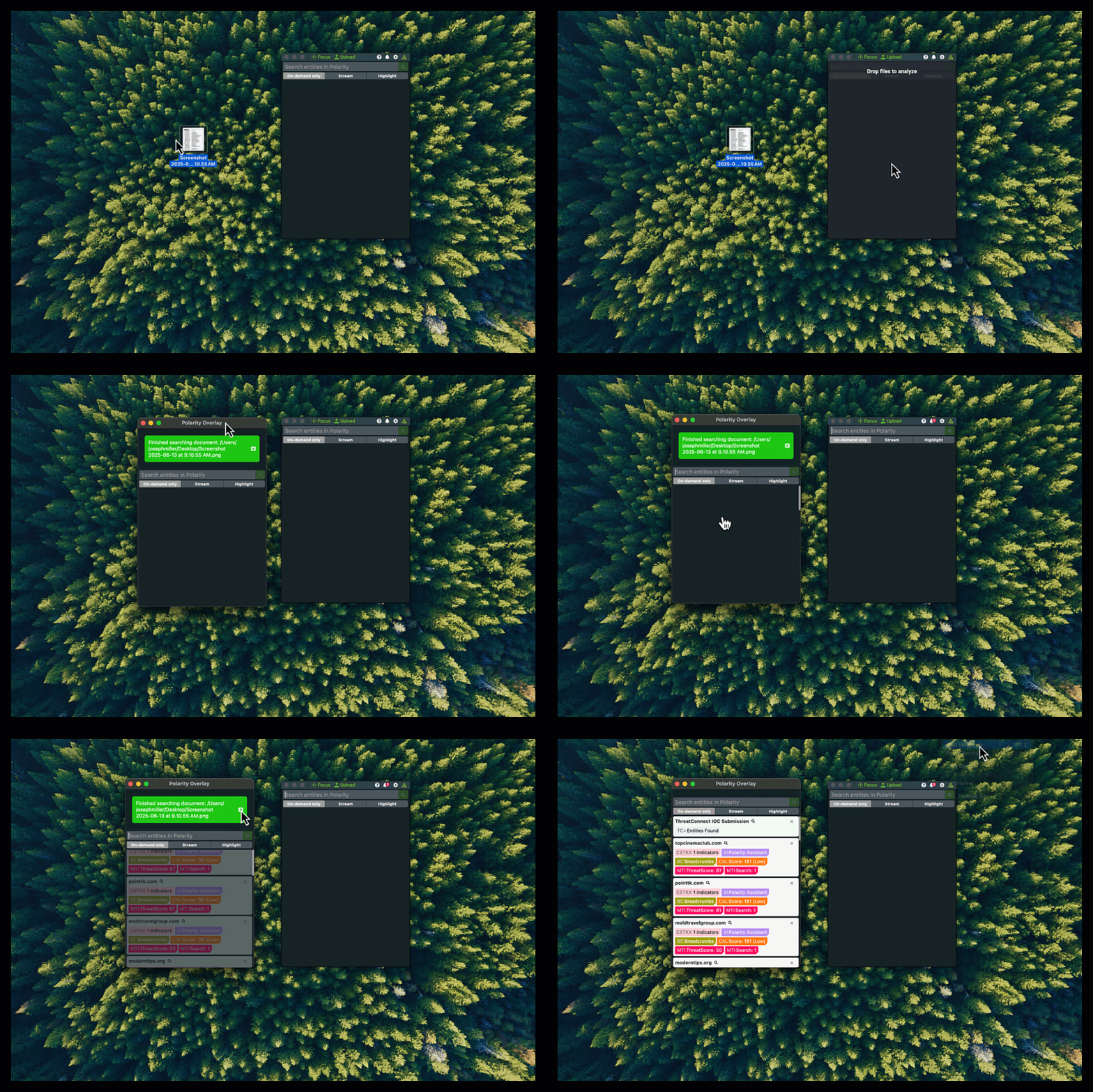
OCR French Support
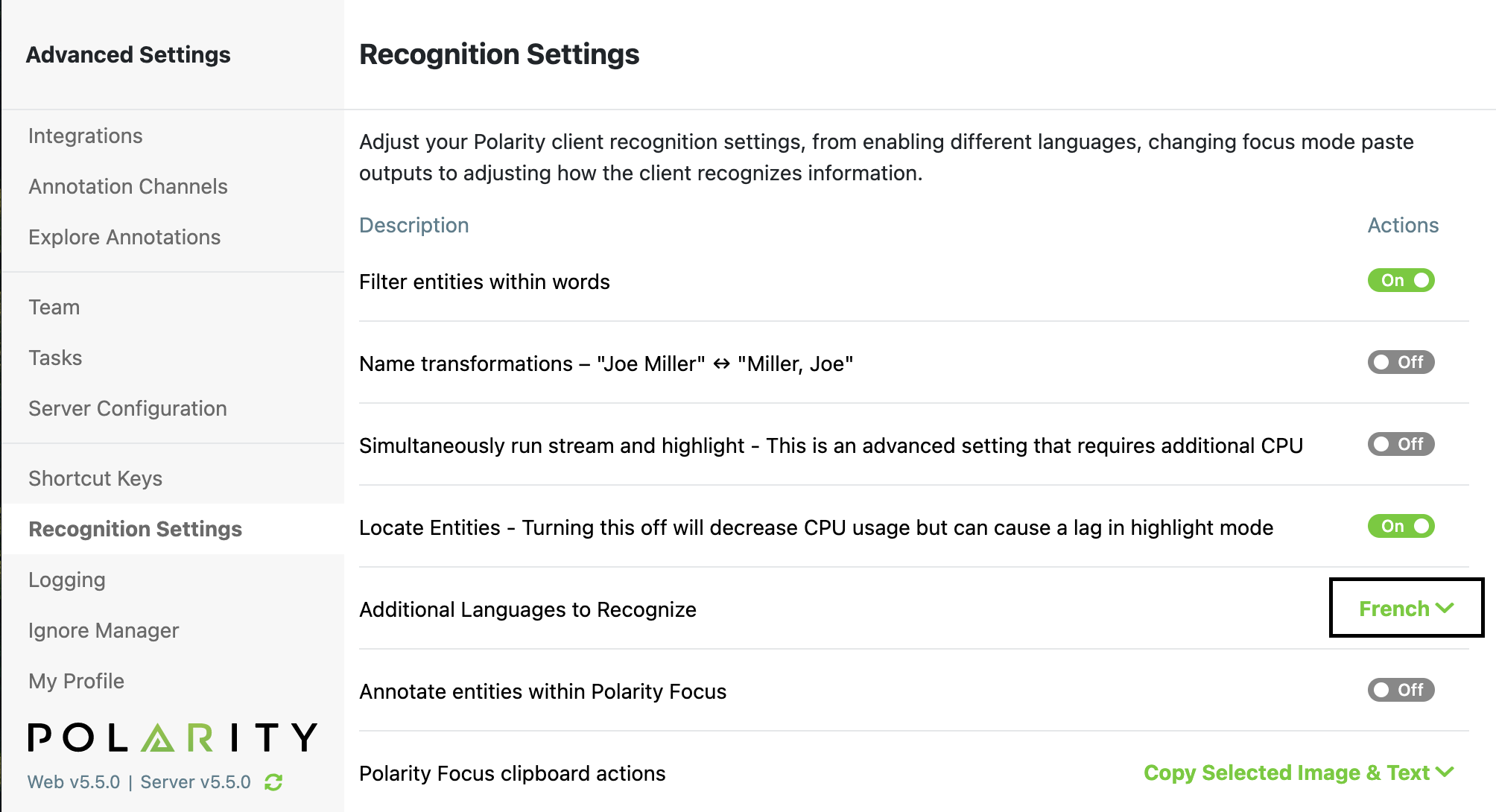
Polarity now recognizes French characters in OCR mode!
To enable French support, navigate to Recognition Settings in the Advanced Settings window and select French.
Other Features and Functionality:
Updated the macOS installer to allow for non-admins to install desktop application
Updated macOS focus mode shortcut key default to be
CMD+Shift+Uas the old shortcut key is now a reserved key on macOS SequoiaAdded ability for API Token Authentication support
Updated TTL triggers to support user timeouts
Updated TLD list
Issues Addressed
Addressed issue with integration configuration loading in the overlay window
Addressed issue with URL defanged entity extraction
Addressed issue with web socket searching of bulk entities
v5.2.2
About Latest Version
Version 5.2.2 introduces some great new functionality and addresses some stability issues that have been discovered.
With this new release our auto-updated was moved into the overlay window to provide a more seamless interaction, we added the ability to recognize data in QR Codes with focus mode, added a new error notification state to always see any integration errors that are occurring, and added some data for telemetry!
New Features and Functionality
QR Code Recognition with Focus Mode
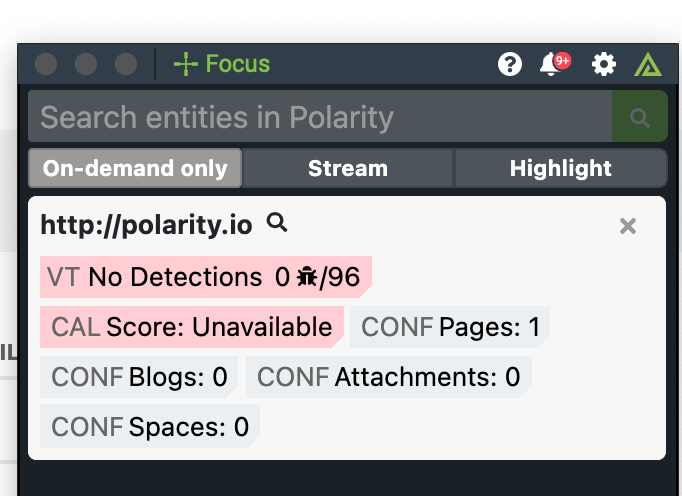
We are super excited to now support QR code recognition with our Focus Mode! Is all analysts have to do is hit the focus mode button and draw it over a QR Code and they can instantly look up information in that QR Code. Allowing for analysts to have quick insights into if the QR Code is being used for phishing.
Auto Updates in the Overlay Window
For ease of use for users, we have moved the auto update window into the overlay window! Now users can more easily check if updates are avilable and have a complete understanding of status on where an update stands.
Notifications in Overlay Window
In order to best streamline functions and enhance the overall user experience of Polarity, we have added in a new notification section. Which for now works for errors and if there is an update avilable. This new section enables us to do some great new features and functionality in the future as well!
Error Notifications
Now users will be able to have a central location within the overlay window where they can see and navigate to integration errors. As well as when an integration errors users will receive an initial error toast, from then on the notification will tick up and users can navigate to an error page to remove or contact their admin about the error they are receiving.
Added ability to send more information for Telemetry
Added window title when triggering focus and on-demand mode
Added focus mode as apart of telemetry search
Added overlay window as a part of the telemetry search
Issues Addressed
Fixed crash when user adds a new connection on mac and windows
Fixed crash when a users adds a "/" at the end of the server url when adding a new connection
Fixed issue with getting stuck on loading screen
Addressed with Client not auto-logging on macOS
v5.1.6
New Features and Functionality
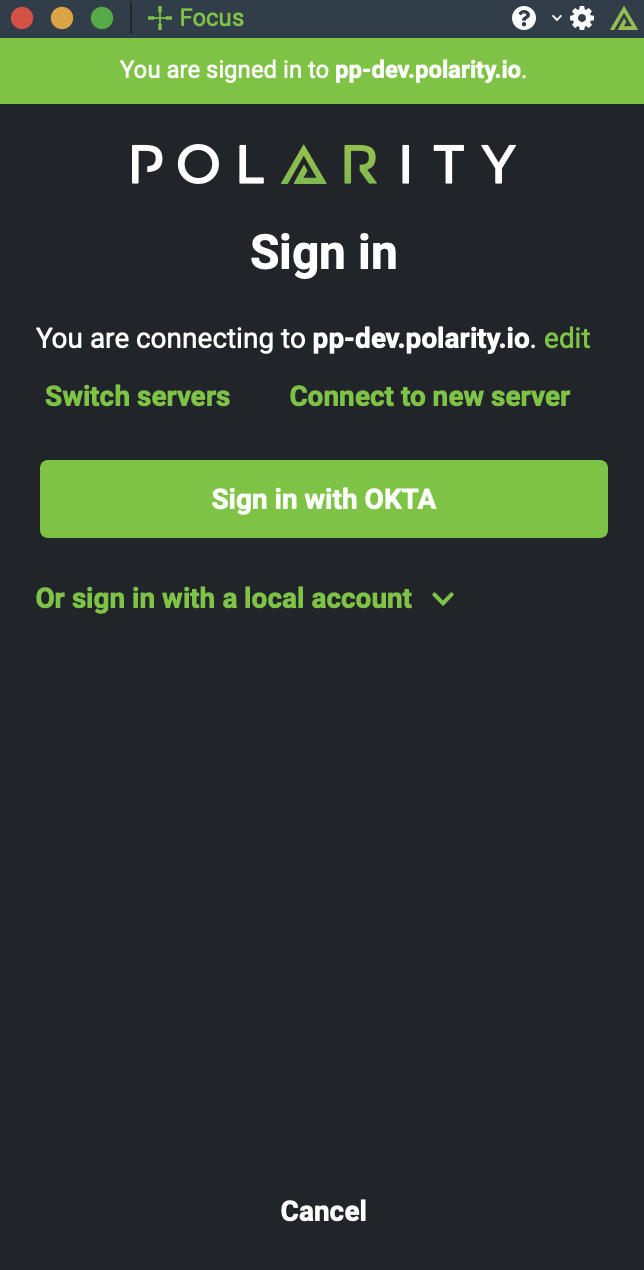
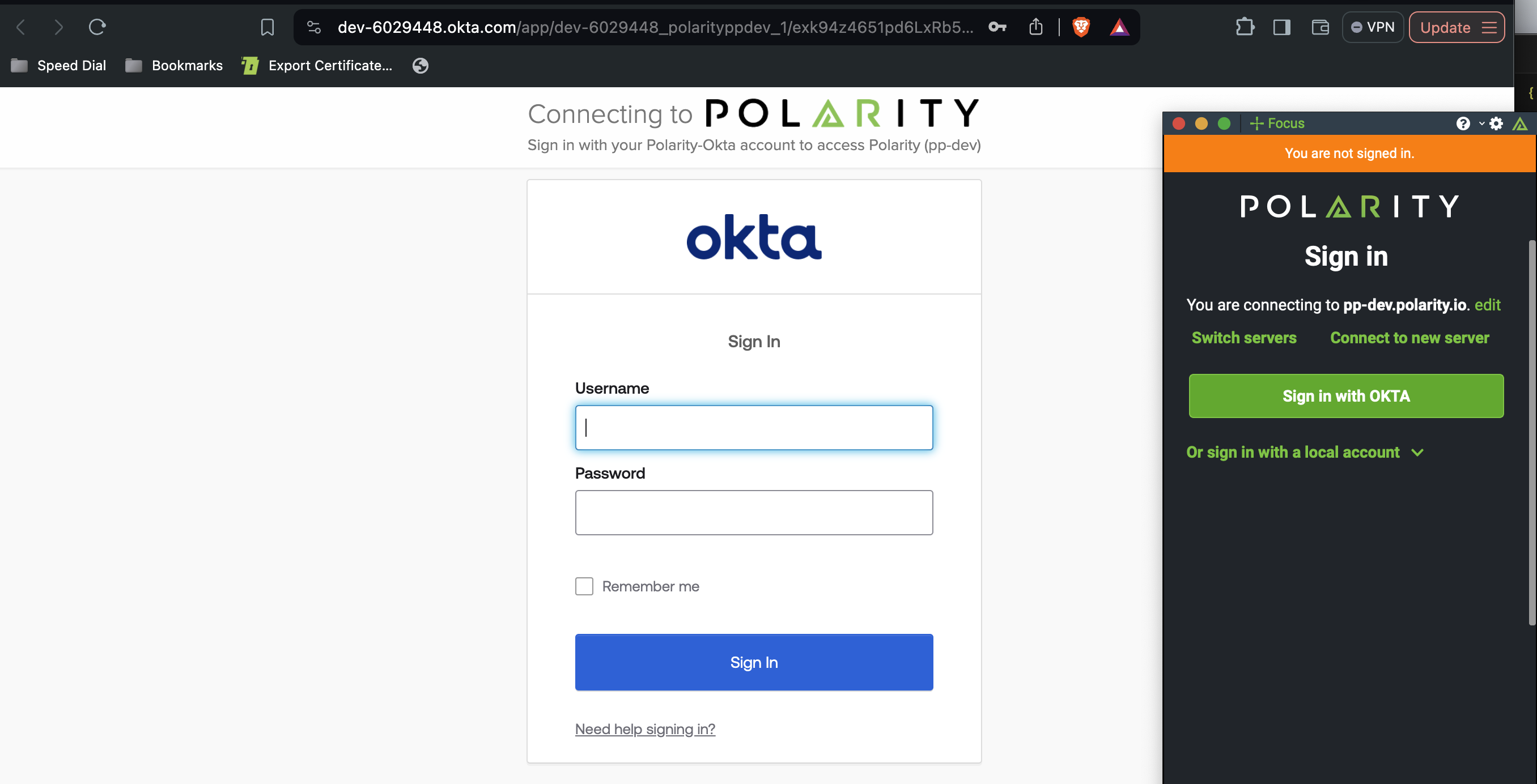
Sign In Page UI redesign
We have updated the UI of the sign in pages to match that of our web design:
SAML Authentication through browser
In order to enable Polarity users to authenticate through SAML with multiple different SAML setups, we have enabled the Polarity client to authenticate through the browser. All SAML authentication will be through the browser, so users can easily authenticate.
Note
The first time using this new feature users will most likely be prompted by the browser to open up the app outside of the browser. Just accept this and things will work just fine moving forward.
Addressed Issues
Fixed bug with client crashing when shutting down windows OS
Addressed UI issues with Auto Update window
Addressed issues with CIDR ranges
v5.0.4
Sign In Page Updates
To make the overall sign in process easier for users we have removed the sign in page and condensed it into the overlay window, which allows for a more seamless login process.
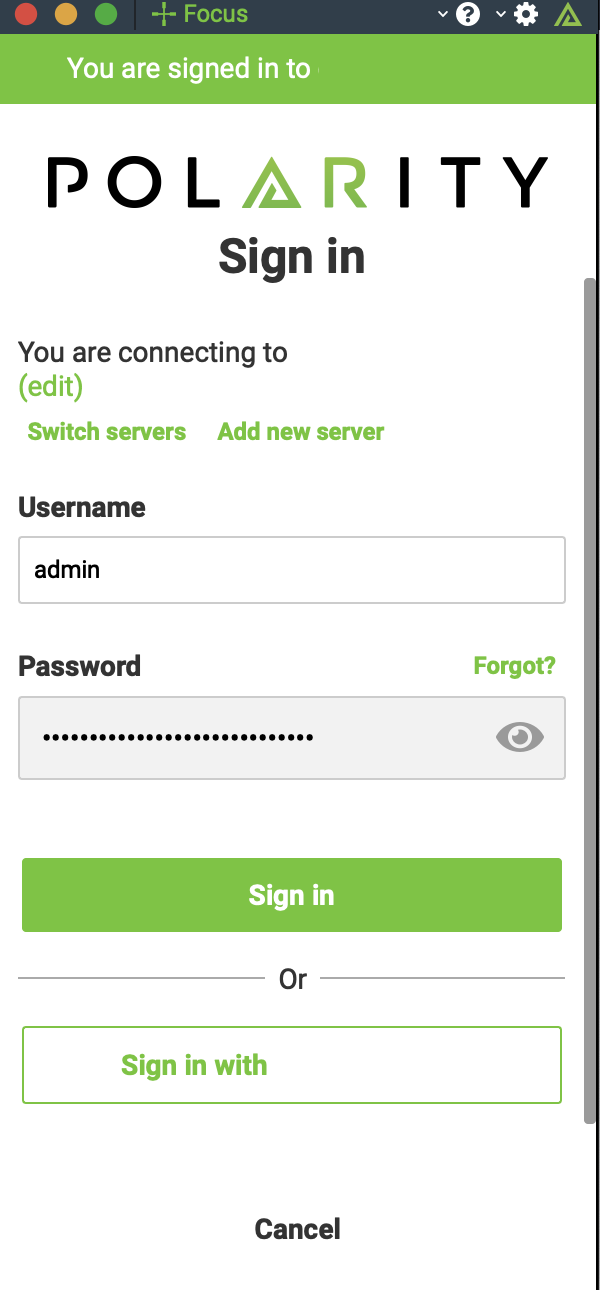
Polarity Sign-In Page
Support for Socks5 Proxy
If you are using a Socks5 Proxy to proxy the connection from your computer to the Polarity server. The Polarity client now supports this natively.
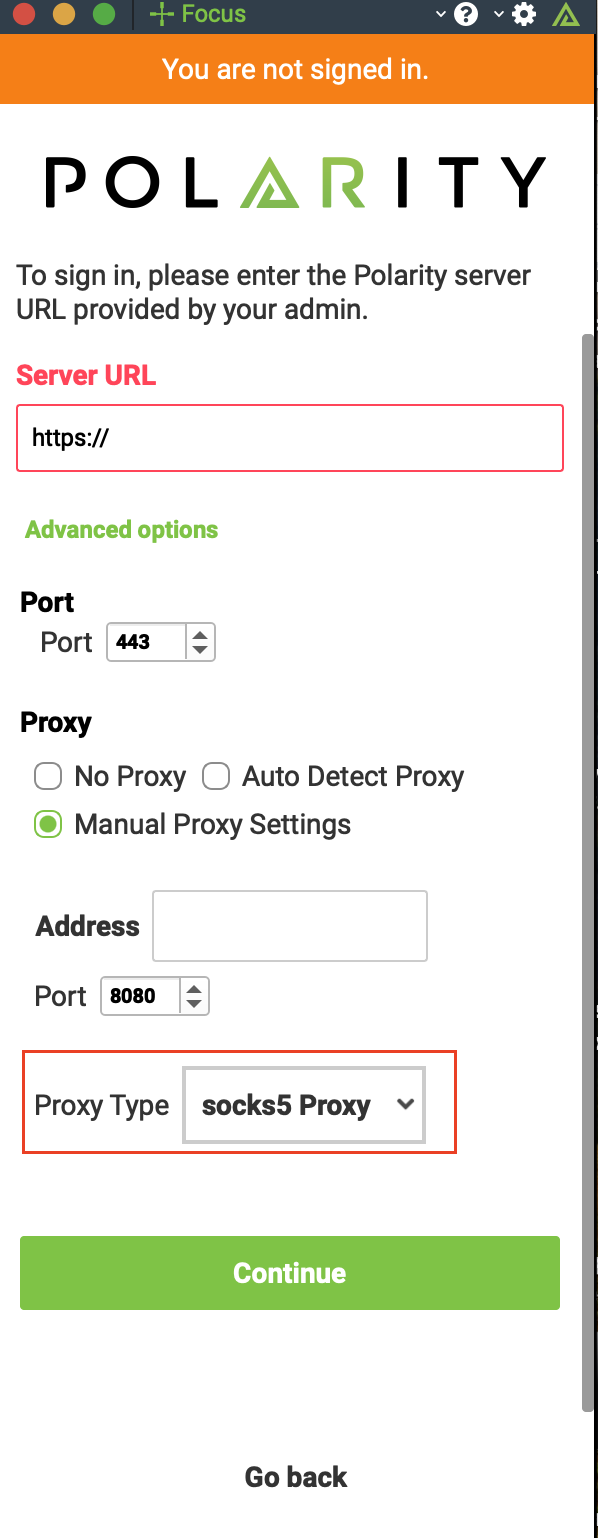
Polarity “Create Server Connection” Page
Note
When setting up a new server, just click on "Advanced Options" and you can change the proxy setting.