

Automated Detection-Signature Extraction
- 15 Dec 2025
- 2 Minutes to read
-
Print
-
DarkLight
-
PDF
Automated Detection-Signature Extraction
- Updated on 15 Dec 2025
- 2 Minutes to read
-
Print
-
DarkLight
-
PDF
Article summary
Did you find this summary helpful?
Thank you for your feedback!
Overview
The CAL™ Doc Analysis Service’s Automated Detection-Signature Extraction capability leverages AI to programmatically identify, extract, and enrich detection signatures, or rules, embedded within natural-language threat reports, blogs, technical write-ups, and other documents in ThreatConnect®. It focuses specifically on transforming codified detection logic into machine-readable intelligence that can be leveraged within analyst workflows. The feature automatically recognizes a wide range of code-based and product-specific detection signatures, extracts their full contents, and enriches them with metadata generated by AI models, enabling analysts to quickly access standardized detection content without manually parsing lengthy reports.
Before You Start
User Roles
- To view details, including Tags and AI summaries, for Reports in the CAL Automated Threat Library Source, your user account can have any Organization role and any Community role except Banned in the CAL Automated Threat Library Source.
Prerequisites
- Turn on the CAL Automated Threat Library feed on the Feeds tab of the TC Exchange™ Settings screen (must be a System Administrator to perform this action).
- Verify your ThreatConnect instance can receive data from CAL (if using an On Premises instance) by ensuring that the CALHost system setting has a value of
cal.threatconnect.com(must be a System Administrator to perform this action).
Extracting Detection Signatures
What Can Be Extracted?
The automated detection-signature extraction feature can recognize and extract a wide array of rule types, categorizing them as either Code Rules or Product Query Rules.
Code Rules
The following rule types are generic detection formats often used across multiple platforms:
- Yara Rules
- Yara-L Rules
- Sigma (YAML) Rules
- Suricata Rules
- Falco Rules
- Zeek Rules
Product Query Rules
The following rule types are platform-specific query languages:
- Splunk® Search Processing Language (SPL)
- Elasticsearch™’s Event Query Language (EQL)
- Microsoft® Kusto Query Language (KQL)
- Crowdstrike Falcon® Query Langauge (FQL)
What Metadata Are Stored?
When a rule is detected in the content being processed, the feature extracts the full rule text and enriches it with the metadata in Table 1, generated primarily by the underlying AI model.
| Metadata Field | Description |
|---|---|
| Name | The unique, AI-generated, one-sentence description of the rule |
| File Text (Rule) | The full, extracted detection-rule content |
| File Names | Literal filenames, paths, or dynamic-link library (DLL) or executable (EXE) file names found in the rule (e.g., silcon.exe) |
| Author | The author of the rule |
| References | A list of external references |
| Malware Family | Malware or tool strings found in the rule’s tags |
| Tags | Associated tags pulled from the rule |
| Severity | Rule severity level (e.g., low, medium, high, critical) |
| File Details | Extra file information (e.g., hashes, paths, extensions) |
| File Type | The type of rule extracted (e.g., YARA, spl) |
Example
Table 2 provides a general example of an EQL rule extracted from a CAL Automated Threat Library (ATL) blog.
| Metadata Field | Extracted Data |
|---|---|
| Name | DLL side-loading detection from temp/appdata locations |
| File Text (Rule) | events| where timestamp >= ago(24h)| where process.name == "powershell.exe"| where file.path contains~ "startup" and file.path endswith ".lnk"| aggregate dc_shortcut_by_host = count_distinct(host.name) by file.name| where dc_shortcut_by_host < 5 |
| File Names | powershell.exe |
| File Type | eql |
Extracting Detection Signatures in CAL ATL
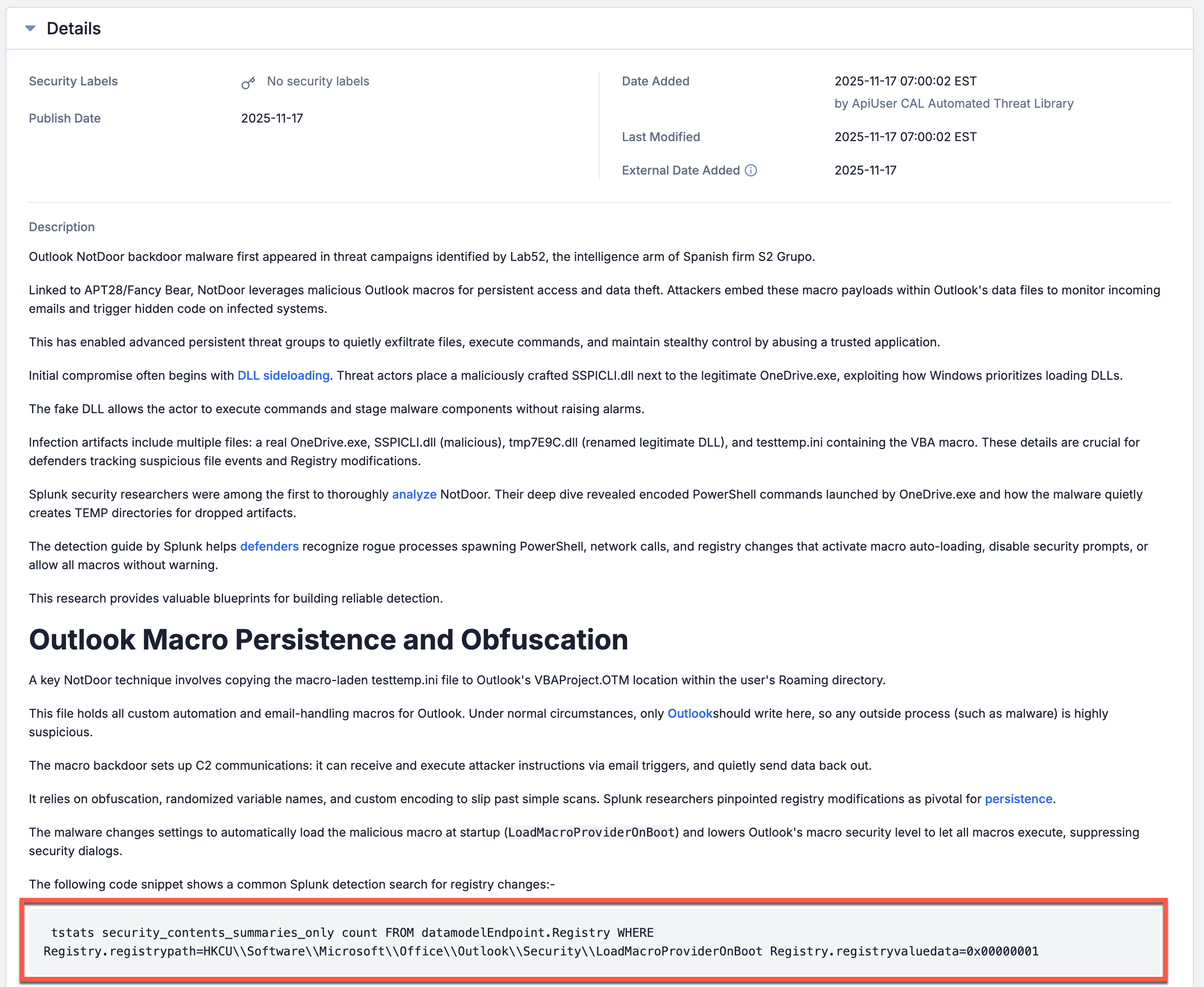
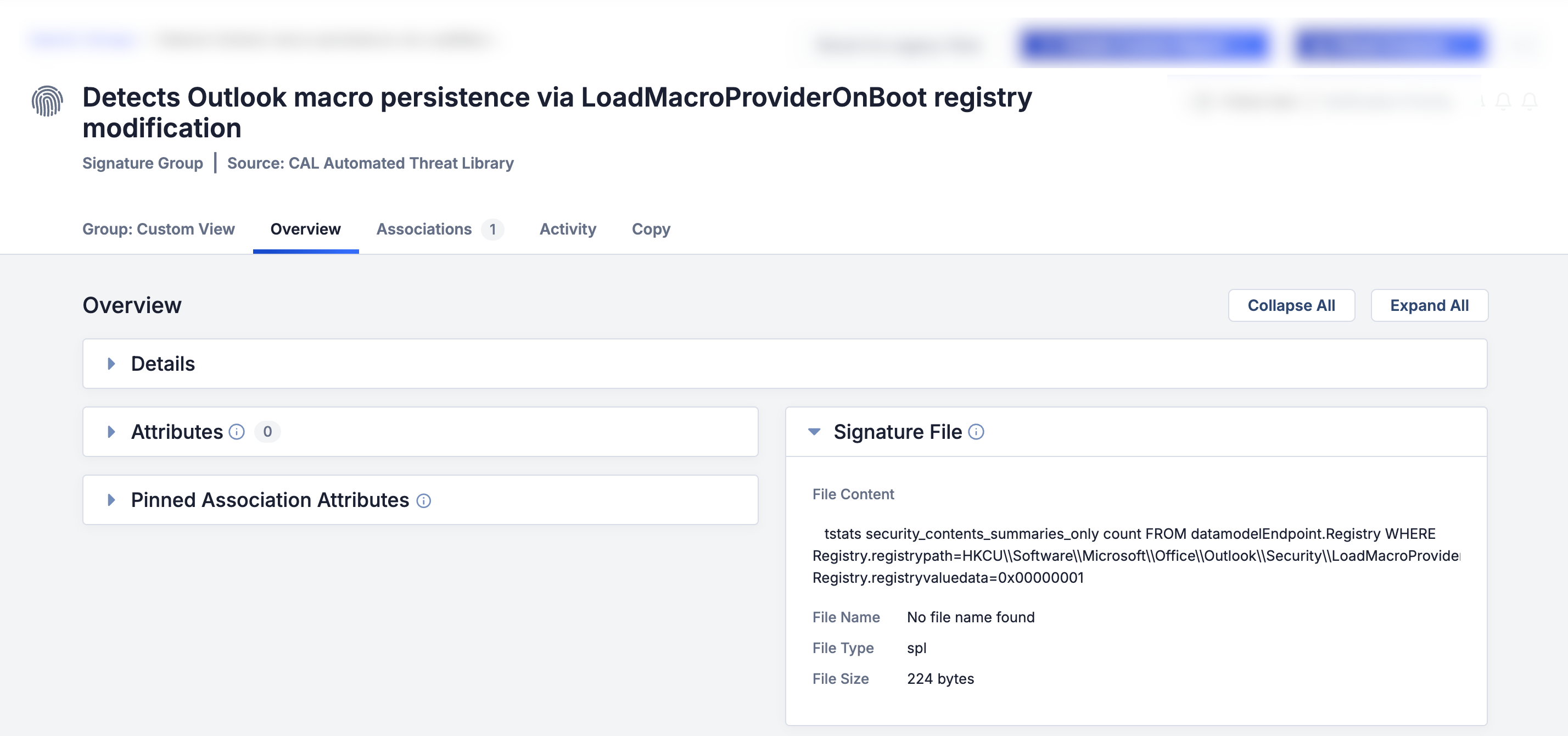
The CAL Automated Threat Library Source automatically processes blogs and reports to identify detection signatures and extract them as Signature Groups. Figure 1 shows a detection signature in CAL ATL Report, and Figure 2 shows the corresponding Signature Group that was created.
ThreatConnect® is a registered trademark, and CAL™ and TC Exchange™ are trademarks, of ThreatConnect, Inc.
CrowdStrike Falcon® is a registered trademark of CrowdStrike, Inc.
Elasticsearch™ is a trademark of Elasticsearch BV.
Microsoft® is a registered trademark of Microsoft Corporation.
Splunk® is a registered trademark of Splunk, Inc.
20177-01 v.01.A
Was this article helpful?
