Run Profiles allow you to create profiles as a way to easily trigger a Playbook execution in a repeatable manner while still working within the Playbooks Designer. Click the  Run Profiles button on the side navigation bar to open the Run Profiles pane, displaying a table of profiles and an option to create a profile (Figure 1).
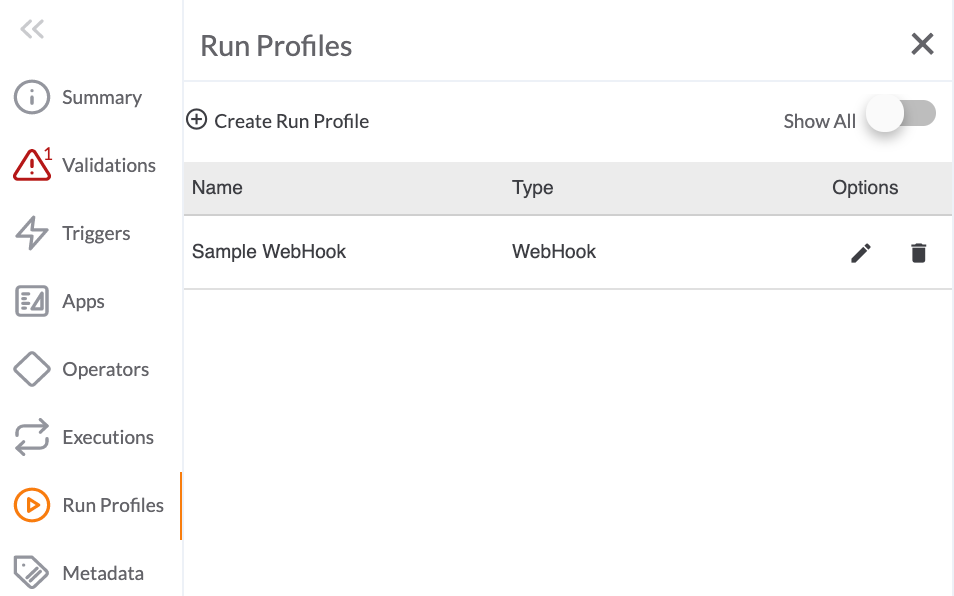
 Create Run Profile: Click this button to open the Run Profiles configuration pane.
- Show All: Toggle this slider on to display all Run Profiles available in an Organization.
- Name: This column displays the name of the Run Profile.
- Type: This column displays the Trigger type used in the Run Profile.
- Options: Click the pencil
 icon to edit the Run Profile or the trash
  icon to delete it.
ThreatConnect® is a registered trademark of ThreatConnect, Inc.
20110-15 v.02.B